Operation
PERATIN
PR
EDURE – PREHEATIN
IMP
RTANT
If the temperature of the grain sample is 20˚F (11˚C) more or less than
the temperature o
the unit, preheat the tester and test as
ollows
PREHEATIN
PR
ED
RE
.
emove cap
an
nspect test ce
to
e sure t
at
t
s c
ean an
empty
Press ON-OFF button
C
to turn on tester. The display
D
will show ALWAYS
VERAGE 3 TESTS for approximately 7 seconds, then will show ALFALFA (initial
operation) or the name o
the last grain tested.
.
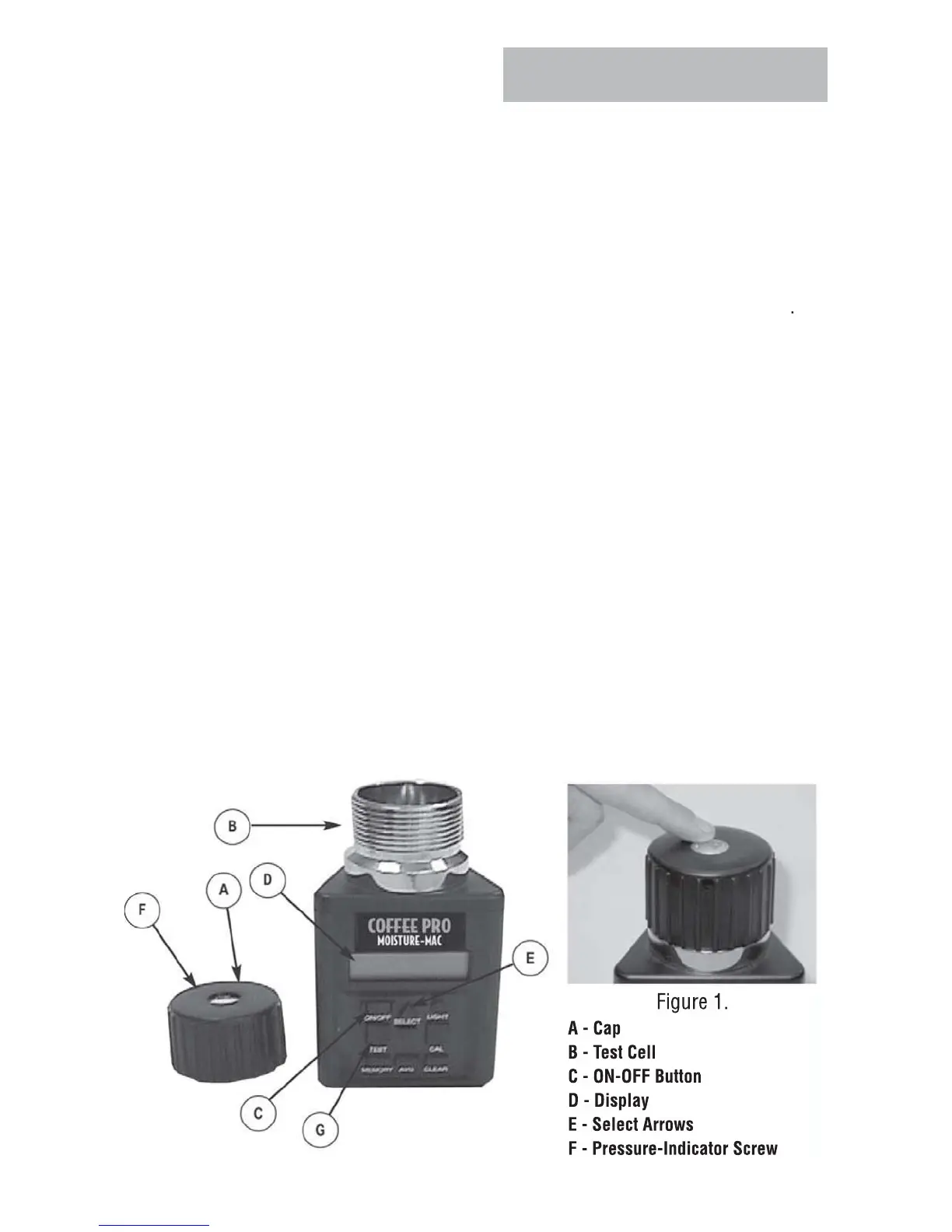
hen the grain to be tested has been selected using the SELECT arrows (E), fill
the test cell (B) even to the top o
the cell with sample to be tested
.
ep
ace cap
oose
DO NOT TIGHTEN.
.
fter 30 seconds, empt
test cell and immediatel
refill with fresh grain.
6. Replace cap (A) and tighten until pressure-indicator screw (F) is
ush with the
top of cap
A
.
Use finger-flush test as illustrated in Figure 1.
Immediately press TE
T button (
). The words TE
TIN
will be displayed for
bout 10 seconds, while the tester compensates for temperature. The moisture
and temperature will then be displayed for about 10 seconds
- Test Butto



 To Next Page