17
LIGHTING INSTRUCTIONS
LIGHTING PROCEDURE FOR BOILER WITH
CONTINUOUS PILOT
For Your Safety, Read Before Lighting!!
Read the warning at the beginning of "
1. Lighting Instruc-
tions
."
This appliance has a pilot which must be lighted by hand.
2.
When lighting the pilot, follow these instructions exactly.
Before lighting, smell all around the appliance area for
3.
gas. Be sure to smell next to the oor because some gas
is heavier than air and will settle on the oor. See section
"
What To Do If You Smell Gas
."
Use only your hand to push in or turn gas control knob or
4.
reset button. Never use tools. If the knob or reset button
will not push in or turn by hand, don’t try to repair it, call
a qualied service technician. Force or attempted repair
may result in a re or explosion.
Do not use this appliance if any part has been under wa-
5.
ter. Immediately call a qualied service technician to in-
spect the appliance and to replace any part of the control
system and any gas control which has been under water.
LIGHTING INSTRUCTIONS FOR CONTINUOUS PILOT
STOP!
1.
Read the safety information at the beginning of
these instructions.
Set the thermostat to the lowest setting.
2.
Turn off all electric power to the appliance.
3.
Remove access panel and burner door.
4.
Turn gas control knob clockwise
5.
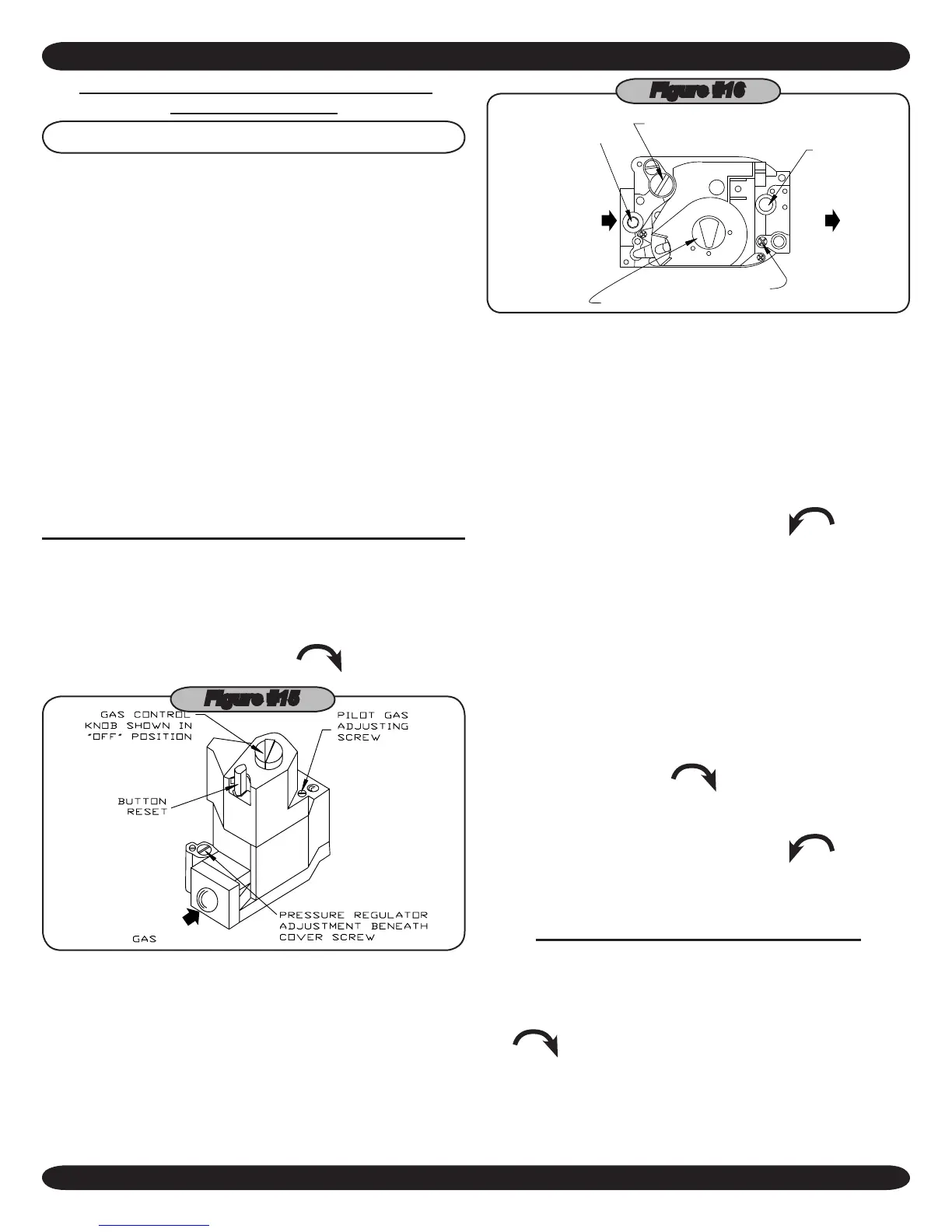
to "OFF." (Fig-
ures #15 and #16)
Figure #15
GAS CONTROL KNOB
PRESSURE REGULATOR
ADJUSTMENT BENEATH
COVER SCREW
PILOT FLOW ADJ. SCREW
BENEATH COVER SCREW
OUTLET
PRESSURE
TAP
TAP
PRESSURE
INLET
GAS
INLET
GAS
OUTLET
TH/TR
ON
OFF
PILOT
Figure #16
NOTE: Some gas control knobs cannot be turned from "PILOT"
to "OFF" unless knob is pushed in slightly. DO NOT FORCE.
Wait (5) minutes to clear out any gas. If you then smell
6.
gas, STOP! Follow "
What To Do If You Smell Gas
." If
you don't smell gas, go to the next step.
Find pilot. Follow metal tube from gas control. Depending
7.
on the model of the boiler, pilot is either mounted on the
base or on one of the burner tubes.
Turn gas control knob counterclockwise
8.
to "PI-
LOT."
Push in gas control knob or reset button if so equipped,
9.
all the way in and hold. Immediately light the pilot with a
match. Continue to hold the gas control knob or reset but-
ton in for about 1 minute after the pilot is lit. Release knob
or button, and it will pop up back up. Pilot should remain
lit. If it goes out, repeat steps 5 through 9.
If knob or button does not pop up when released, stop •
and immediately call a qualied service technician or
your gas supplier.
If the pilot will not stay lit after several tries, turn the gas •
control knob clockwise
to "OFF." Call a qualied
service technician or your gas supplier.
Replace burner door.
10.
Turn gas control knob counterclockwise
11.
to "ON."
Replace access panel.
12.
Turn on all electric power to the appliance.
13.
Set thermostat to desired setting.
14.
TO TURN OFF GAS TO THE APPLIANCE
Set the thermostat to lowest setting.
1.
2. Turn off all electric power to the appliance if service is
2.
to be performed.
3. Push in gas control knob slightly and turn clockwise
3.
to "OFF." DO NOT FORCE.
4. Call a qualied service technician.
4.



 To Next Page