WATER FLOW ADJUSTMENT FUNCTION
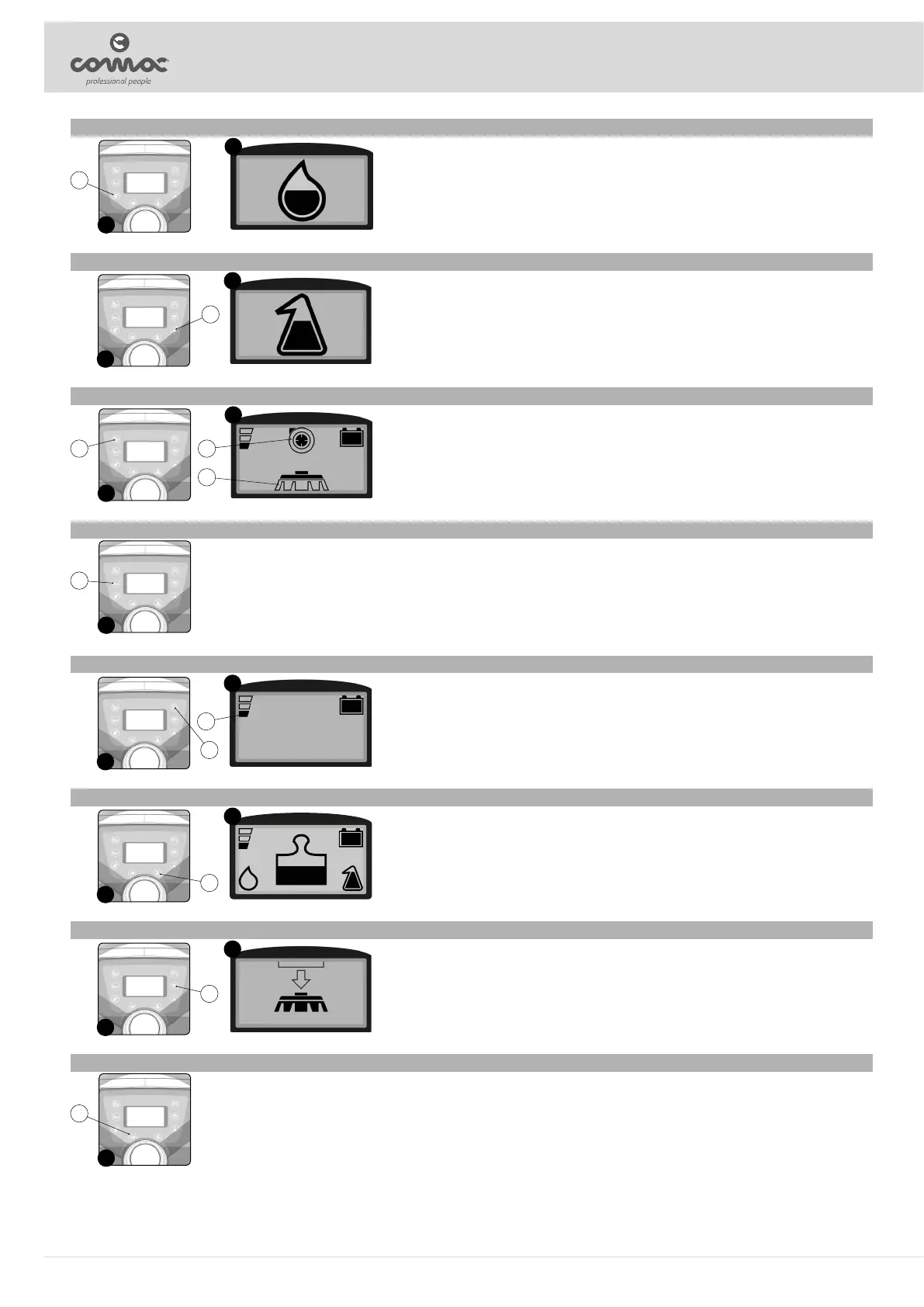
The water ow function in the machine's water system is regulated by the button (1) on the control panel (Fig. 1).
By pressing the button (1) for the rst time, you can display in the control display the status of the water ow set in the machine
at that precise moment (Fig. 2), each time the button (1) is pressed, the water level increases, and the ow rate will be
zeroed once the maximum level is reached. The water ow rate changes by pressing the button again, there are 8 selectable
levels (also counting the zero level). If the button (1) is kept pressed for more than three seconds, the water ow rate in the
machine's water system is reset.
The water ow rate level refers to the ow delivered at maximum machine speed, at intermediate speeds, the ow is reduced
and is proportional to the value set.
1
2
1
DETERGENT SOLUTION FLOW ADJUSTMENT FUNCTION (CDS VERSION)
The detergent solution ow function in the machine's water system is regulated by the button (1) on the control panel (Fig. 1).
By pressing the button (1) for the rst time, you can display in the control display the status of the detergent solution ow set
in the machine at that precise moment (Fig. 2), each time the button (1) is pressed, the detergent percentage increases, and
the ow will be zeroed once the maximum percentage is reached. The detergent solution percentage changes by pressing the
button again, there are 8 selectable levels (also counting the zero level). If the button (1) is kept pressed for more than three
seconds, the ow of detergent solution in the machine's water system is reset.
3
4
2
ECO-MODE FUNCTION
When the “ECO MODE” function is activated, by means of the appropriate key (3) on the control panel (Fig. 5), the speed of
the brushes' gearmotor and of the vacuum motor is reduced, in this way the energy consumption is reduced.
The Eco-mode function can only be used with working programs: drying; scrubbing with drying and scrubbing without drying.
When the eco-mode function is active the symbols of the vacuum motor (4) or the brush (5) or both, depending on the working
program selected, will be shown on the control display as shown in the gure (Fig. 6).
5
6
3 4
5
BUZZER
When button (6) on the control panel (Fig. 7) is pressed continuously it activates the buzzer on the machine.
If the button (6) is pressed during the reverse movement, as a signal priority, only the intermittent buzzer connected to the reverse will be heard.
7
6
DIPPED HEADLIGHTS
The default machine has two sidelights at the front of the nose that are activated when the machine is turned on.
Pressing the button (11) on the control panel (Fig. 14) activates the machine's dipped beam headlights, pressing the button again, the headlights will switch o.
14
11
MOVEMENT SPEED ADJUSTMENT
When the button (7) on the control panel (Fig. 8) is pressed it allows to adjust the speed of machine's movement, the level
selected can be viewed by looking at the symbol (8) on the control display (Fig. 9).
Each time the button (7) is pressed, the speed level of the machine's movement is increased, once the maximum level has
been reached, the speed will start again from the rst level. Pressing the button subsequently changes the movement speed of
the machine, there are 3 selectable levels (50% - 75% - 100%).
the reverse speed is lower than the forward speed to comply with current health and safety standards.
8
9
7
8
EXTRA-PRESSURE FUNCTION EXERTED ON THE BRUSHES
The extra-pressure function applied to the brushes is adjusted by means of the button (9) on the control panel (Fig. 10).
By pressing the button (9) for the rst time, you can display in the control display the level of extra-pressure exerted on the
brushes at that precise moment (Fig. 11), each time the button (9) is pressed, the extra-pressure level increases, and the
extra-pressure will be zeroed once the maximum level is reached. The extra-pressure changes by pressing the button again,
there are three selectable levels (also counting the zero level). If the button (9) is kept pressed for more than three seconds,
the extra-pressure is reset.
The set level is displayed with the weight symbol above the brush symbol in the control display.
10
11
9
BRUSH RELEASE FUNCTION
The brush release function can only be activated with the machine stopped, the user seated in the driver's seat and with the
transfer program selected.
When the button (10) on the control panel (Fig. 12) is pressed for the rst time, the conrmation request symbol (Fig. 13) will
appear in the control display. Pressing the button (10) again will activate the brush release function.
Once the release sequence has been activated, it is not possible to activate other functions or move the machine.
12
13
10
20


 To Next Page