Disarm
Arm
Home Screen
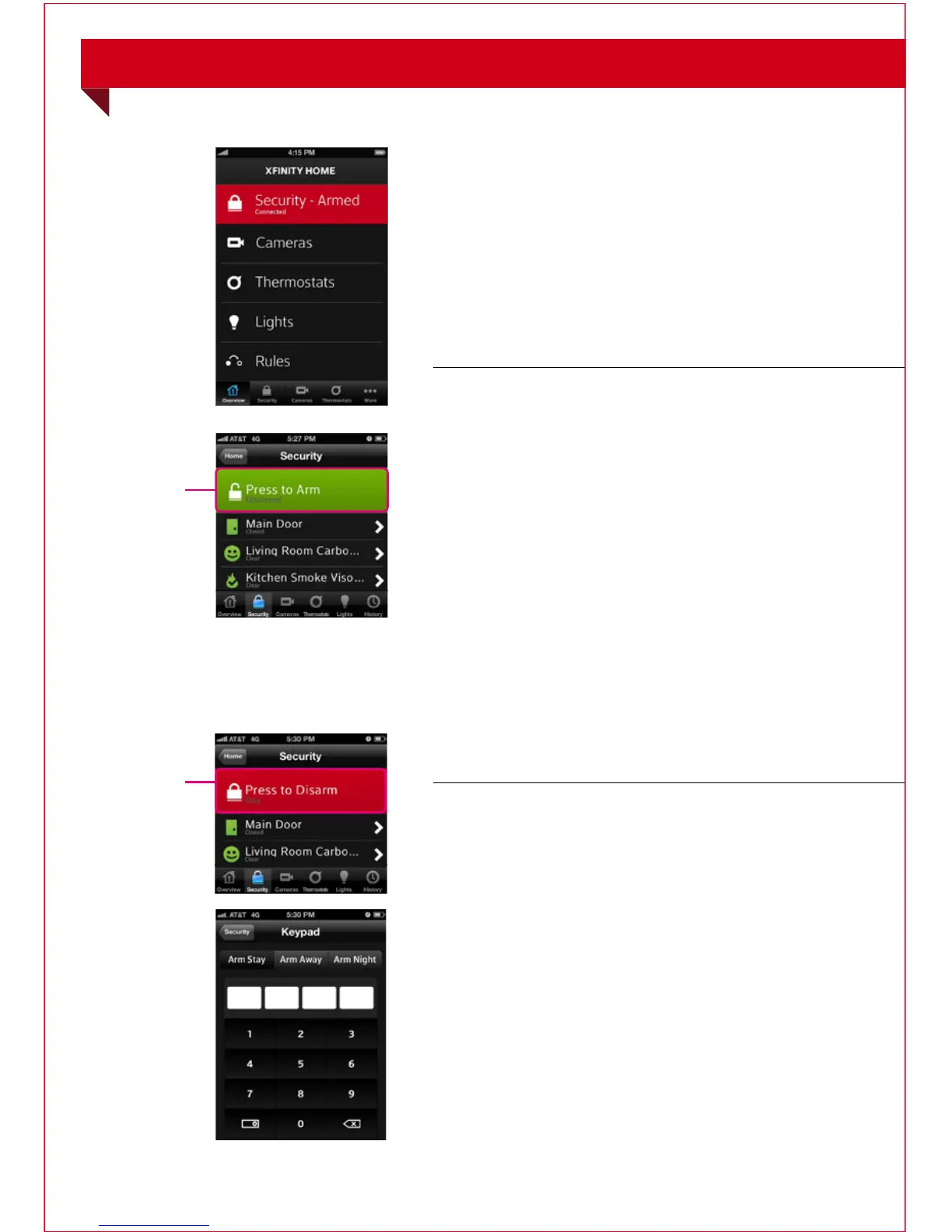
The Home Screen gives you one-touch
access to all XFINITY Home features.
Security
To arm your security system:
1. On the Home Screen, tap [Security].
2. To bypass any Home Security Zone, tap the
respective zone and use the On/Off toggle.
3. On the Security screen, tap [Press to Arm].
4. T a p [Arm Stay] to arm the sensors on your
doors and windows with an entry delay, or
[Arm Night] with no entry delay.
Or select [Arm Away] to include the
motion sensors.
5. Enter your 4-digit master code to arm
the system.
6. Once activated, your system will arm in a few
seconds and indicate the new status.
To disarm your security system:
1. On the Home Screen, tap [Security].
2. On the Security screen, tap [Press to Disarm].
3. Enter your 4-digit master code to disarm
the system.
MOBILE ACCESS
Mobile Access continues on next page...
29



 To Next Page