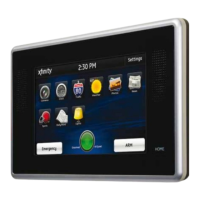
Arm
1. Touch the [Press to Arm] button on the
Home Screen.
2. Select [Arm Stay] to arm the sensors on
your doors and windows with an entry delay
or [Arm Night]* with no entry delay. Select
[Arm Away] to arm all sensors including
motion sensors. If a sensored door or
window is not opened and closed within the
entry delay, the system will automatically
default to [Arm Stay].
3. Enter your 4-digit master code to arm the
system.
*Motion sensors can be configured to be armed in night mode.
Emergency
Sends an immediate alarm to the central
monitoring station indicating an emergency
of a specific type — medical, fire or police.
1. T o u c h at the bottom of the Touch
Screen Controller to display the individual
emergency buttons.
2. Press the applicable emergency button to alert
the proper authorities.
Note: Enter your 4-digit master code to cancel
the alarm.
Disarm
1. Touch the [Press to Disarm] button on the
Home Screen.
2. Enter your 4-digit master code to
disarm the system.
Touch Screen Controller continues on next page...
QUESTIONS?
Learn more and watch How-To Videos at comcast.com/XFINITYHomeSupport
5



 To Next Page