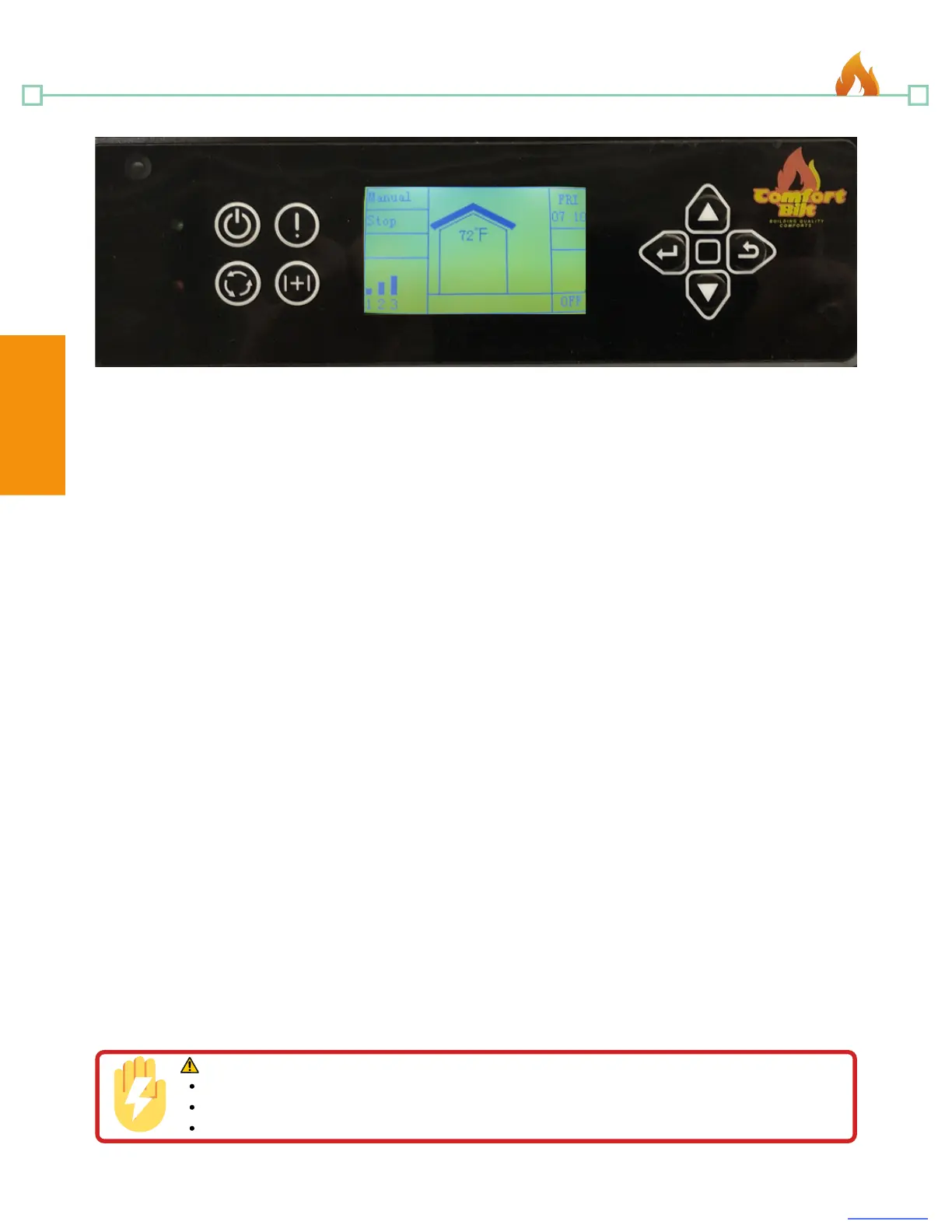
1) Infrared Receiver: Receives signal from remote control. (Included)
2) Power Indicator: Illuminates when main power is switched on.
3) Alarm Light: Illuminates when a fault is encountered (Low Temperature, High
Temperature, Ignite Failed, etc... see troubleshooting section for more information)
4) On/Off Button: Starts and stops operation of the stove.
5) Information Button: Allows you to read the real-time status of the stove at any time.
6) Mode Select Button: Allows you to set the unit to one of four operational mode settings:
Manual, Temp, Weekly, and Thermostat. (Thstat mode requires external thermostat to work
correctly. See wiring diagram)
7) Combination Function Button: After you press this key, the alarm indicator will light.
You can then press another key to complete an operation. See the combination key
function list below:
Button 6: Timer (use scroll up and down to change value)
Button 11: Feeding On (Used to prime the auger)
Button 9: Stop Feeding (Used when auger priming is finished)
Button 4: Child Lock (Hold button 4 for three seconds to activate child lock. Hold button
9 for three seconds to disengage child lock)
8) Scroll up Button: Allows you to scroll up to choose items in the menu.
9) Exit Button: Takes you out of current selection and returns to previous option and/or
screen.
10) Scroll Down Button: Allows you to scroll down to choose items in the menu.
11) Enter Button: Pressing "Enter" button allows you to adjust and select data on the
screen. Pressing the "Enter" button for 3 seconds will take you the "Set Data" menu, where
you can alter settings such as time, combustion, and weekly schedules.
18
comfortbilt.net
Operation
2
3
4
6
5
7
11
10
9
1 8
Control Panel Operation
WARNING!
Plug directly into properly grounded 3 prong receptacle.
Do NOT route power cord under or in front of the stove.
The use of a surge protector is recommended.
Shock Hazard.
Operation


 To Next Page