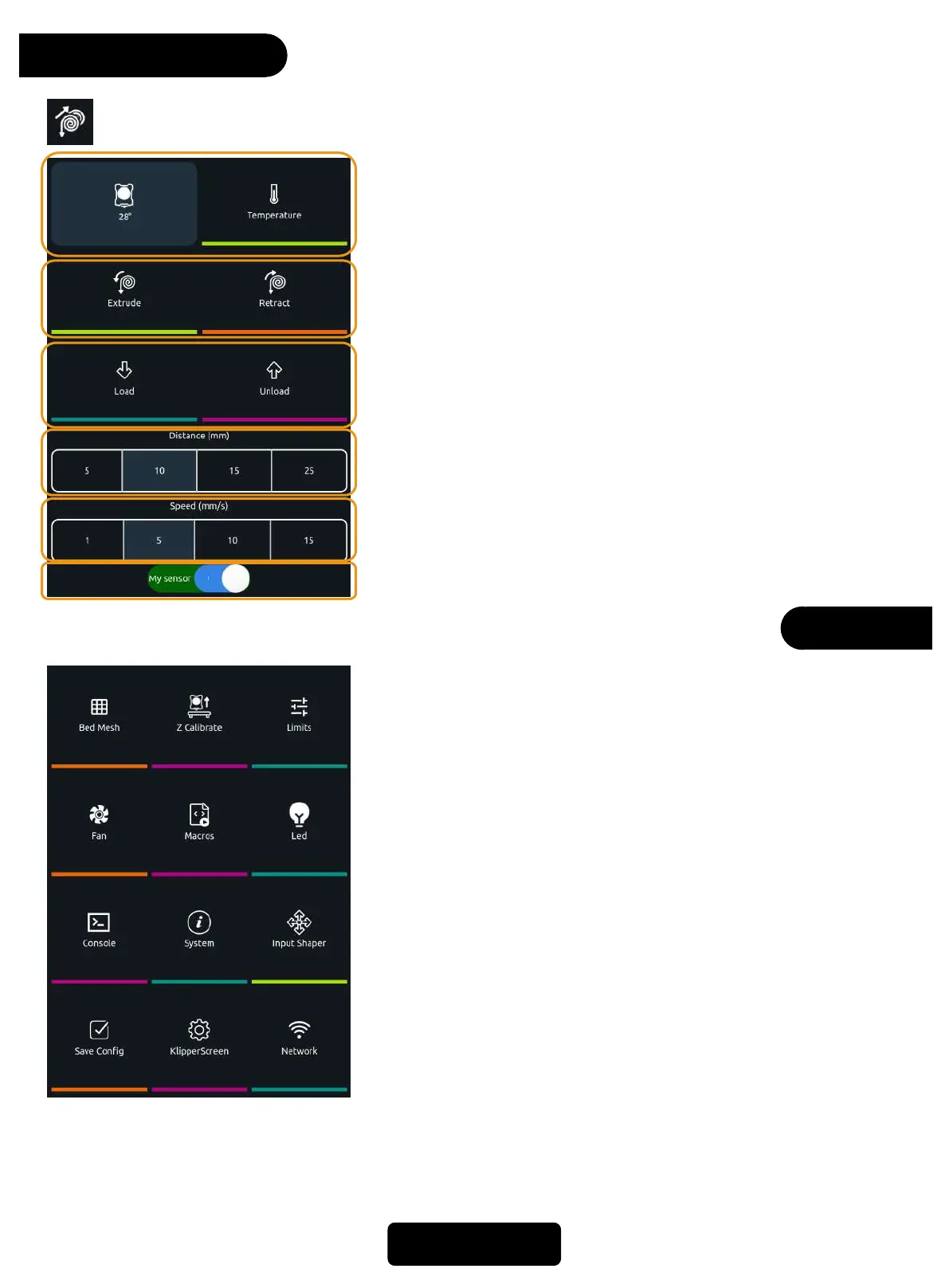
1. Nozzle real-time temperature,click*Temperature* to
adjust temperature.
2. Extrude: extrude filament
Retract: retract filament
3. Load: Execute a macro command to load filament.
Unload: Execute a macro command to withdraw the
filament
4. Distance: The extrusion distance/ retraction distance.
5. Speed: The extrusion speed/ retraction speed.
6. Filament Sensor On/Off
When temconnect to wifip is not enough, it is not
allowed to have related operation about the extruder.
Extrude
Extruder
More
11
⑪ ⑫
1. Bed Mesh: detect hotbed mesh flattening data.
2. Z Calibrate: adjust the Z-axis offset from the hotbed to the
nozzle.
3. Limits: adjust the speed and acceleration of the printer.
4. Fan: control the switch and speed of the fan.
5. Macros: check out the macro command.
6. Led: control the on and off of the nozzle LED
7. Console: open console to check out or input the command
8. System: update, restore factory, restart, shutdown
9. Input Shaper: adjust the vibration compensation of the XY axis
10.Save Config: save current configuration
11.KlipperScreen: screen settings
12.Network: connect to wifi
For more details, see the follow-up content



 To Next Page