Bed Leveling
16
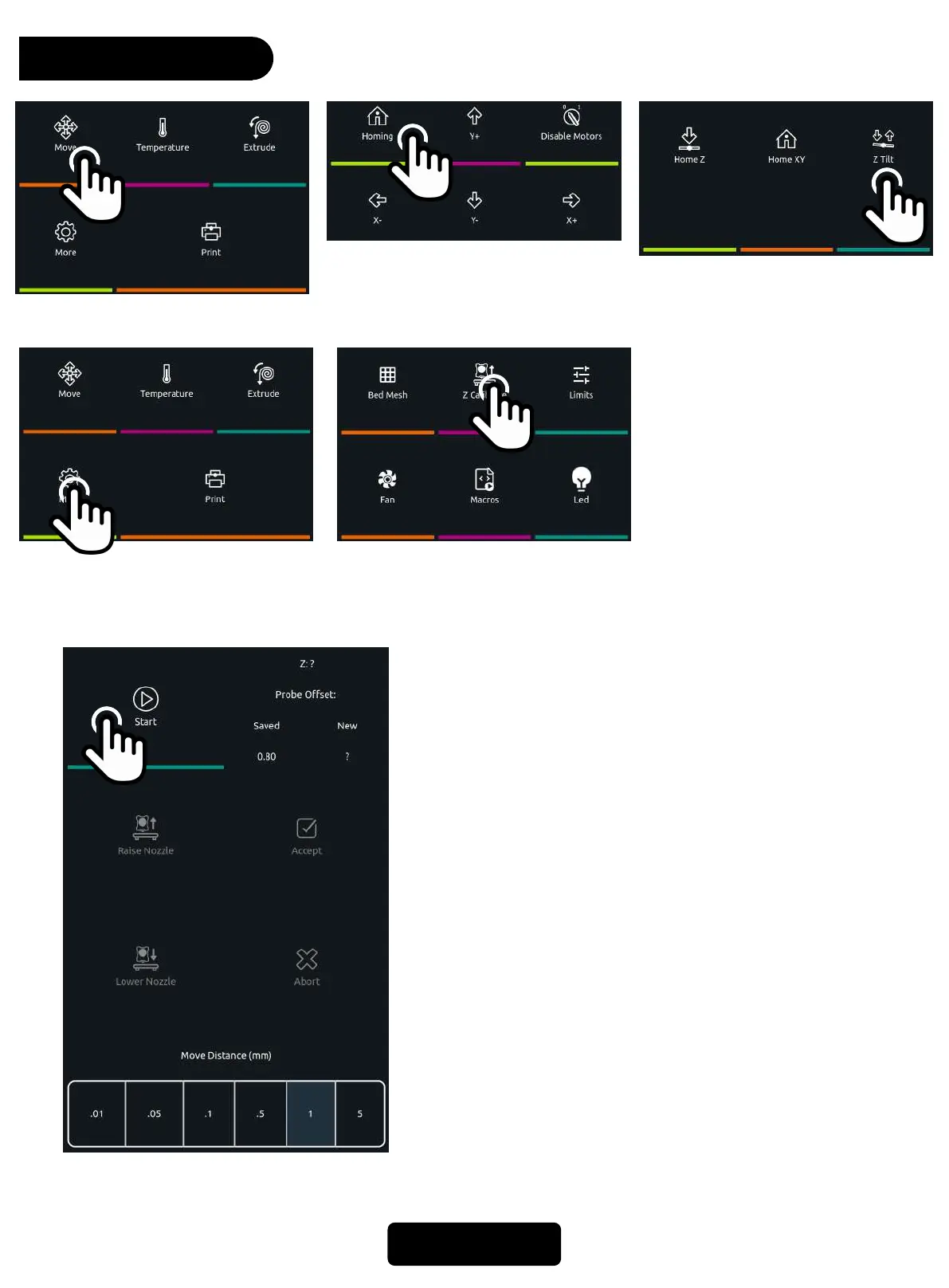
1. Click *Move* on the home page. 3. Click * Z Tilt*. The machine
will detect the left and right
sides of the hot bed, and
automatically calibrate the
level of the X-axis beam
5. Click * Z calibrate*.
6. Click *start*, the printer will auto home first.
7. After the printer auto home, the nozzle will
slowly move to the center of the bed,put a piece
of A4 paper between the nozzle and the hotbed.
8. Select the suitable move distance then click
*raise nozzle * or * lower nozzle *, to adjust the
distance between the nozzle and the hotbed.
9. Adjust the distance between the nozzle and the
hotbed (please keep pulling the paper during
the period, when you feel resistance to pulling
the paper and the nozzle does not completely
press the paper, the distance is appropriate.
10.Click *accept* to apply the values, then confirm
and restart the system.
Please do not move a large distance at one time to
avoid the nozzle hitting the hotbed.
2. Click *Homing*
4. After machine calibration
stops,Click *More* on the
home page.



 To Next Page