① Menu
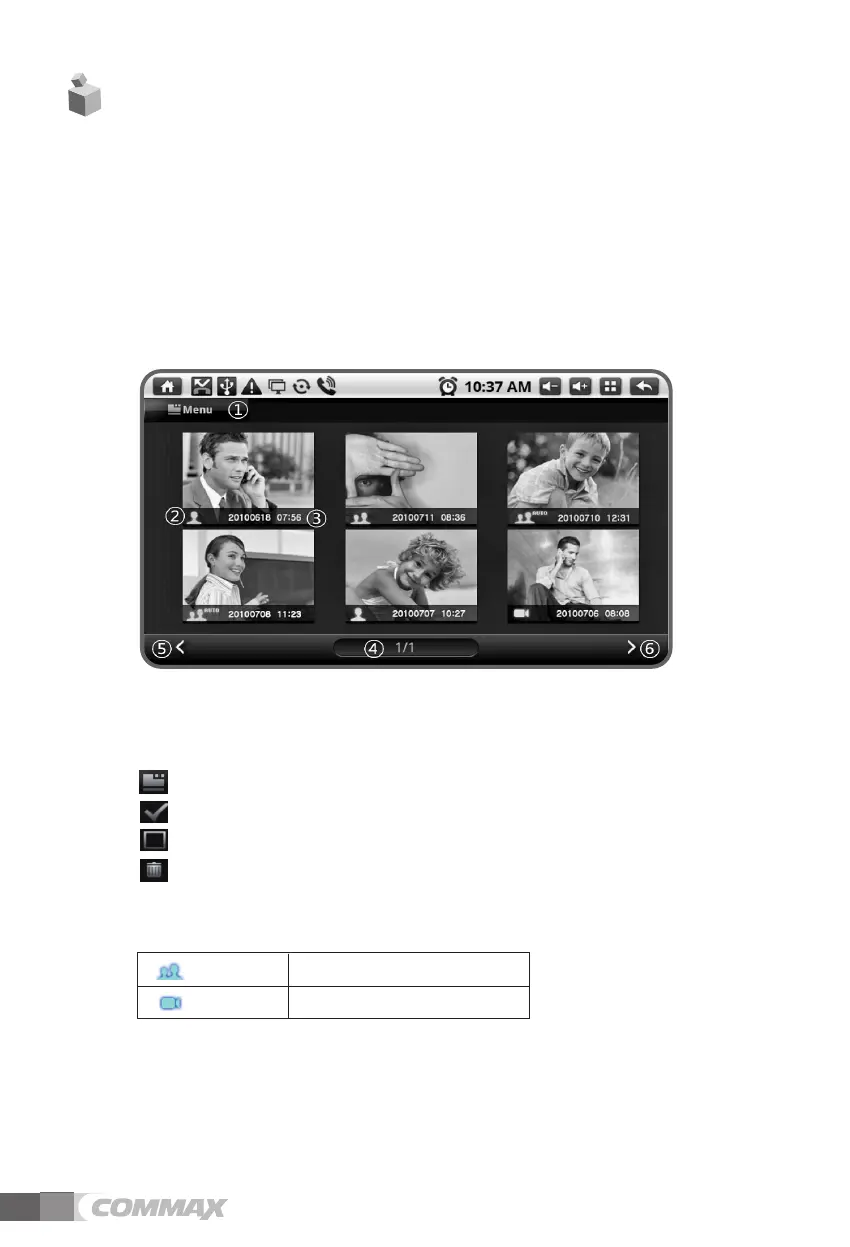
By pressing menu, it can be covert into selection mode.
Viewing menu : Select mode entry and return to viewing pictures mode
Selecting all : selecting all pictures in a page
Cancellation : Lifting the select mode of selected images
Dele : Deleting the selected images
② Recorded location and checking the information during your absence. You can check
the location that the image recorded
③ Time recorded the saved images
④ Page information
⑤ Move to previous page
⑥ Move to next page
7. Checking visitors
Through the camera installed in lobby, you can check visitors’ images and pictures
taken from CCTV in a household.
• Checking saved pictures
1. Through the screen of checking visitors, pictures taken in a lobby, CCTV is
distinguished and saved date and time can be checked.
2. You can delete the saved pictures with ①
(Viewing menu)
Checking the saved pictures screen
14
Lobby Recorded images in the lobby
CCTV Recorded images by CCTV



 To Next Page