3 Commissioning
Page 35
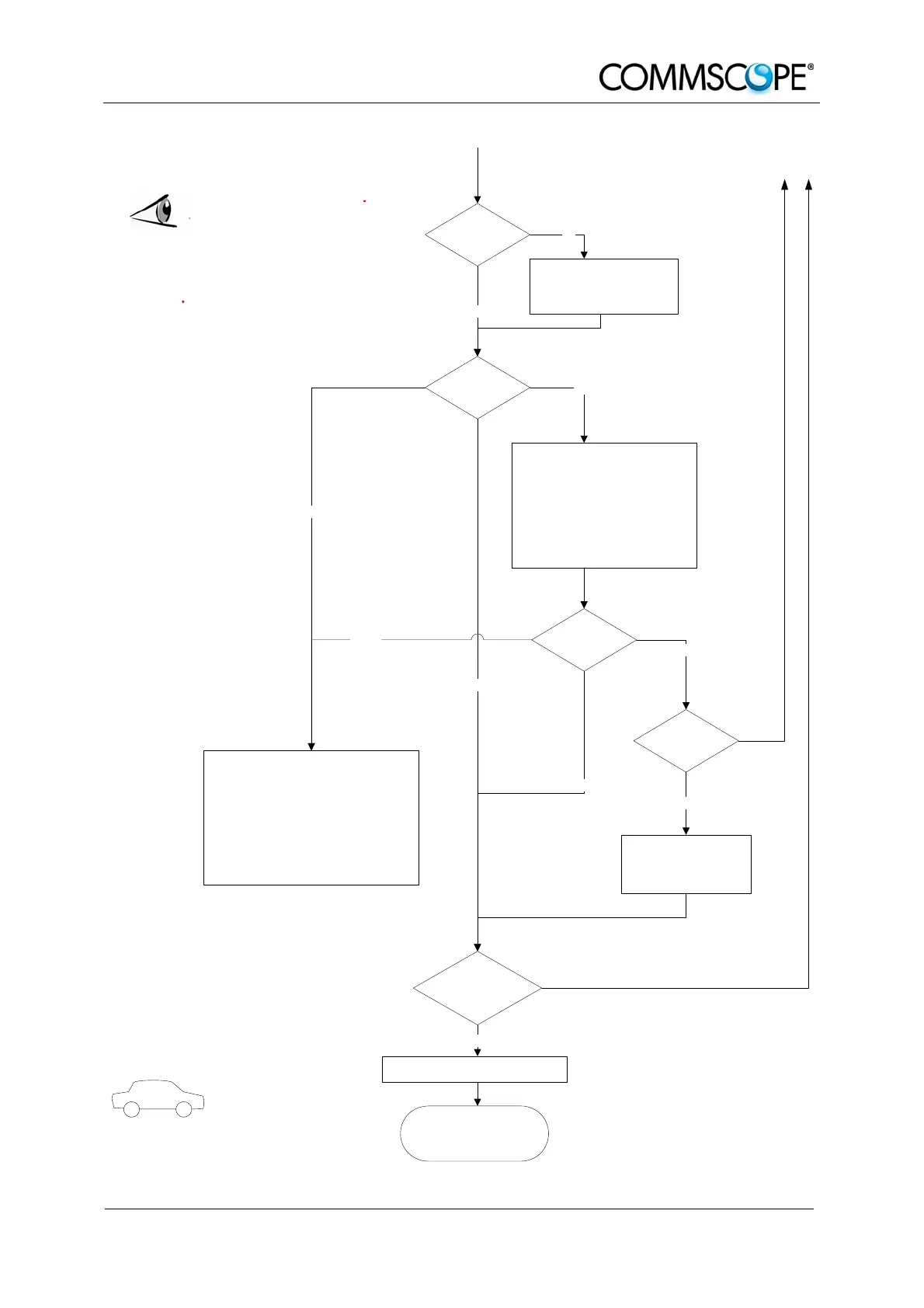
Output:
All RUs okay.
Go to MU
External error
Close the door (RUs with a door).
Check externally connected devices.
Check fibre loss of optical link.
Check optical connectors.
Clean optical connectors.
Check optical output power of corresponding
OTRx at master unit.
ALC alarm: Decrease DL input power of
affected band.
VSWR alarm: Check antenna and cable.
LED status
Proceed to MU to set up the SW
Orange
Yes
Internal Error
Change power supply (RUs with a
door)
.
Reduce environmental temperature.
Eliminate thermal short circuit.
Disconnect and connect mains. Fans
should run. If not, replace the fans at
RU.
MU: Change amplifier setting at MU
controller
Red
LED statusYellow
Green
Red
Finished setting up
all RUs?
Green
Spare RU
available?
Yes
Contact customer
service
No
Yes
LED on?
Check power switch inside RU
(RUs with door).
Check mains cabling.
Check mains power.
No
No


 To Next Page