INS_FDW1000_EXP101 01/06/2020 PAGE 11
INSTALLATION AND OPERATION MANUAL FDW1000 / EXP101
TECH SUPPORT: 1.888.678.9427 / +44 (0)203 630 1653
Programming
• Remove power from the FDW1000/C.
• Turn all DIP switches OFF.
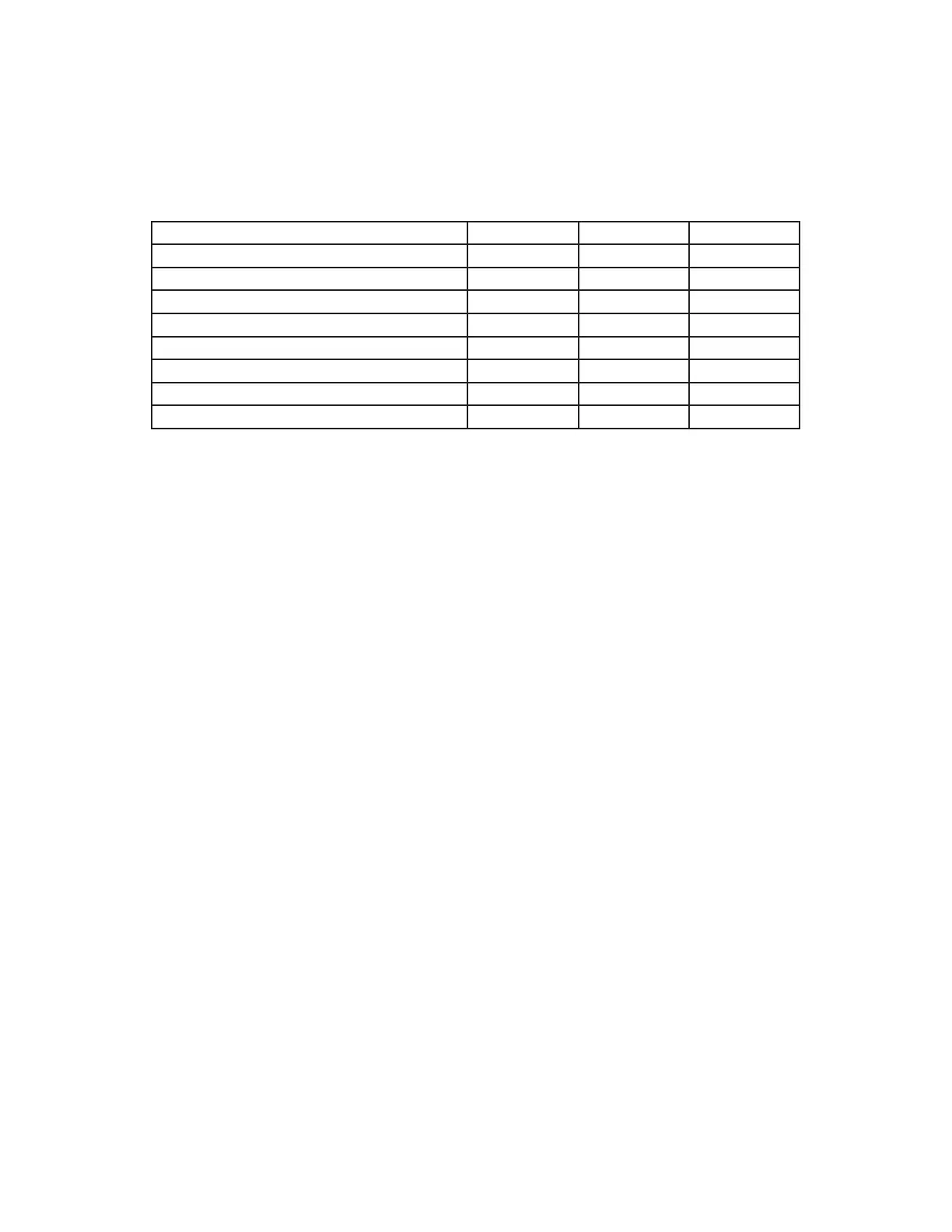
• Using DIP Switches 6, 7, and 8, set the communications format using the following table:
Communications Format DIP Switch 6 DIP Switch 7 DIP Switch 8
not used during programming OFF OFF OFF
Wiegand OFF OFF ON
Wiegand, no filter OFF ON OFF
strobed rising edge (MR-5) OFF ON ON
strobed rising edge (Dorado 644) ON OFF OFF
strobed rising edge (Mag-Tek) ON OFF ON
strobed falling edge ON ON OFF
unsupervised F/2F ON ON ON
• Apply power to the FDW1000/C. The device is now ready to use.
A common ground connection is critical for proper operation. At each remote location, a common
ground must exist between the reader(s), the FDW1000/R, and any EXP100/Rs. At the central loca-
tion, a common ground must exist between the panel, the FDW1000/C, and any EXP100/Cs.


 To Next Page