INS_FDW1000_EXP101 01/06/2020 PAGE 22
INSTALLATION AND OPERATION MANUAL FDW1000 / EXP101
TECH SUPPORT: 1.888.678.9427 / +44 (0)203 630 1653
References
LED status
FDW1000
• During initialization:
• A solid green STATUS LED on power up indicates that the unit has accepted the settings and
that it is ready to be programmed.
• After successful initialization and programming:
• An alternating green / red STATUS LED indicates that there is no optical link between the
FDW1000s.
• If using expansion modules, a solid green STATUS LED indicates a problem with at least one
expansion module connected to the FDW1000 at the opposite end.
• A rapidly flashing green STATUS LED indicates that there is communication between the Central
and the Remote units and – if using expansion modules – all expansions modules are operating
properly. The STATUS LED’s will flash green after each polling cycle. The frequency of the flashing
will depending on the number of expansion modules being used. With only one pair of FDW1000s
connected – no expansion modules – the STATUS LED should flash several times per second. With
seven sets of expansion modules, the STATUS LED could flash as slowly as one flash per second.
EXP101
• Once a Central / Remote pair of FDW1000s and the pair(s) of EXP101s have been successfully
initialized and programmed:
• A STATUS LED-flashing green slowly indicates that there is no optical link between the FDW1000s.
• A solid red STATUS indicator LED indicates that the unit is properly powered but there is no
2-wire RS-485 link.
• A rapidly flashing green STATUS LED indicates that there is communication between the
Central and the Remote units and that there is a good 2-wire RS-485 link. The STATUS LED
will flash green after each polling cycle. The frequency of the flashing will depending on the
number of expansion modules being used. With only one pair of FDW1000s connected – no
expansion modules – the STATUS LED’s should flash several times per second. With seven sets
of expansion modules, the STATUS LED could flash as slowly as one flash per second.
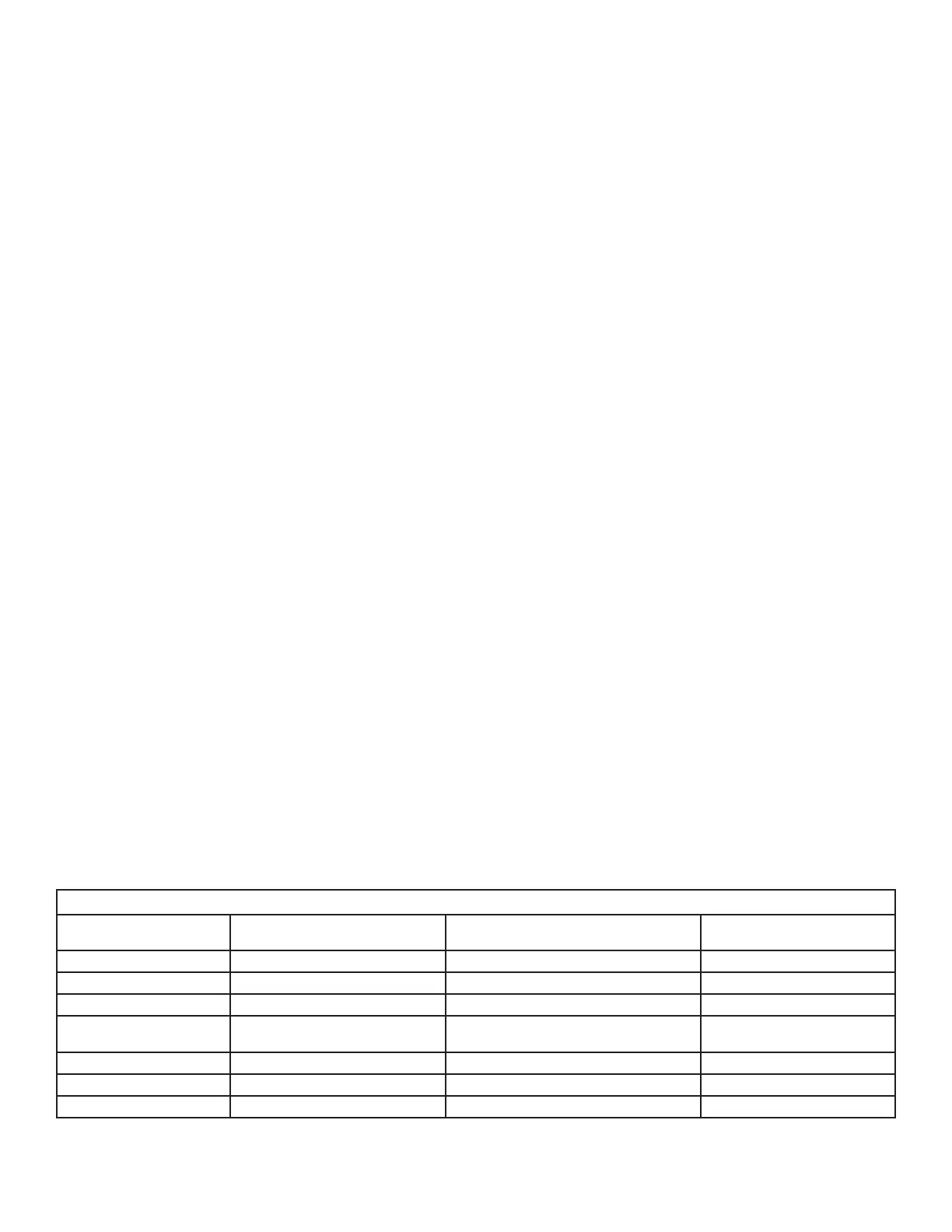
LED Status
STATUS LED
FDW
(during initialization)
FDW
(initialized and programmed)
EXP101
(programmed)
Off not properly powered not properly powered not properly powered
Green, solid ready to be programmed opposite side expansion module failure not used
Green, flashing slowly not used not used optical link failure
Green, flashing rapidly not used good optical link
good optical link and
good 2-wire RS-485 link
Red, solid not used not used no 2-wire RS-485 link
Red, flashing not used not used not used
Red / Green, alternating not used optical link failure not used


 To Next Page