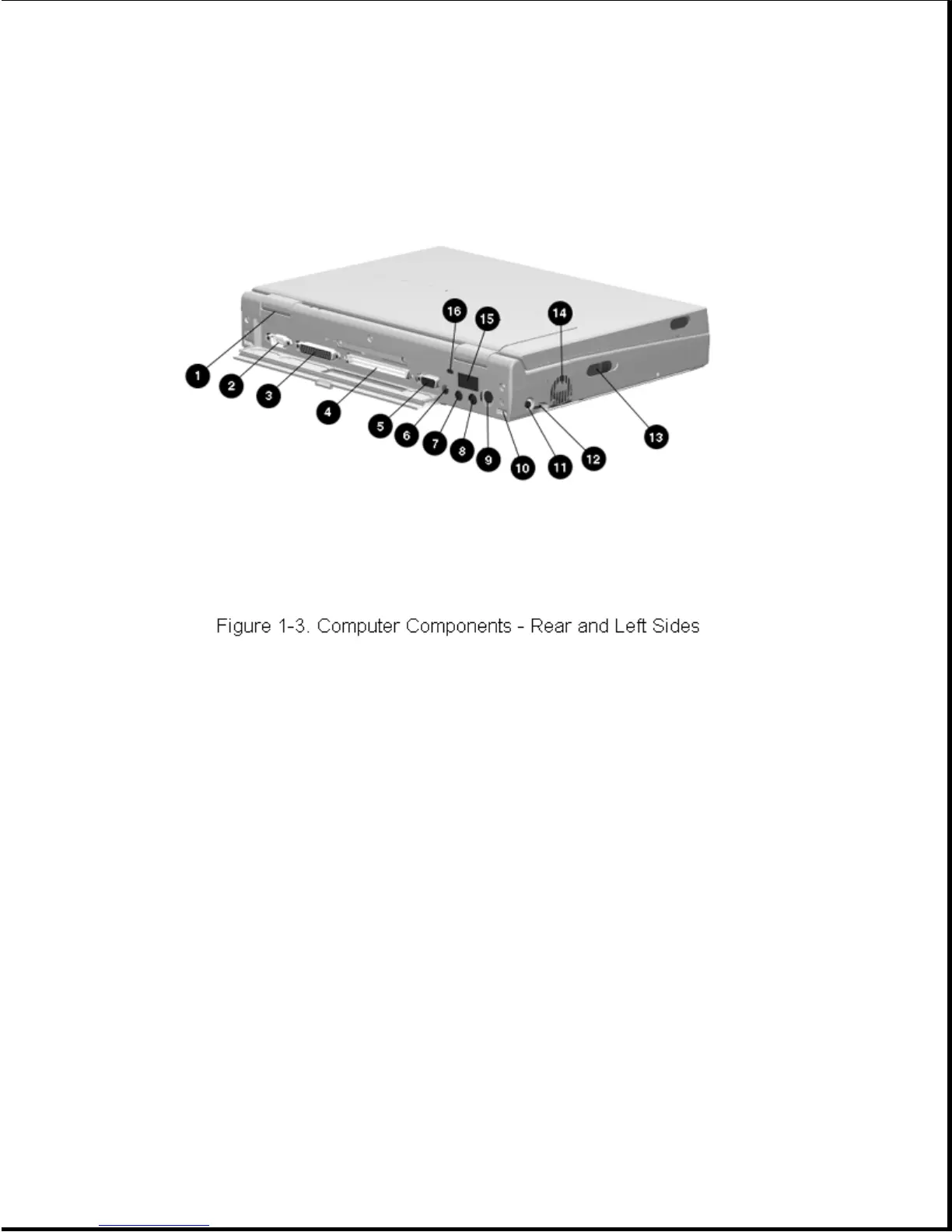
Table 1-4. Computer Components - Rear and Left Sides
===========================================================================
Item Component Function
===========================================================================
1 Serial number Identifies the computer.
---------------------------------------------------------------------------
2 Serial connector Connects optional serial devices.
---------------------------------------------------------------------------
3 Parallel connector Connects optional parallel devices.
---------------------------------------------------------------------------
4 External options Connects the expansion base or the
connector optional Automobile Adapter.
---------------------------------------------------------------------------
5 External monitor connector Connects an external monitor.
---------------------------------------------------------------------------
6 Power connector Connects the AC Adapter or the
optional Automobile Adapter.
---------------------------------------------------------------------------
7 Stereo speaker/headphone Connects external speakers or
jack headphones.
---------------------------------------------------------------------------
8 Stereo line in jack Stereo line-in jack for CD player,
tape deck, tuner, or other line level
audio source.
---------------------------------------------------------------------------
9 Keyboard/mouse connector Connects an external keyboard, numeric
keypad, PS/2 mouse, or other pointing device.









 To Next Page