Conceptronic C54BRS4A User Manual
23
Note:
Remember or write down the entered wireless security information. You will need it when
you want to configure a Wireless Client to connect to the C54BRS4A!
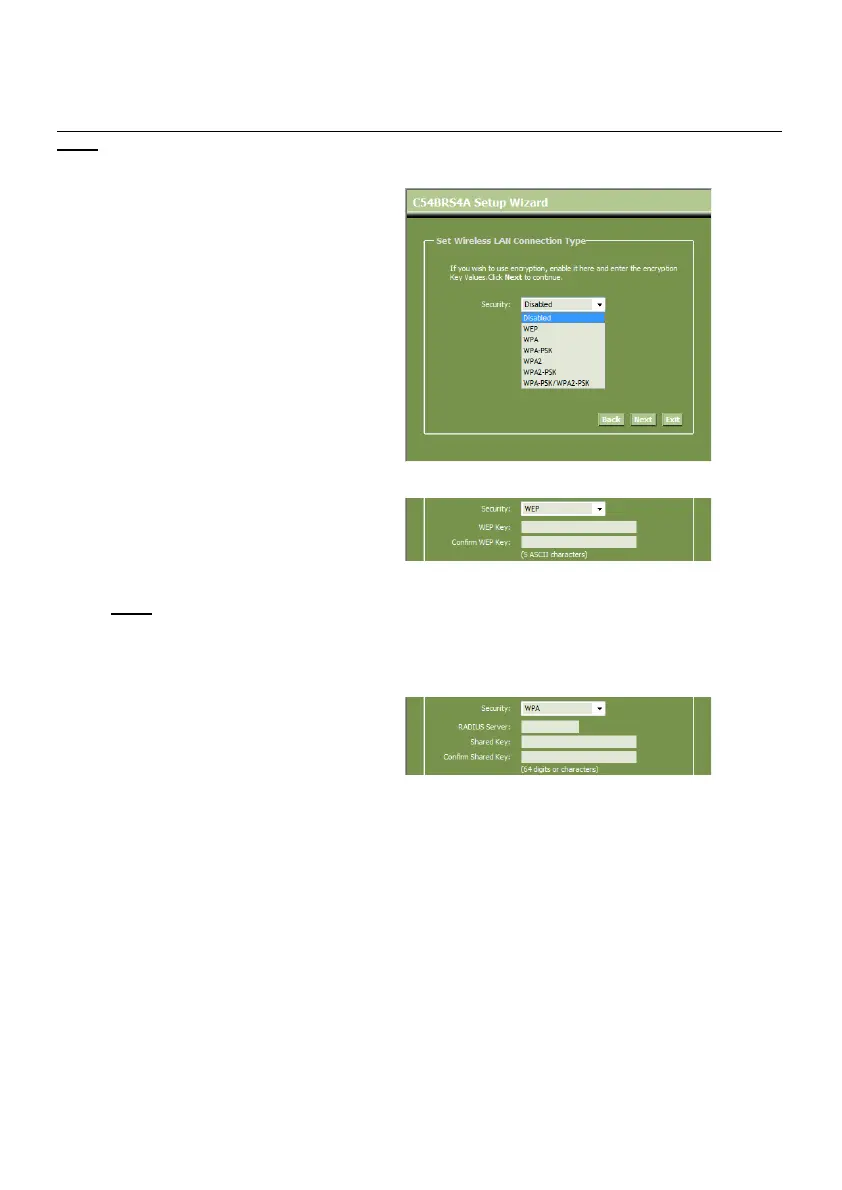
K. Select a security level for your
Wireless Network.
When a security level is chosen, the
Wizard will show fields for the
required information.
L. If you want to secure your network
with WEP encryption, select “WEP”
from the drop-down list. Enter the
WEP key in ASCII format (input: A-Z,
0-9).
Note:
Through the Wizard you can only
configure WEP 64Bits.
Security – WEP Encryption
M. If you want so secure your network
with WPA or WPA2 (with Radius
Server), select “WPA” or “WPA2”
from the drop-down list.
Enter the IP Address of the Radius
Server, the Shared Key and confirm
the Shared Key in the second field.
Security – WPA / WPA2 Encryption



 To Next Page