Conceptronic C54BRS4A User Manual
28
WPA/WPA2-PSK With Passphrase Encryption
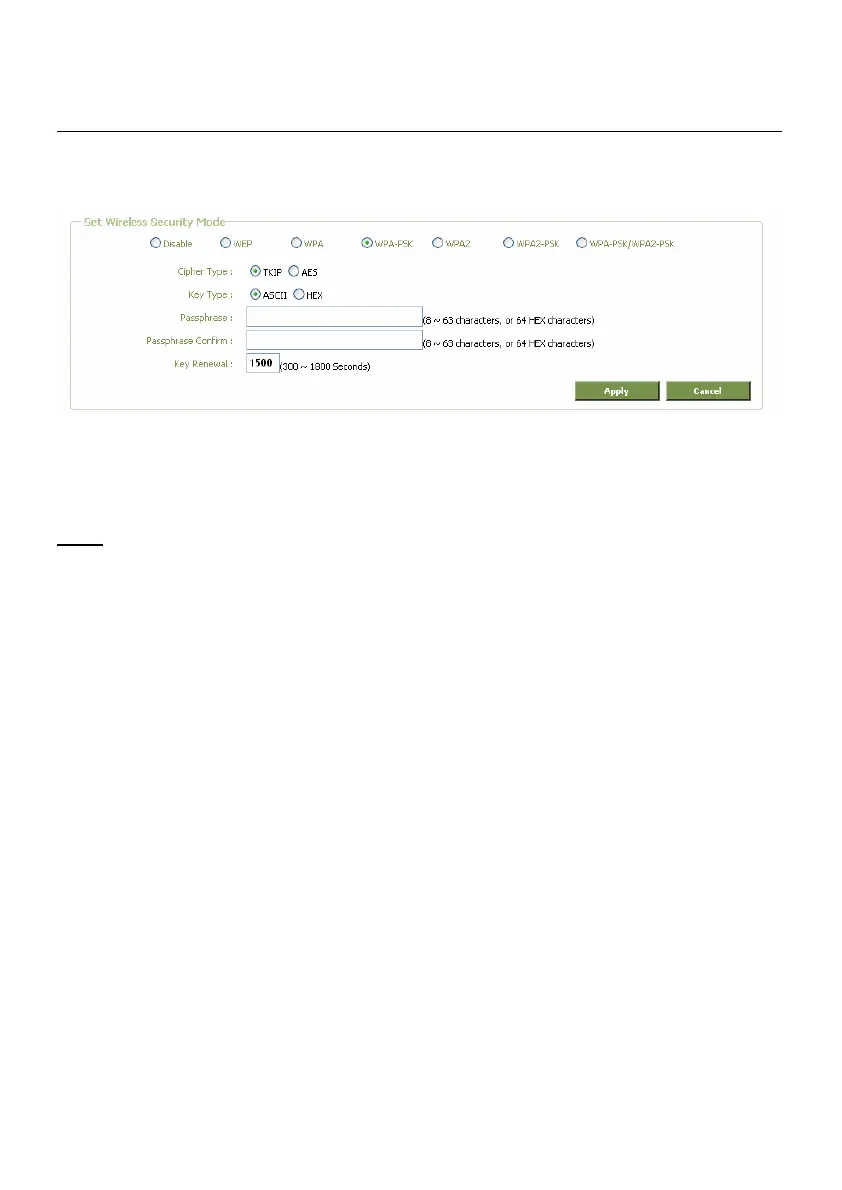
Wireless Settings window for WPA-PSK, WPA2-PSK and WPA-PSK/WPA2-PSK
1. Select the type of WPA encryption for use with your Passphrase, WPA-PSK, WPA2-PSK or
WPA-PSK/WPA2-PSK.
Note:
If you select WPA-PSK/WPA2-PSK, the router will work with the highest WPA2-PSK
encryption. If clients try to connect which do not support WPA2-PSK, the router will
automatically authorize the client on WPA-PSK Level.
2. Select the desired Cipher Type, TKIP or AES.
3. Select the Key Type, ASCII or HEX (Hexadecimal).
4. Enter the Passphrase you want to use for your WPA-PSK encryption (8 ~ 63 characters ASCII,
or 64 characters HEX).
5. Re-enter the Passphrase in the second field.
6. Click Apply.



 To Next Page