37
INSTALLING SOFTWARE
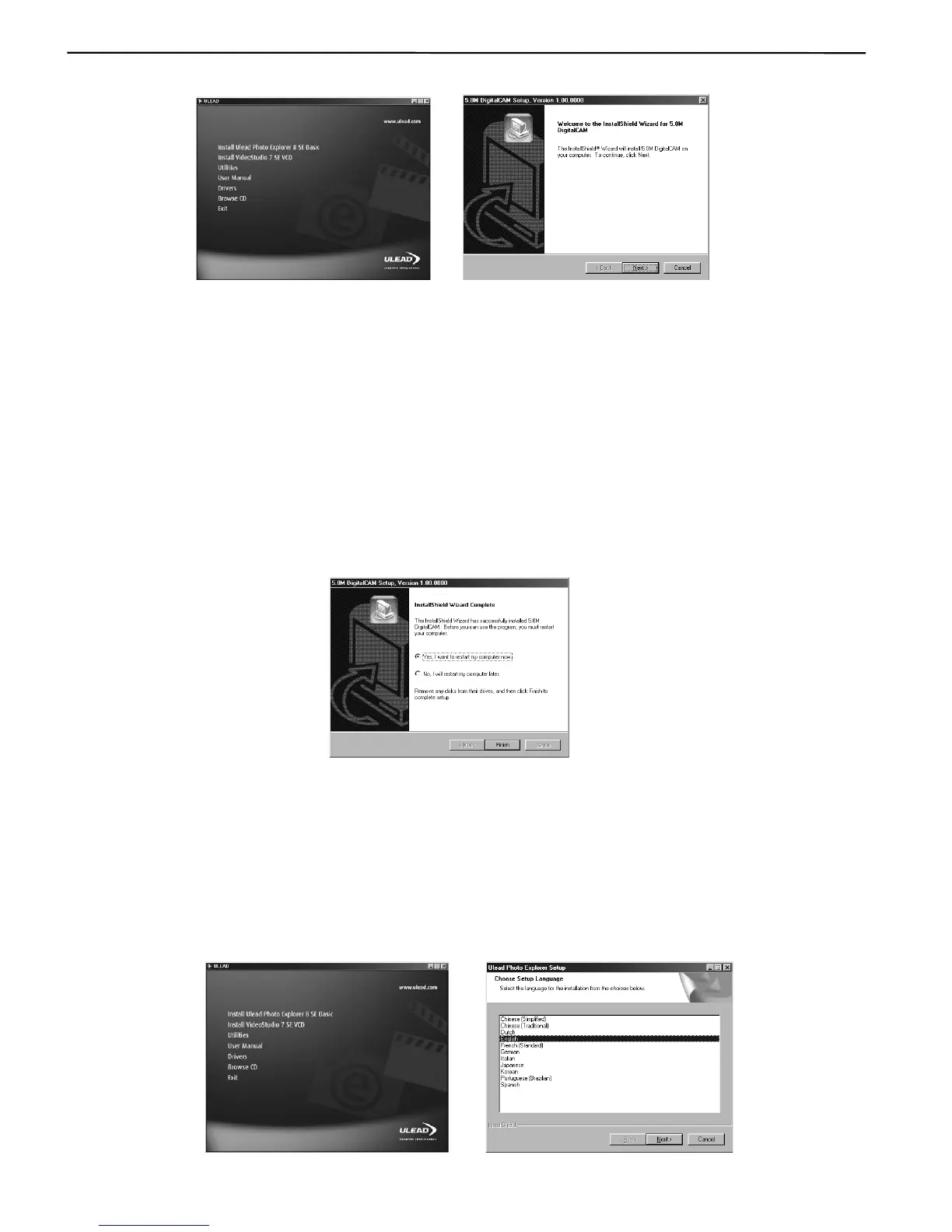
Computer and find the CD-ROM drive, then double-it.
2. Click Drivers on the model selection screen. Choose a language from the menu and click OK. The
“InstallShield Wizard” screen appears.
Note: The computer may remind you to disconnect the camera with the computer and to prepare
the system CD, please click OK to continue the installation.
3. Click Next.
The USB driver installation starts. When the installation is completed, the screen informs you of
completion.
4. Click “Yes, I want to restart my computer now” then click “Finish”
Your computer restarts. Then, you can establish USB connection.
INSTALLING ULEAD PHOTO EXPLORER 8 SE BASIC – FOR WINDOWS 98SE/2000/
ME/XP
Ulead Photo Explorer 8 SE Basic is a photo editing application that is included for free in the software
installation CD-ROM.
1. Start up your computer, and insert the software installation CD-ROM into the CD-ROM drive. The
model selection screen appears in a few second. If it does not appear, double-click My Computer
and find the CD-ROM drive, then double-click it.
Fig. 1.1 Fig. 1.2











 To Next Page