EasyManua.ls Logo

Contax Tvs III - Front Cover

Contax Tvs III
67 pages
Print Icon
To Next Page IconTo Next Page
To Previous Page IconTo Previous Page
Loading...
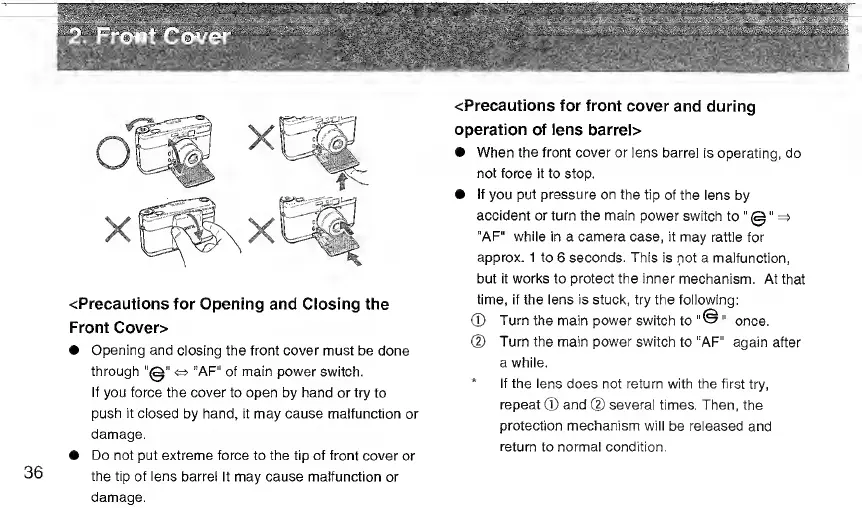
<Precautions
for
Opening
and
Closing
the
Front
Cover>
Opening
and
closing
the
front
cover
must
be
done
through
"0"
<=>
“AF"
of
main
power
switch.
If
you
force
the
cover
to
open
by
hand
or
try
to
push
it
closed
by
hand,
it
may
cause
malfunction
or
damage.
Do
not
put
extreme
force
to
the
tip
of
front
cover
or
the
tip
of
lens
barrel
It
may
cause
malfunction
or
damage.
<Precautions
for
front
cover
and
during
operation
of
lens
barrel>
When
the
front
cover
or
lens
barrel
is
operating,
do
not
force
it
to
stop.
If
you
put
pressure
on
the
tip
of
the
lens
by
accident
or
turn
the
main
power
switch
to
"0"
=>
"AF"
while
in
a
camera
case,
it
may
rattle
for
approx.
1
to
6
seconds.
This
is
not
a
malfunction,
but
it
works
to
protect
the
inner
mechanism.
At
that
time,
if
the
lens
is
stuck,
try
the
following:
©
Turn
the
main
power
switch
to
once.
@
Turn
the
main
power
switch
to
"AF”
again
after
a
while.
*
If
the
lens
does
not
return
with
the
first
try,
repeat
®
and
@
several
times.
Then,
the
protection
mechanism
will
be
released
and
return
to
normal
condition.

Related product manuals