EasyManua.ls Logo

Contax Tvs III - Battery Repiacement

Contax Tvs III
67 pages
Print Icon
To Next Page IconTo Next Page
To Previous Page IconTo Previous Page
Loading...
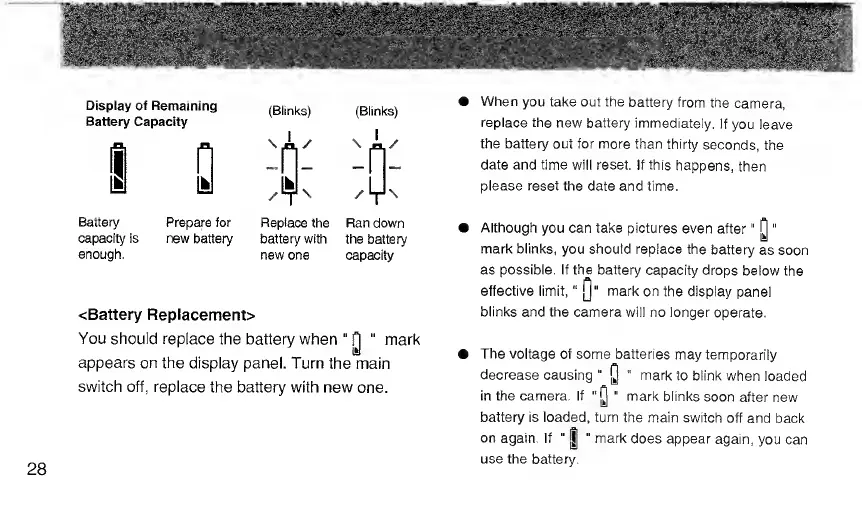
Display
of
Remaining
Battery
Capacity
Battery
Prepare
for
capacity
is
new
battery
enough.
(Blinks)
(Blinks)
Replace
the
Ran
down
battery
with
the
battery
new
one
capacity
<Battery
Replacement>
You
should
replace
the
battery
when
p
mark
appears
on
the
display
panel.
Turn
the
main
switch
off,
replace
the
battery
with
new
one.
28
When
you
take
out
the
battery
from
the
camera,
replace
the
new
battery
immediately.
If
you
leave
the
battery
out
for
more
than
thirty
seconds,
the
date
and
time
will
reset.
If
this
happens,
then
please
reset
the
date
and
time.
Although
you
can
take
pictures
even
after"
p
"
mark
blinks,
you
should
replace
the
battery
as
soon
as
possible.
If
the
battery
capacity
drops
below
the
effective
limit,''
j]
"
mark
on
the
display
panel
blinks
and
the
camera
will
no
longer
operate.
The
voltage
of
some
batteries
may
temporarily
decrease
causing
"
Q
"
mark
to
blink
when
loaded
in
the
camera.
If
“p
"
mark
blinks
soon
after
new
battery
is
loaded,
turn
the
main
switch
off
and
back
on
again.
If
"
|
"
mark
does
appear
again,
you
can
use
the
battery.

Related product manuals