EasyManua.ls Logo

Contax Tvs III - Flash Photography:

Contax Tvs III
67 pages
Print Icon
To Next Page IconTo Next Page
To Previous Page IconTo Previous Page
Loading...
4.
Flash
Photography:
130
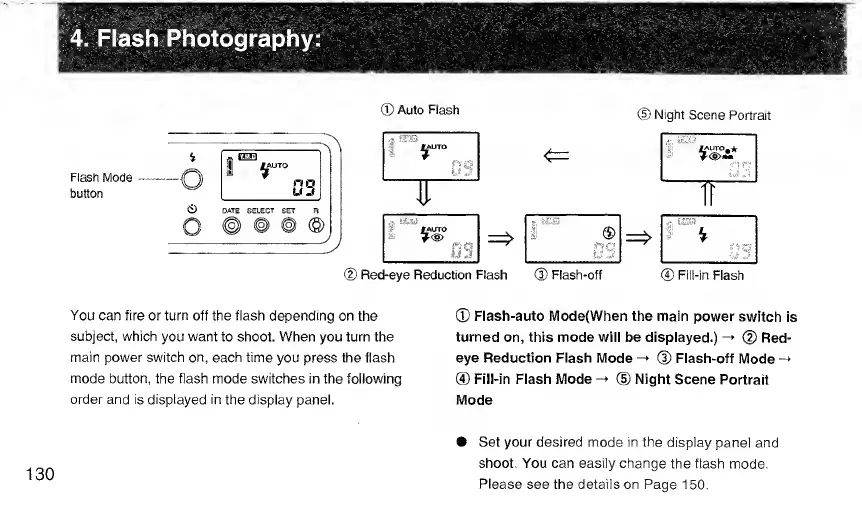
Flash
Mode
button
0
DATE
SELECT
SET
o
©
©
©
®
Auto
Flash
(D
Night
Scene
Portrait
4
lAUTO
i
>
r-s
<=
1
a
023
^
M^O
i'"'
®
US
®
Red-eye
Reduction
Flash
(D
Flash-off
®
Fill-in
Flash
You
can
fire
or
turn
off
the
flash
depending
on
the
subject,
which
you
want
to
shoot.
When
you
turn
the
main
power
switch
on,
each
time
you
press
the
flash
mode
button,
the
flash
mode
switches
in
the
following
order
and
is
displayed
in
the
display
panel.
®
Flash-auto
IVIode(When
the
main
power
switch
is
turned
on,
this
mode
will
be
displayed.)
-*
(D
Red¬
eye
Reduction
Flash
Mode
-*
(D
Flash-oft
Mode
-
®
Fill-in
Flash
Mode
-*
(D
Night
Scene
Portrait
Mode
Set
your
desired
mode
in
the
display
panel
and
shoot.
You
can
easily
change
the
flash
mode.
Please
see
the
details
on
Page
150.

Related product manuals