EasyManua.ls Logo

Contax Tvs III - Exposure Compensation

Contax Tvs III
67 pages
Print Icon
To Next Page IconTo Next Page
To Previous Page IconTo Previous Page
Loading...
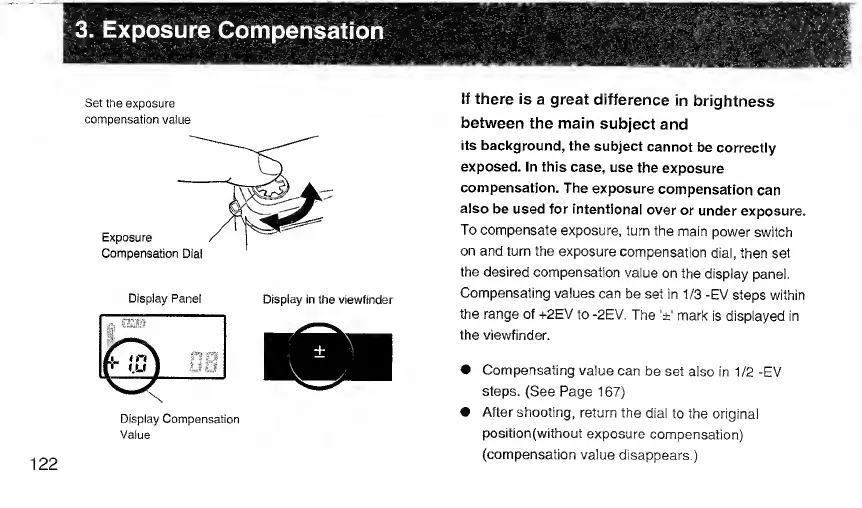
3.
Exposure
Compensation
Set
the
exposure
compensation
vaiue
Display
Panel
Display
in
the
viewfinder
Display
Compensation
Value
If
there
is
a
great
difference
in
brightness
between
the
main
subject
and
its
background,
the
subject
cannot
be
correctly
exposed.
In
this
case,
use
the
exposure
compensation.
The
exposure
compensation
can
aiso
be
used
for
intentionai
over
or
under
exposure.
To
compensate
exposure,
turn
the
main
power
switch
on
and
turn
the
exposure
compensation
dial,
then
set
the
desired
compensation
value
on
the
display
panel.
Compensating
values
can
be
set
in
1/3
-EV
steps
within
the
range
of
+2E\/
to
-2EV.
The
'±'
mark
is
displayed
in
the
viewfinder.
Compensating
value
can
be
set
also
in
1/2
-EV
steps.
(See
Page
167)
After
shooting,
return
the
dial
to
the
original
position(without
exposure
compensation)
(compensation
value
disappears.)
122

Related product manuals