EasyManua.ls Logo

Contax Tvs III - Home Position

Contax Tvs III
67 pages
Print Icon
To Next Page IconTo Next Page
To Previous Page IconTo Previous Page
Loading...
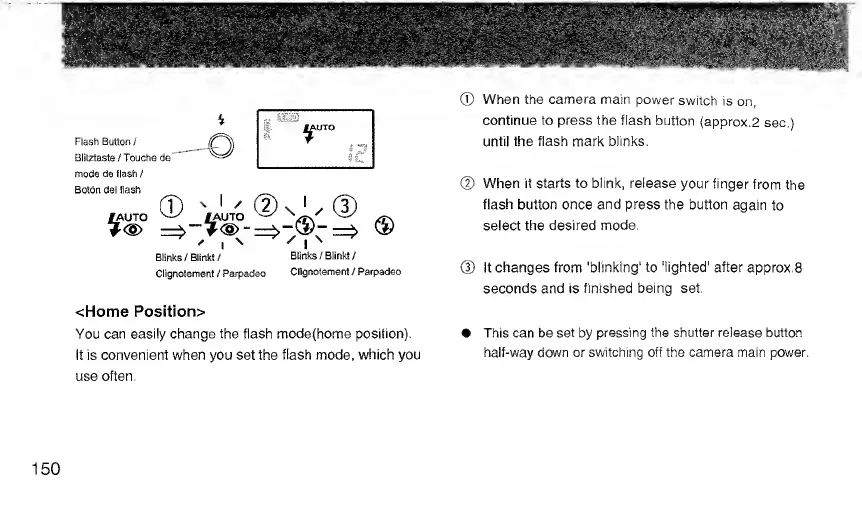
Flash
Button
/
Blitztaste
/
Touche
de
mode
de
Hash
/
Blinks/Blinkt/
Blinks
/
Blinkt
/
Clignotement
/
Parpadso
Clignotement
/
Parpadeo
<Home
Position>
You
can
easily
change
the
flash
modefhome
position).
It
is
convenient
when
you
set
the
flash
mode,
which
you
use
often.
®
When
the
camera
main
power
switch
is
on,
continue
to
press
the
flash
button
(approx.2
sec.)
until
the
flash
mark
blinks.
(D
When
it
starts
to
blink,
release
your
finger
from
the
flash
button
once
and
press
the
button
again
to
select
the
desired
mode,
@
It
changes
from
'blinking'
to
'lighted'
after
approx.8
seconds
and
is
finished
being
set.
This
can
be
set
by
pressing
the
shutter
release
button
half-way
down
or
switching
off
the
camera
main
power.
150

Related product manuals