EasyManua.ls Logo

Contax Tvs III - Taking out the film:

Contax Tvs III
67 pages
Print Icon
To Next Page IconTo Next Page
To Previous Page IconTo Previous Page
Loading...
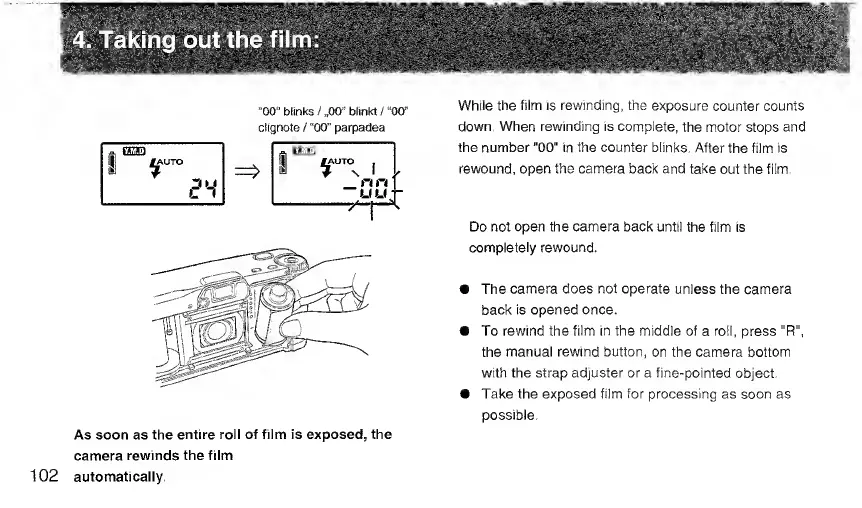
While
the
film
is
rewinding,
the
exposure
counter
counts
down.
When
rewinding
is
complete,
the
motor
stops
and
the
number
"00"
in
the
counter
blinks.
After
the
film
is
rewound,
open
the
camera
back
and
take
out
the
film.
Do
not
open
the
camera
back
until
the
film
is
completely
rewound.
The
camera
does
not
operate
unless
the
camera
back
is
opened
once,
To
rewind
the
film
in
the
middle
of
a
roll,
press
"R",
the
manual
rewind
button,
on
the
camera
bottom
with
the
strap
adjuster
or
a
fine-pointed
object.
Take
the
exposed
film
for
processing
as
soon
as
possible.
As
soon
as
the
entire
roll
of
film
is
exposed,
the
camera
rewinds
the
film
102
automatically.

Related product manuals