38 39
FEATURES
C
ONTOUR
®
NEXT ONE blood glucose monitoring system
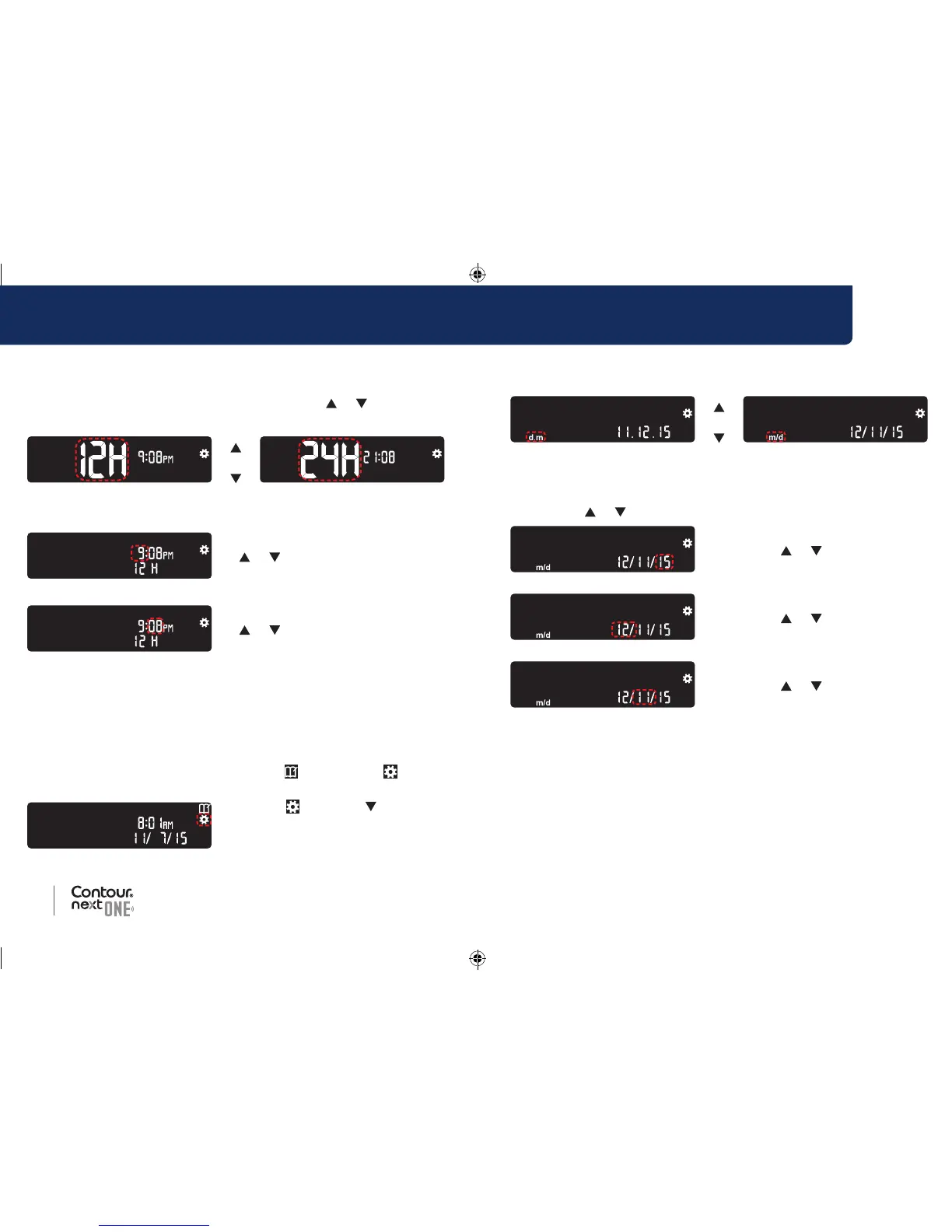
4. Continue to press the OK button until you see the Date
Format screen.
or
Date Format
The date format (m/d or d.m) is blinking.
5. To select Month/Day/Year (m/d) or Day.Month.Year (d.m),
press the
or button, then press the OK button.
6. To change the year (blinking),
press the
or button,
then press the OK button.
7. To change the month (blinking),
press the
or button,
then press the OK button.
8. To change the day (blinking),
press the
or button,
then press the OK button.
The meter displays the Sound screen.
Change the Time
The time format is blinking.
1. To change the time format, if needed, press the
or button,
then press the OK button.
or
Time Format
The hour is blinking.
2. To change the hour, press the
or button, then press the
OK button.
The minutes are blinking.
3. To change minutes, press the
or button, then press the
OK button.
4. For a 12-hour time format, select AM or PM, as needed, then press
the OK button.
Change the Date
If your meter is not ON:
1. Press and hold the OK button until the meter turns on.
The Home screen has 2 options: Logbook
and Settings .
2. To highlight the Settings
symbol
, press the button.
3. When the Settings symbol is
blinking, press the OK button to
enter Settings.
85096877_CntrNxtONE_UG_EN.indd 38-39 9/21/16 3:47 AM



 To Next Page