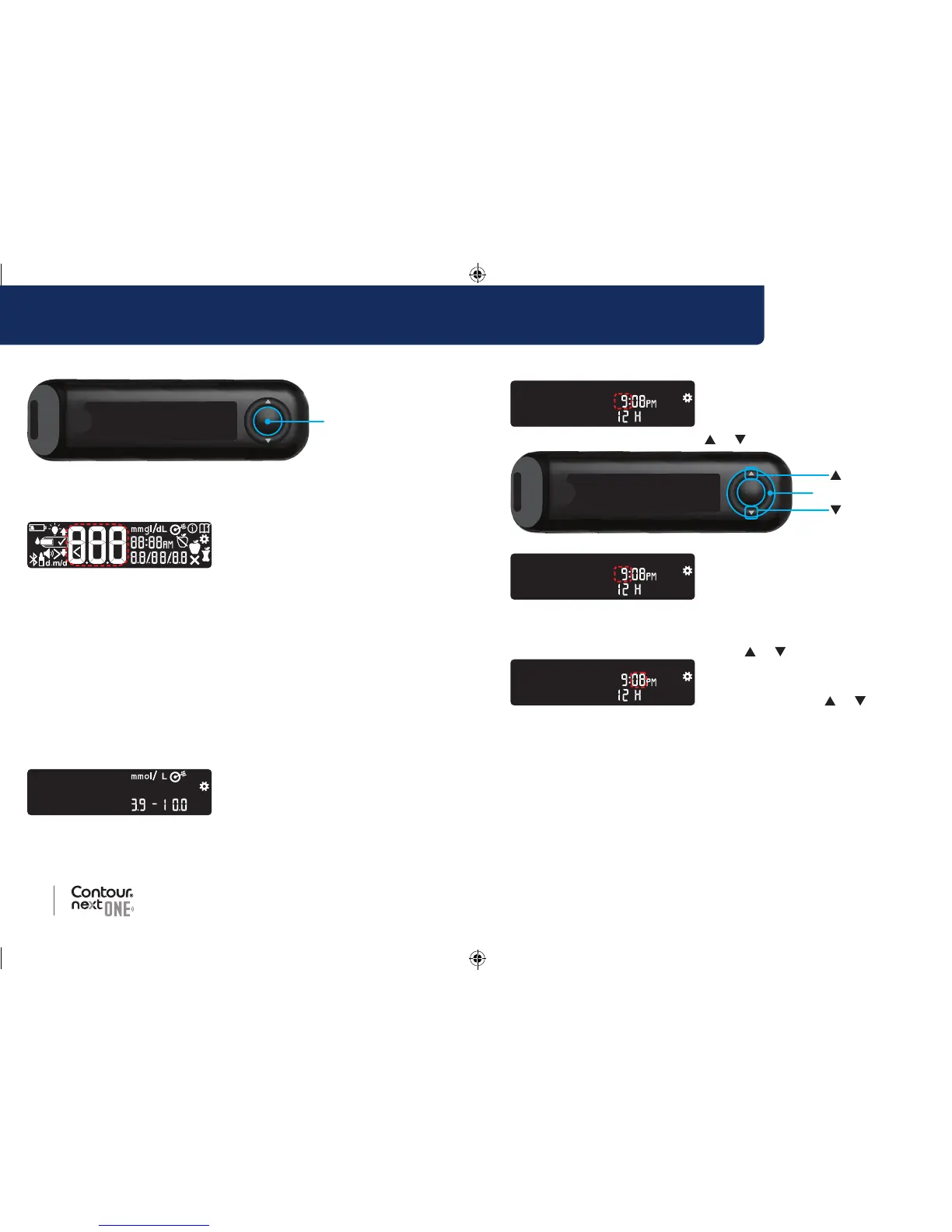
Press and hold the OK button for 2 seconds until the meter turns on.
The screen displays the Power On Self Test.
All symbols on the screen and the white strip port briefly light up. It is
very important to verify that 8.8.8 displays fully and that the white light
from the test strip port is visible.
If there are missing characters or if the strip port light is a color other
than white, contact Diabetes Care Customer Service. This may affect
the way you see your results.
Initial Setup begins with View Pre-Set Target.
View Pre-Set Target
The meter displays a pre-set Overall
Target Range. You can change
this pre-set Target Range from
the
CONTOUR DIABETES app after
initial setup.
To move to the next screen, press
the OK button. Continue to
Set the Time.
Set the Time
The hour is blinking.
1. To change the hour, press the
or button on the outer ring.
2. To set the hour and move to
minutes, press the OK button.
3. To change the minutes, press
the
or button on the outer
ring, then press the OK button.
For a 12-hour format, select AM
or PM, press the
or button,
then press the OK button.
Continue to Set the Date.
85096877_CntrNxtONE_UG_EN.indd 8-9 9/21/16 3:46 AM



 To Next Page