
 Need help?
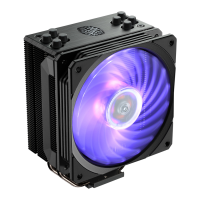
Do you have a question about the Cooler Master HYPER 212 RGB BLACK EDITION and is the answer not in the manual?
Assembly of mounting brackets E and I for Intel LGA 1366/115X/775 sockets.
Attaching the backplate D to the motherboard for Intel LGA 1366/115X/775.
Securing standoffs F and adapter J onto the motherboard for Intel LGA 1366/115X/775.
Applying thermal paste using applicator K to the CPU surface for Intel.
Attaching the heatsink unit A to the motherboard for Intel LGA 1366/115X/775.
Fastening the heatsink to the motherboard using bracket B and screws H.
 General
| Fan Speed | 650-2000 RPM (PWM) ± 10% |
|---|---|
| Noise Level | 8 - 30 dBA |
| Airflow | 57.3 CFM (Max) |
| Connector | 4-Pin PWM |
| Bearing Type | Rifle Bearing |
| Lighting | RGB |
| Fan Dimensions | 120 x 120 x 25 mm |
| Rated Voltage | 12 VDC |
| Warranty | 2 years |
| Dimensions | 120 x 79.6 x 158.8 mm |
| Compatibility | AMD AM4/AM3+/AM3/AM2+/AM2/FM2+/FM2/FM1 |
| Heatpipes | 4 |
| Heatsink Material | Aluminum (Fins), Copper (Base) |
| Fan Air Pressure | 2.0 mmH2O |
| Material | Aluminum and Copper |
| Socket Support | Intel: LGA 2066/2011-v3/2011/1156/1155/1151/1150, AMD: AM4/AM3+/AM3/AM2+/AM2/FM2+/FM2/FM1 |


 To Next Page