
 Need help?
Do you have a question about the Cooler Master Masterliquid ML240L RGB and is the answer not in the manual?
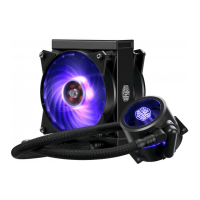
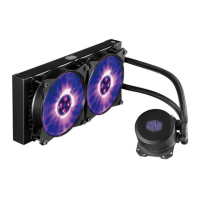
Install fans onto the radiator and then mount the assembly into the PC case.
Apply thermal paste (E) to the CPU surface before mounting the cooler.
Configure mounting brackets (G, J) for specific Intel LGA socket types.
Mount the pump assembly using brackets (C, L) for compatible Intel sockets.
Secure the motherboard using the backplate (B) for Intel LGA sockets.
Use clips (K) to firmly secure the pump assembly to the CPU cooler mount.
Insert standoffs (H) into the motherboard for Intel LGA 2066/2011 sockets.
Attach and secure the pump with clips (K) for LGA 2066/2011 compatibility.
Install appropriate mounting brackets (D, L) for various AMD socket types.
Attach the pump assembly to the motherboard for AMD socket installation.
Connect fans (M, N) and pump (O) to the RGB controller (P).
Connect the RGB controller (P) to the RGB strips (Q) for illumination.
 General
| Pump voltage | 12 V |
|---|---|
| Type | All-in-one liquid cooler |
| Fan diameter | 120 mm |
| Pump connector | 3-pin |
| Fan speed (max) | 2000 RPM |
| Fan speed (min) | 650 RPM |
| Maximum airflow | 66.7 cfm |
| Pump noise level | 15 dB |
| Suitable location | Processor |
| Maximum air pressure | 2.34 mmH2O |
| Fan noise level (max) | 30 dB |
| Fan noise level (min) | 6 dB |
| Supported processor sockets | LGA 1150 (Socket H3), LGA 1151 (Socket H4), LGA 1155 (Socket H2), LGA 1156 (Socket H), LGA 1366 (Socket B), LGA 2011 (Socket R), LGA 2011-v3 (Socket R), LGA 2066, LGA 775 (Socket T), Socket AM2, Socket AM2+, Socket AM3, Socket AM3+, Socket AM4, Socket FM1, Socket FM2, Socket FM2+ |
| Fan's mean time to failure (MTTF) | 160000 h |
| Pump's mean time to failure (MTTF) | 70000 h |
| Pulse-width modulation (PWM) support | Yes |
| Fan connector | 4-pin |
| Product color | Black |
| Number of fans | 2 fan(s) |
| Radiator material | Aluminum |
| Illumination color | Multi |
| Harmonized System (HS) code | 84733080 |
 Weight and Dimensions
| Weight | 1140 g |
|---|---|
| Fan thickness | 25 mm |
| Package depth | 327 mm |
| Package width | 280 mm |
| Package height | 141 mm |
| Package weight | 1820 g |
| Radiator depth | 119.6 mm |
| Radiator width | 277 mm |
| Radiator height | 27 mm |


 To Next Page