3
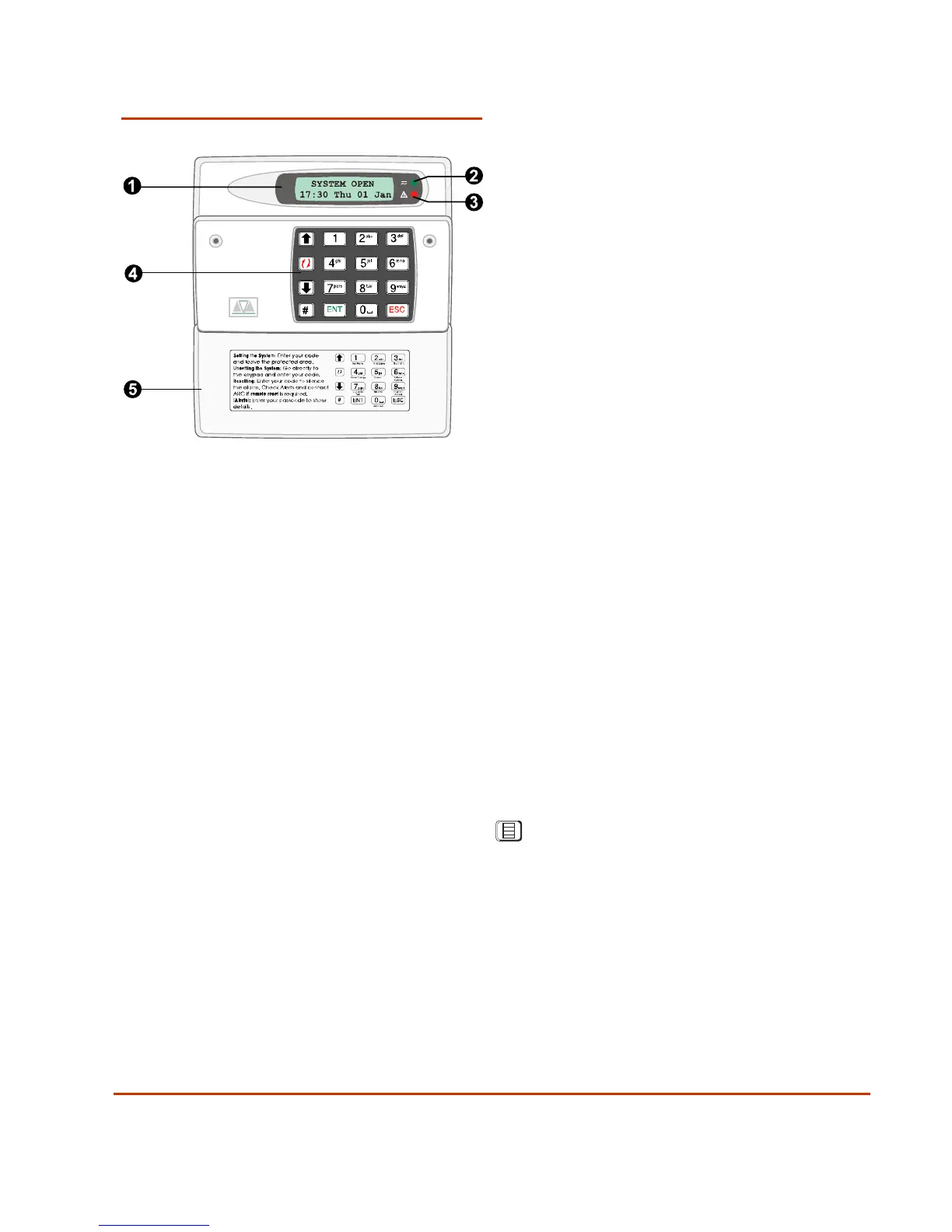
Keypad Features
1. Display: Normally shows the
date, time and a banner message
(chosen by your alarm company
1
).
When you operate the system, the
display shows: text to guide you,
alert messages, and other system
information. The instructions in this
guide often refer to the display.
2. Green power indicator:
Glows steadily when power is
present.
3. Function indicator: By
default, this indicates that there is
more than one alert message to
reset (page 14). The indicator can
be programmed by an engineer
2
to
show other conditions.
4. Keys:
0 to 9
Key in user codes or
choose wards to set
| ¬
Scroll to the next/previous
option.
[
Accept options shown
on the display.
r
Change the setting of the
displayed option.
]
Exit the displayed
option without
setting/unsetting the
system.
Menu (operates only after
entering user code). See
the Manager's Manual.
5. Flap A protective flap. Close
to protect the keys
when not in use.
1
Engineer option 75
2
Engineer option 34; by changing keypad output to follow an event other than "Pending"



 To Next Page