xvii
166240001
DUMP CYCLE
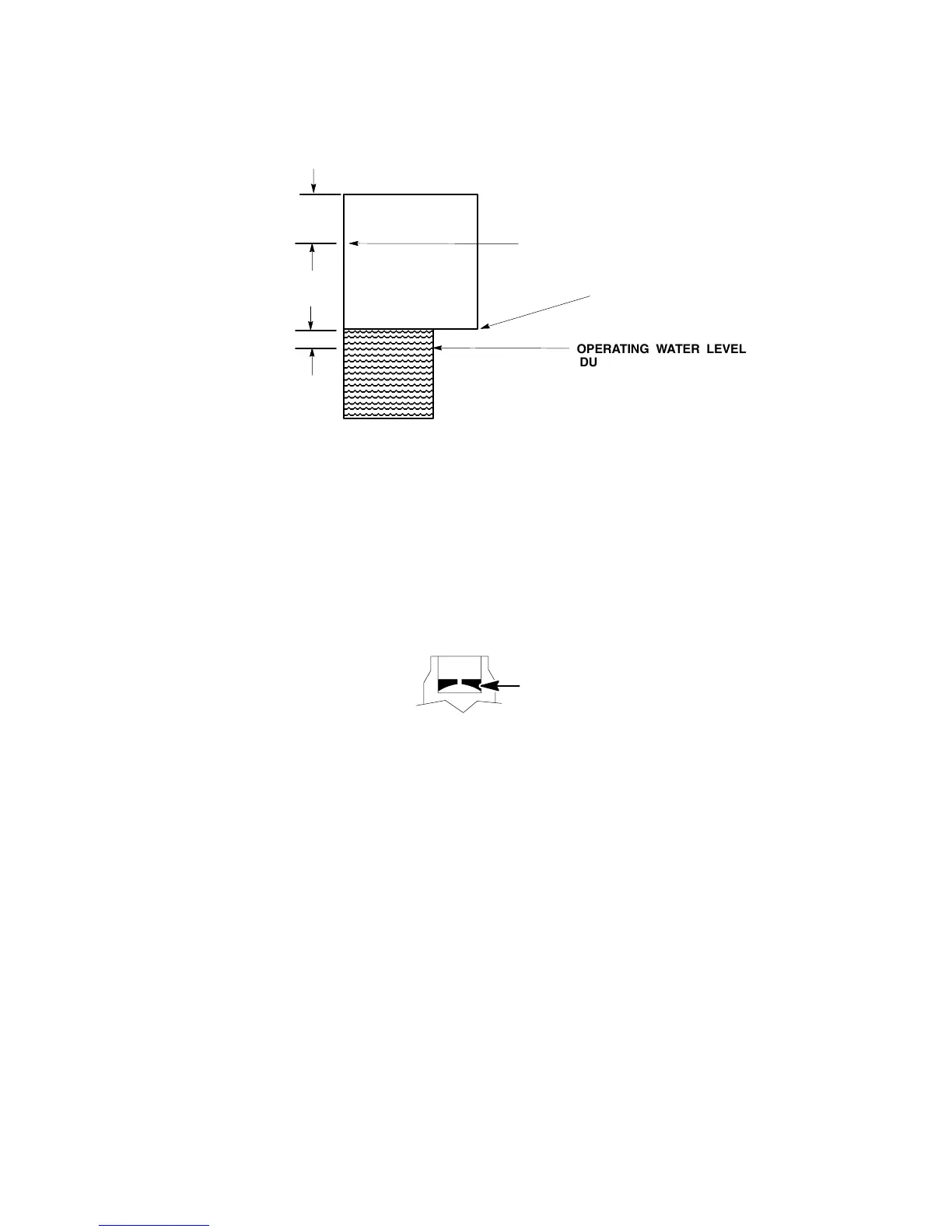
Water Pan Level Settings
WATER PAN
RIGHT SIDE VIEW
ÎÎÎÎÎ
ÎÎÎÎÎ
ÎÎÎÎÎ
ÎÎÎÎÎ
ÎÎÎÎÎ
OPERATING WATER LEVEL
DUAL EVAPORATOR UNITS
3/8I
OPERATING WATER LEVEL 2448
FOUR EVAPORATOR UNIT
OPERATING WATER LEVEL
SINGLE EVAPORATOR UNITS
1-3/4I
1. With the proper water level in the water pan, start the water pump to circulate the water. Check that the
float will return water level to original setting and stop inlet water.
2. There is a flow washer in the inlet side of the float assembly that will control inlet water pressure from
20/120 PSI (3.4/8.16 Bars). This will prevent float flutter. In low water pressure conditions, 20 PSI (1.37
Bars) or less, the flow washer may have to be removed from the float assembly for proper volume.
FLOW CONTROL WASHER FLAT SIDE UP
3. Push the manual dump switch – allow dump action to drain the water pan. When you release the momen-
tary switch, the pump will stop and the float will return the water level back to its original setting and shut off
the water supply.
4. You have the option of selecting dump cycle intervals of:
S every cycle; (Standard setting from factory)
S every 3rd cycle;
S every 7th cycle.



 To Next Page