USER
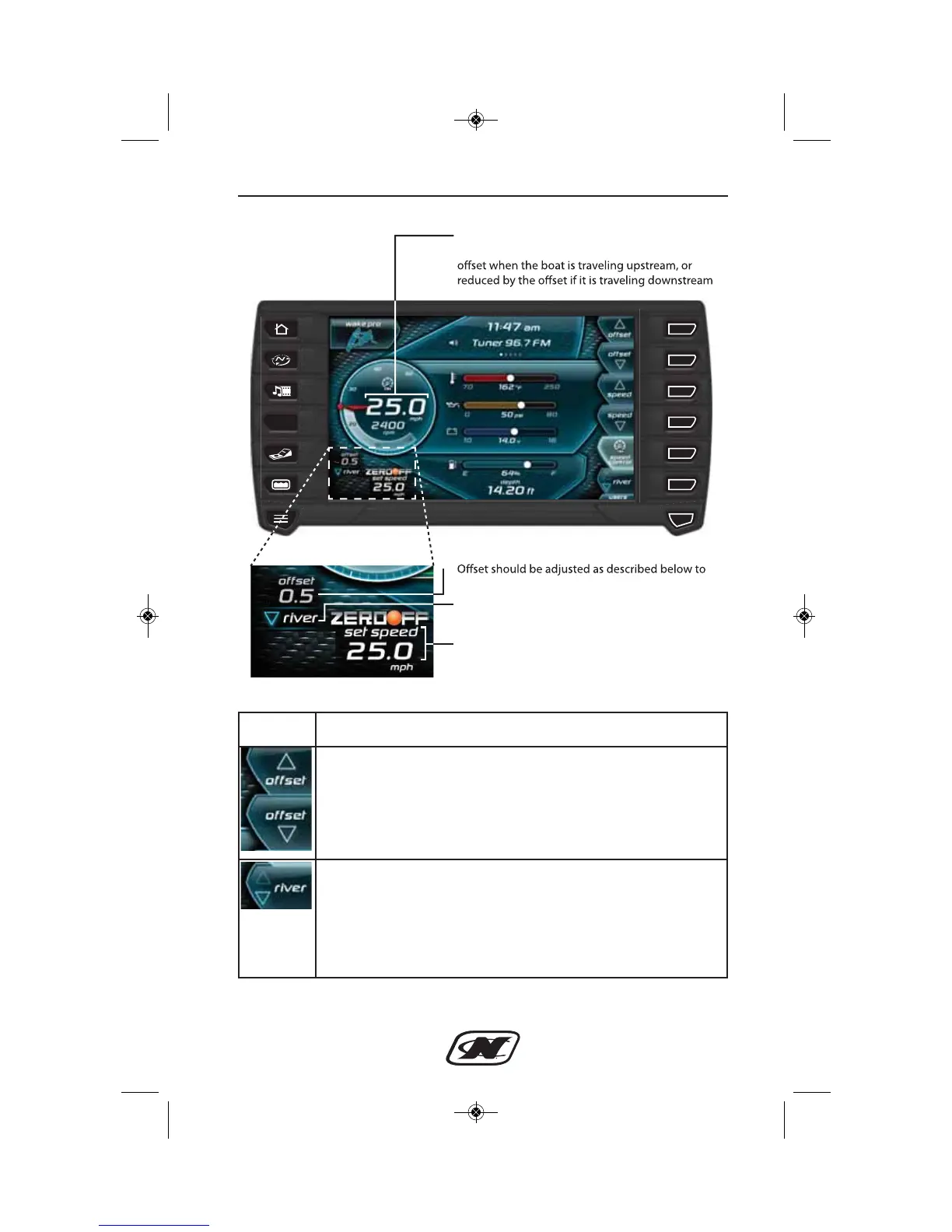
LINC Home Screen with River Mode on
equal the estimated current speed
This is the speed-over-water and equals the GPS
speed (or speed-over-ground) increased by the
River Upstream/Downstream indicator
(Depicted as downstream in the illustration)
Set speed equals the desired “water speed” and is
adjusted using speed up or down soft keys
Soft Key Description
OFFSET UP and OFFSET DOWN – adjust the off set up
or down to equal the estimated current speed.
UP – increases the off set.
DOWN – decreases the o ffset.
RIVER MODE UPSTREAM/DOWNSTREAM – should
be pressed when driver is changing directions from upstream
to downstream or vice versa. If the boat is moving upriver,
this function adds the o ffset to the GPS speed (or speed-over-
ground) to display the estimated speed-over-water, or
subtracts it, if the boat is moving downriver.
V-Drive Sec 3_2015.qxp_Naut Air Sec 4.qxd 6/27/14 1:53 PM Page 3-58








 To Next Page