7. YHC Configuration YHC 700
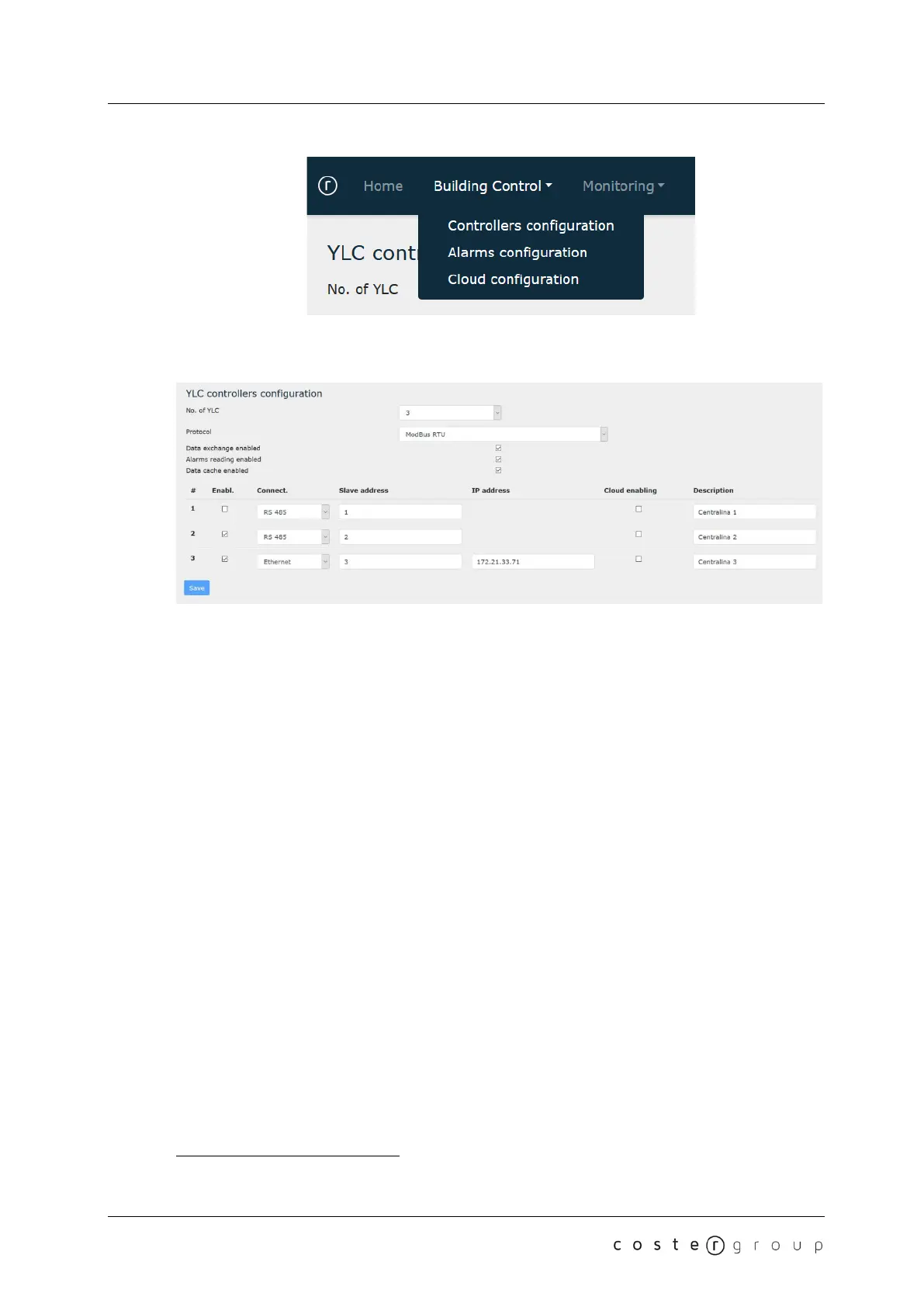
7.2.1.1 YLC configuration
You can use this page to specify:
● How many controllers are connected to YHC700 (up to 20). Default: 0
● The communication protocol used for data exchange with these controllers. Default:
ModBus/RTU
● If the YHC function of data exchange between controllers is enabled or not. Default:
Disabled
● If alarm reading is enabled or not. Default: Disabled
● Whether the YLC data caching is enabled or not. Default: Disabled
● For each controller, you can specify:
○ Whether it is enabled or not (this can be useful in the support phase, to
isolate any source of errors)
○ The connection mode (RS485 bus or Ethernet
5
). Default: RS 485
○ The Modbus address (Default: 1)
○ The IP address, if any (if the specified connection mode is Ethernet).
o Whether the instantaneous data logger cloud sending is enabled on that
controller. Default: No
○ A short description (used in the diagnostic web pages)
NOTE: Modbus address and communication protocol must be the same as those set on YLC;
The selected communication protocol must necessarily be used also for ClimaOffice
connections (YHC does not perform protocol conversions)
5
Used to support the existing installations where YLC is connected to STE000.
20


 To Next Page