YHC 700 7. YHC Configuration
devices data to the supervisor or the MDM 232 modem. In the first case, for each monitoring
device category, you can specify
• If the data must me sent to the cloud or not. Default: Disabled.
• What kind of cloud service the data must be sent to and its URL address. So far, only
CkimatelCloud is admitted.
• The key used by this service to identify the section of the message sent that refers to
that specified installation
• The transmission interval (Default: Disabled)
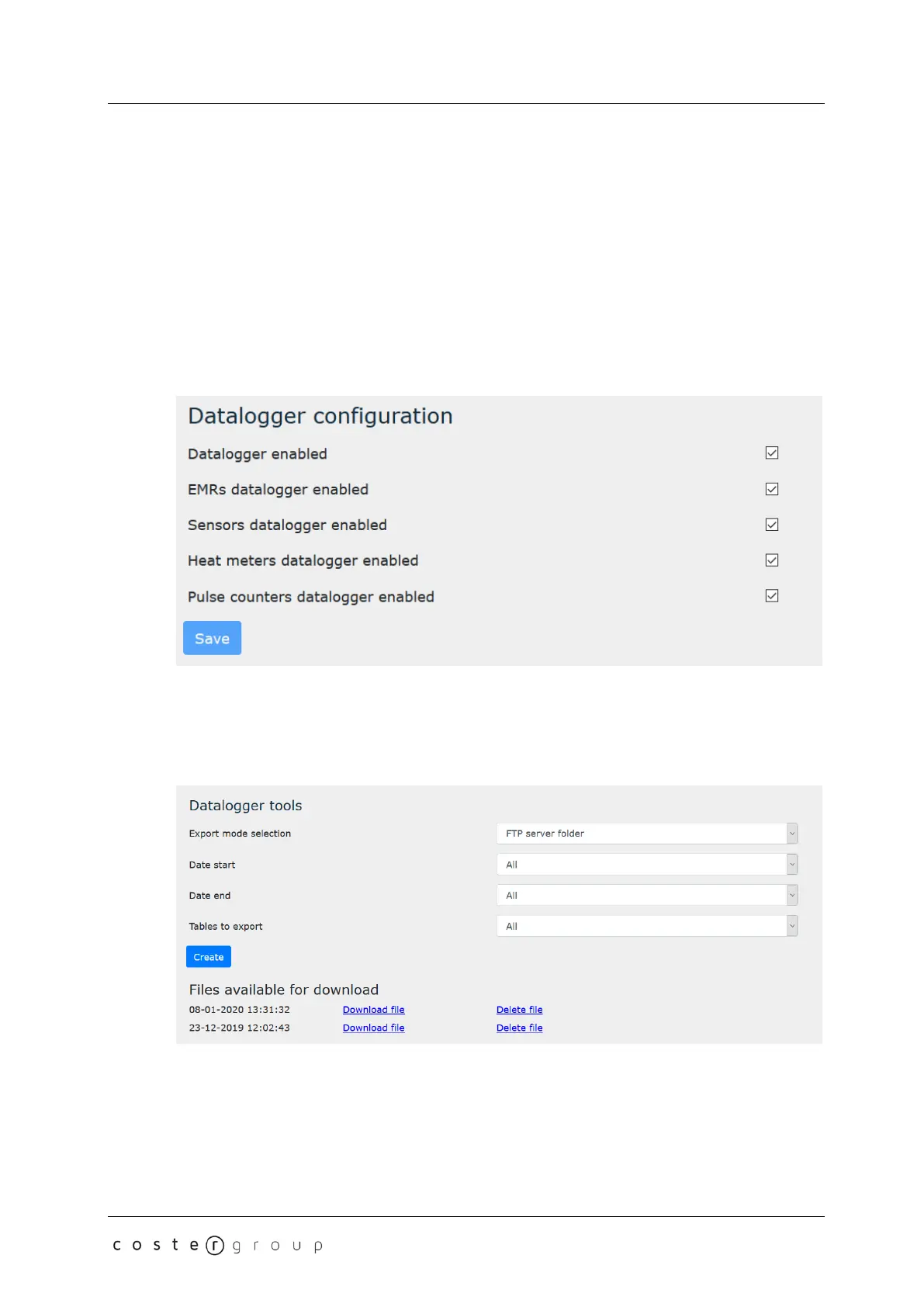
7.2.2.4 Datalogger configuration
In this page, for each monitoring device type, you can select wether to log its data or not.
Default: disabled.
7.2.2.5 Datalogger data export
In this page you can:
• Specify how to export the monitoring datalogger (USB pen or FTP server on YHC):
Default: FTP Server
• The timeframe (starting and ending time) of data you are interested in. Default: All
• The types of monitoring devices whose data you want to export. Default: All
and create the .zip file containing the requested date.
25


 To Next Page