11
11
Checking the System after Installation
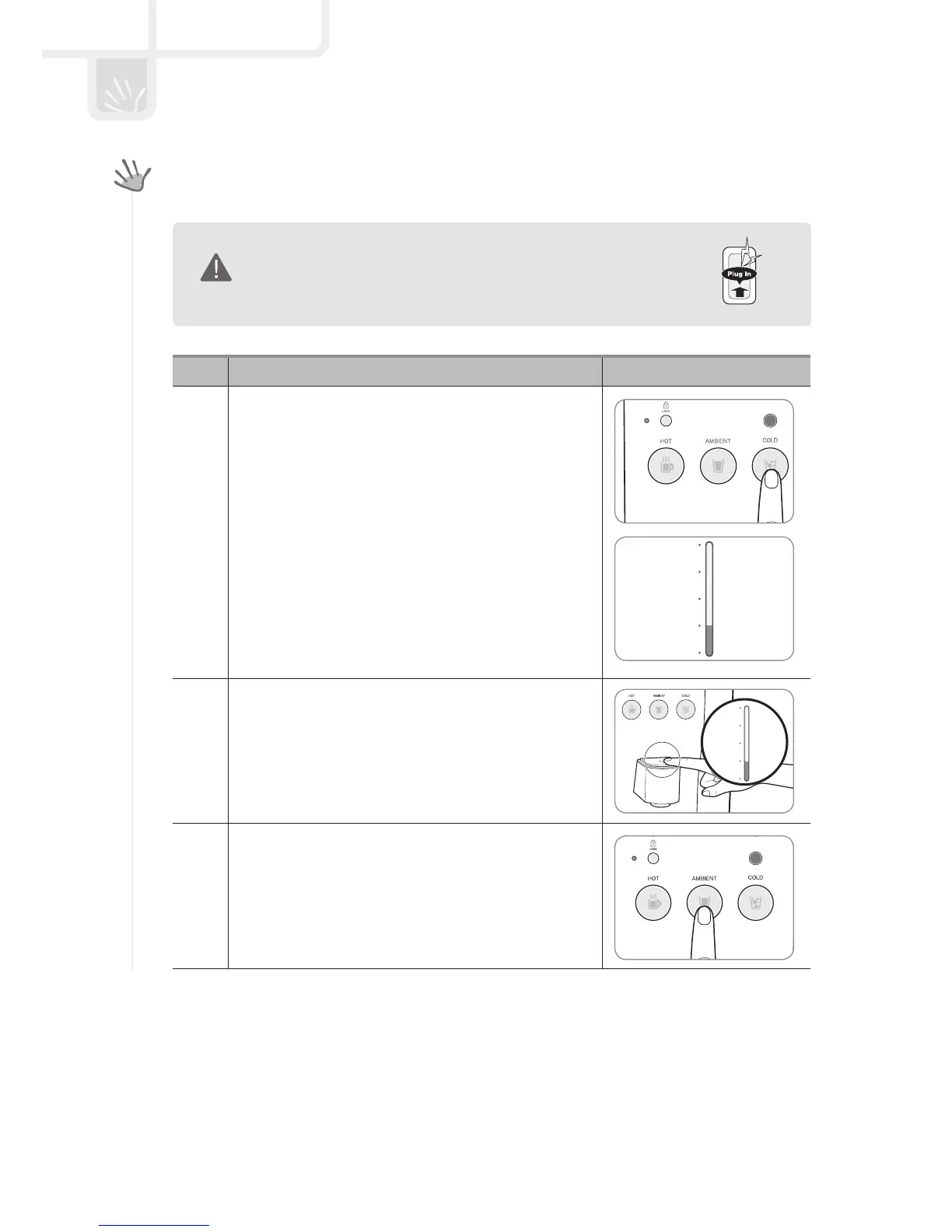
Connect it to voltage rating that matches it on the rating plate.
- Then, open the feed valve to supply water to the filtration system.
WARNING
No. Explanation Reference picture
1
Select the cold button to drink cold water.
- To drink cold water, the cold water function must be operat-
ing. Press the cold button for three seconds, and the cold
water mode lamp comes on; you can then use cold water.
If you don’t need the cold water, press the cold button
again for three seconds, and the lamp goes out, exiting
cold water mode.
2
To drink cold water, press the cold button after the cold
water lamp comes on.
- To drink cold water, select the cold button and touch
the extraction part, and you can extract a cupful of water.
If you touch the extraction part again during extraction,
water stops flowing.
3
To drink ambient water, select the ambient button.
- Select the ambient water button and touch the extraction
part, and you can extract a cupful of water. If you touch the
extraction part again during extraction, water stops flowing.
PRODUCT INSTALLATION


 To Next Page
 Loading...