EasyManua.ls Logo

Cowfish Technologies VanConnect - User Manual

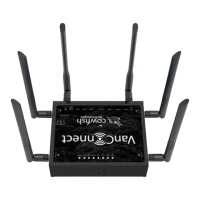
Cowfish Technologies VanConnect
38 pages
Print Icon
To Next Page IconTo Next Page
Loading...
Question and Answer IconNeed help?

Do you have a question about the Cowfish Technologies VanConnect and is the answer not in the manual?

Summary

Preface and Copyright

Package Contents

Introduction

Installation

Connecting to the Wireless Network

Router Configuration

Set the Wireless Password

Configure WiFi Network Settings

Steps to set the wireless network name (SSID/ESSID), encryption method, and password for the WiFi network.

Change Administrator Password

Factory Reset

Using VanConnect Media Storage

Setting Up Network Shares

Mapping Network Drives in Windows

Accessing Media with VanPlayer

Accessing Media with Mobile Devices

Frequently Asked Questions

Troubleshooting

WiFi Connection Problems

Resolving issues with connecting to the WiFi network, including password and security settings.

Internet Access Problems

Troubleshooting steps for when the VanConnect is connected to WiFi but cannot access the internet.

WiFi Password and Network Issues

Addressing problems with WiFi password acceptance, slow speeds, forgotten admin passwords, and missing network names.

Cellular Network Connectivity Issues

Troubleshooting tips for when the router does not connect to the cellular network.

Technical Specifications

Product Warranty

Warranty Conditions

Details of the warranty, including benefits, exclusions, and limitations imposed by Australian State and Federal legislation.

Damaged Goods and Returns Process

Procedures for handling damaged goods, obtaining return authority, and the returns/repairs process under warranty.

Summary

Preface and Copyright

Package Contents

Introduction

Installation

Connecting to the Wireless Network

Router Configuration

Set the Wireless Password

Configure WiFi Network Settings

Steps to set the wireless network name (SSID/ESSID), encryption method, and password for the WiFi network.

Change Administrator Password

Factory Reset

Using VanConnect Media Storage

Setting Up Network Shares

Mapping Network Drives in Windows

Accessing Media with VanPlayer

Accessing Media with Mobile Devices

Frequently Asked Questions

Troubleshooting

WiFi Connection Problems

Resolving issues with connecting to the WiFi network, including password and security settings.

Internet Access Problems

Troubleshooting steps for when the VanConnect is connected to WiFi but cannot access the internet.

WiFi Password and Network Issues

Addressing problems with WiFi password acceptance, slow speeds, forgotten admin passwords, and missing network names.

Cellular Network Connectivity Issues

Troubleshooting tips for when the router does not connect to the cellular network.

Technical Specifications

Product Warranty

Warranty Conditions

Details of the warranty, including benefits, exclusions, and limitations imposed by Australian State and Federal legislation.

Damaged Goods and Returns Process

Procedures for handling damaged goods, obtaining return authority, and the returns/repairs process under warranty.

Cowfish Technologies VanConnect Specifications

General IconGeneral
BrandCowfish Technologies
ModelVanConnect
CategoryNetwork Router
LanguageEnglish