ENGLISH 10
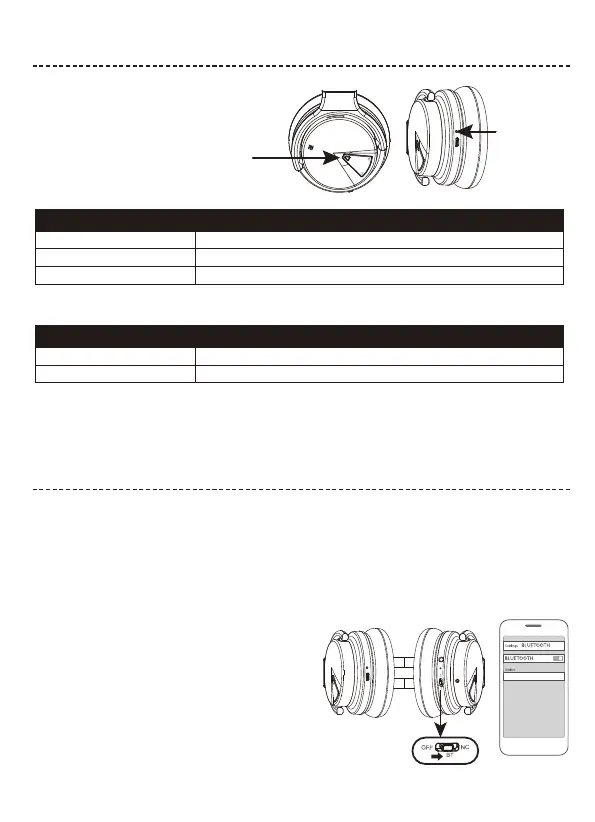
STATUS INDICATORS
BLUETOOTH CONNECTIONS
Bluetooth indicator
Bluetooth indicator
Connection method
Connect using the Bluetooth menu on your mobile device
Battery indicator
You can connect your mobile device with your headphones using Bluetooth wireless technology or Near Field Communication (NFC).
1. Slide the button OFF to the right BT.
You hear “dududu” and the Bluetooth indicator blinks blue.
2. On your device, enable the Bluetooth feature.
Tip: The Bluetooth feature is usually found in the Settings menu.
3. Select your headphones from the device list.
Indicator activity System state
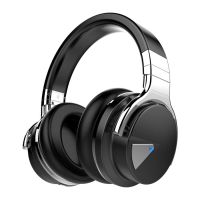
The Bluetooth indicators is located on the right earcup.
The battery indicators is located on the left earcup.
Note: If connected to an Apple device, the device displays the headphone battery level near the upper right corner
of the screen.
Power ON
Paired
Active noise cancelling ON
Light Blue and Flash
Light Blue and Stay Solid
Light White
Indicator activity System state
Charging in process
Fully charged
Light Red
Light OFF
Once connected, you hear “Di” and the Bluetooth indicator
glows solid blue.
Battery indicator
E7


 To Next Page