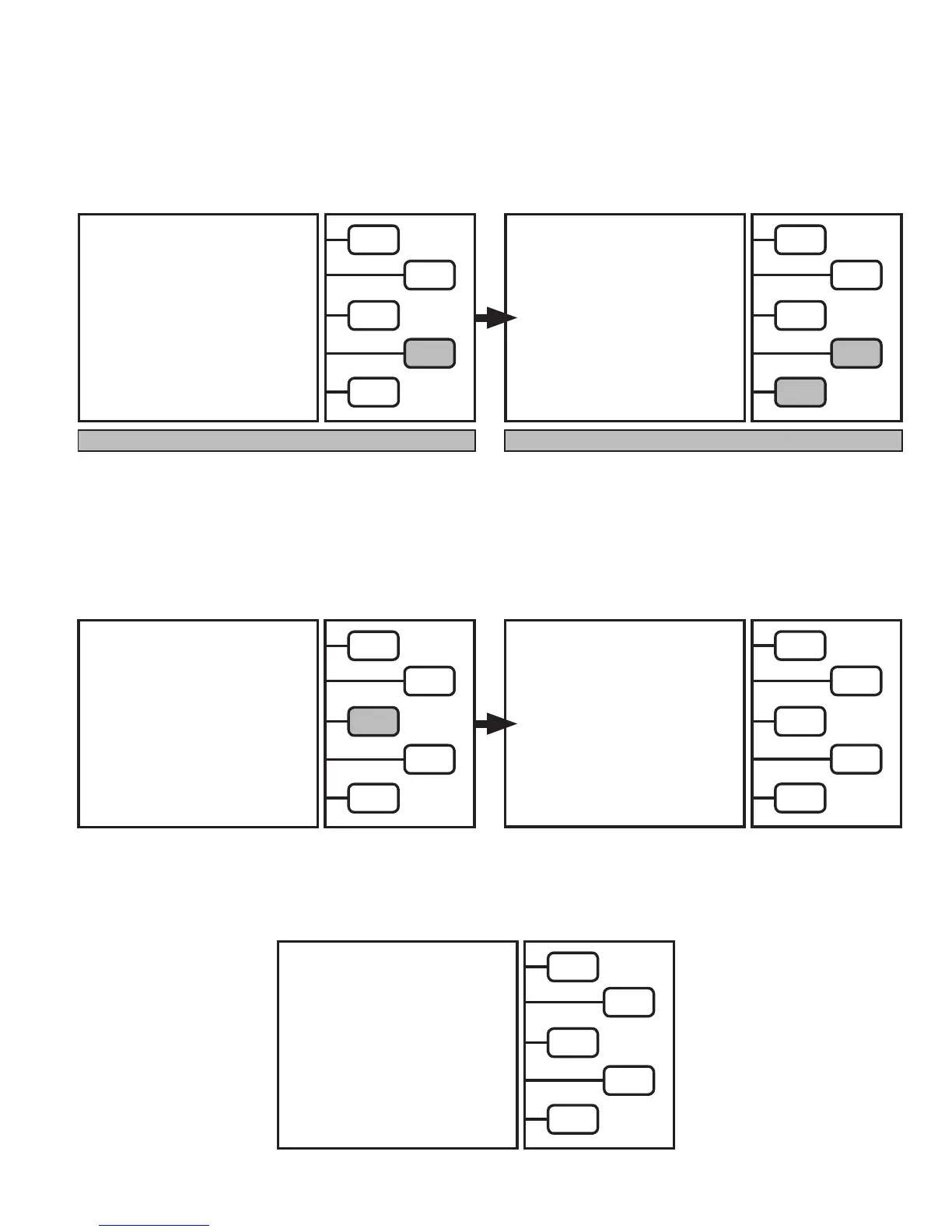
The Pressure Transducer (PT) calibration will automatically complete the procedure.
Once done, the LCD will return to the
MAIN MENU:
SELECT MODE
RECOVER >
EVACUATE >
CHARGE >
FULL CYCLE >
TANK REFILL >
The LCD will now read:
Wait for Re-zeroing procedure to complete.
PT SENSOR/GAUGES:
Push the
PT SENSOR
key.
The FA1000 will begin a automatic routine
to recalibrate the Pressure Transducer (PT).
RE-ZEROING
P. TRANSDUCER
PLEASE WAIT
0.1 PSI
MAINTENANCE
SELECT MODE
CHANGE FILTER >
SCALE >
PT ZERO >
QUIT >
The LCD will now read:
Wait until the LCD screen changes.
TARE OPERATION
COMPLETE
WEIGHT - 0 ?
CURRENT SCALE
WEIGHT
g
YES >
NO >
The LCD will now read:
Push the
YES
key if
CURRENT SCALE WEIGHT
is zero.
The unit will re-boot and go to the
MAIN MENU.
Pushing the
NO
key will repeat Re-Zeroing process.
NOTE: Keep tank off scale platform NOTE: Once complete place tank back on scale platform
RE-ZEROING
SCALE
PLEASE WAIT
20
MAINTENANCE


 To Next Page