OR
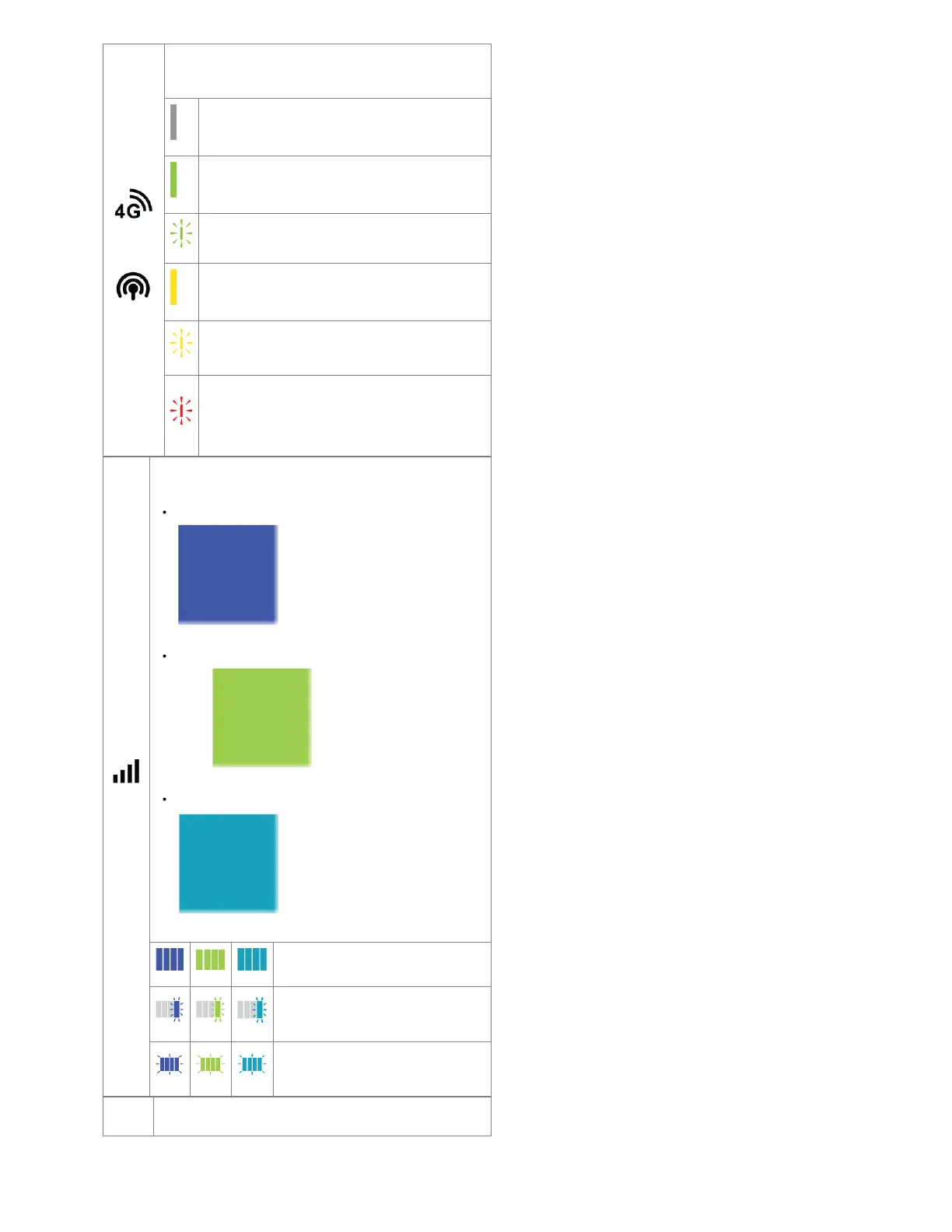
EMBEDDED MODEM STATE: Indicates information about the
integrated modem
No Light - Modem not connected.
Solid Green - Modem has established an active WAN
connection.
Blinking Green - Modem is connecting.
Solid Yellow - Modem is not active.
Blinking Yellow - Data connection error. No modem
connection possible.
Blinking Red - Modem is in the process of resetting.
Blinking Red with Signal Strength LEDs - SIM door is
not installed, modem is off.
CELLULAR HEALTH: Indicates the health of the primary cellular
modem's signal
When the embedded modem is active, the bars are blue (
).
When the removable (MC400) modem is active, the bars are
green ( ).
When a remote (captive) modem is active, the bars will be cyan (
blue-green color).
Four Solid Bars - Strongest signal.
One Blinking Bar - Weakest signal (a
blinking bar indicates half of a bar).
Four Blinking Bars - SIM door is not
installed, modem is off.
OTHER ADDITIONAL LED INDICATORS










 To Next Page