22
REPLACING THE BELTS
Make sure the switch is in the “OFF”
position and remove the cord from the
power source.
Lower and tilt the blade to the maximum
and open the motor cover.
To remove the main belt, you will have to
remove the smaller belt rotating the scoring
saw, first.
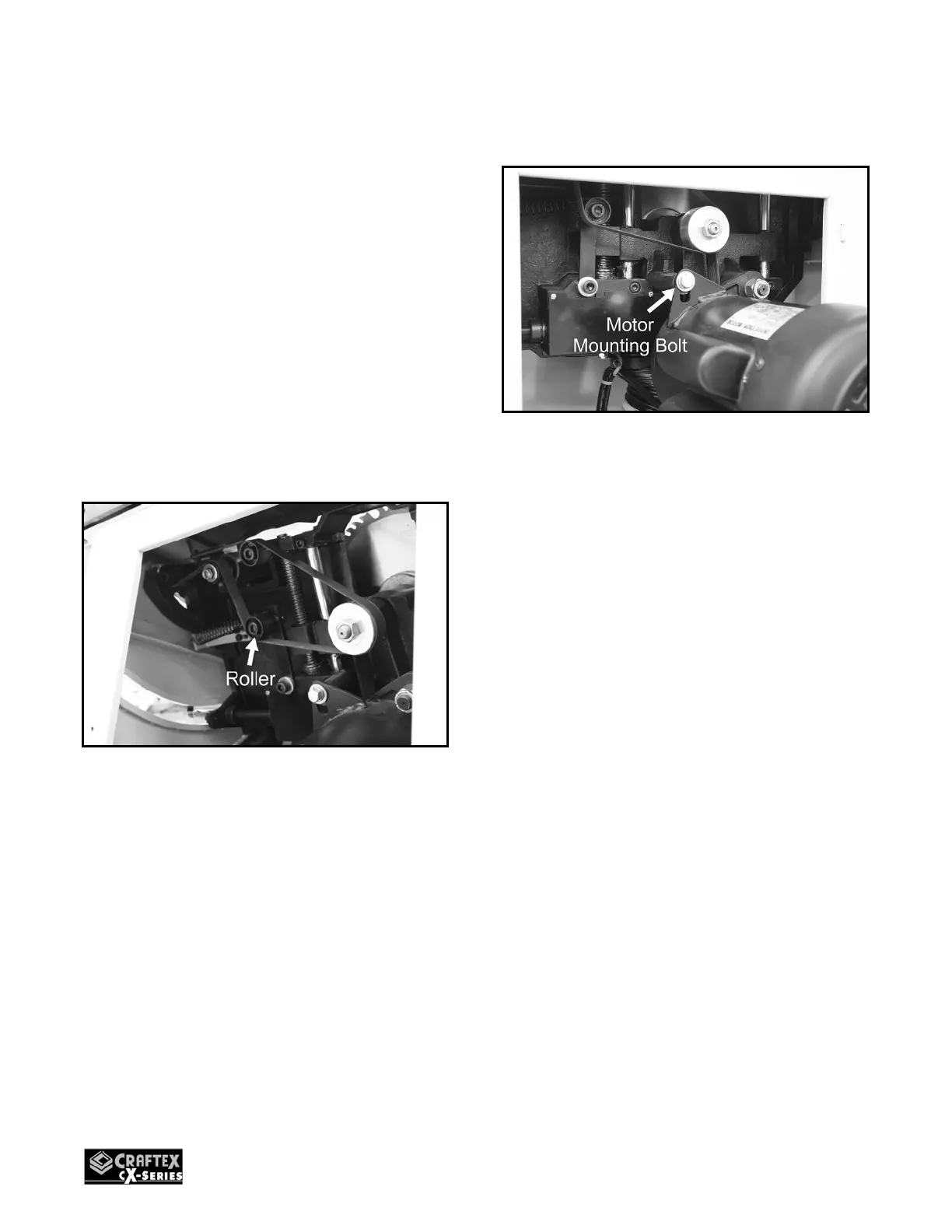
Push the roller equipped with spring
towards the motor pulley to loosen tension
on the smaller belt and remove the smaller
belt.
Figure-35 Removing the small belt
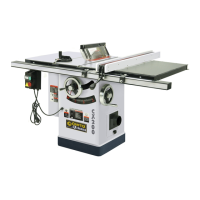
Now, loosen the motor mounting bolt as
shown in figure-36 and push the motor up
to loosen the tension on the main belt.
Figure-36 Loosening the motor mounting
bolt
Remove the main belt from the pulleys and
install the new one.
Move the motor down to tension the main
belt and retighten the bolt.
Replace the small belt with a new one and
install it onto the rollers and pulleys and
close the motor cover.
MITER GAUGE
ADJUSTMENT
The miter gauge provided with CX204 can
be set at 0° and plus or minus 45° with the
gauge stop pin and adjustable stop screws.
To adjust the miter gauge:
Loosen the knob and pull out the stop pin.
Loosen the lock nut of the 0° stop screw at
the stop pin with an 8mm wrench.



 To Next Page