_I_ WARNING: When servicing, use on3yidentical
Craftsman replar.smentparts.Use of any other paTt
may create a hazard or cause product damage.
_k WARN|NG: Alwayswear safety goggles or safety
gta.sesswith side shieldswhen usingcompressed air
to clean tools. ITthe operationis dusty,siso wear a
dust mask.
_lk WARNING: To avoid seriouspersonalinjury,always
remove the battery pack from the tool when cleaning
or performingany maintenance.
G ENERAL MAINTENANCE
Avoid usingsolventswhen cleaning plasticparts. Most
plasticsare susceptible to damage fromvarioustypes st
commemia] solventsand may be damaged by theiruse.
Use clean clothsto remove dirt, dust, sit, grease, eta.
_1_ WARNING: Do not at any time let brake fluids,
gasoline,petroleum-based products, penetrating
oils,etc. come ]ncon'_ct with plastic parts.Chsmi-
Palscan damage, weaken or destroy plasticwhich
may resultin serious personalinjury.
Only the parts shown on the parts [(stare intendedto be
repairedor rep(aced by the customer.All otherparts
should be replaced at a Sears ServiceCenter.
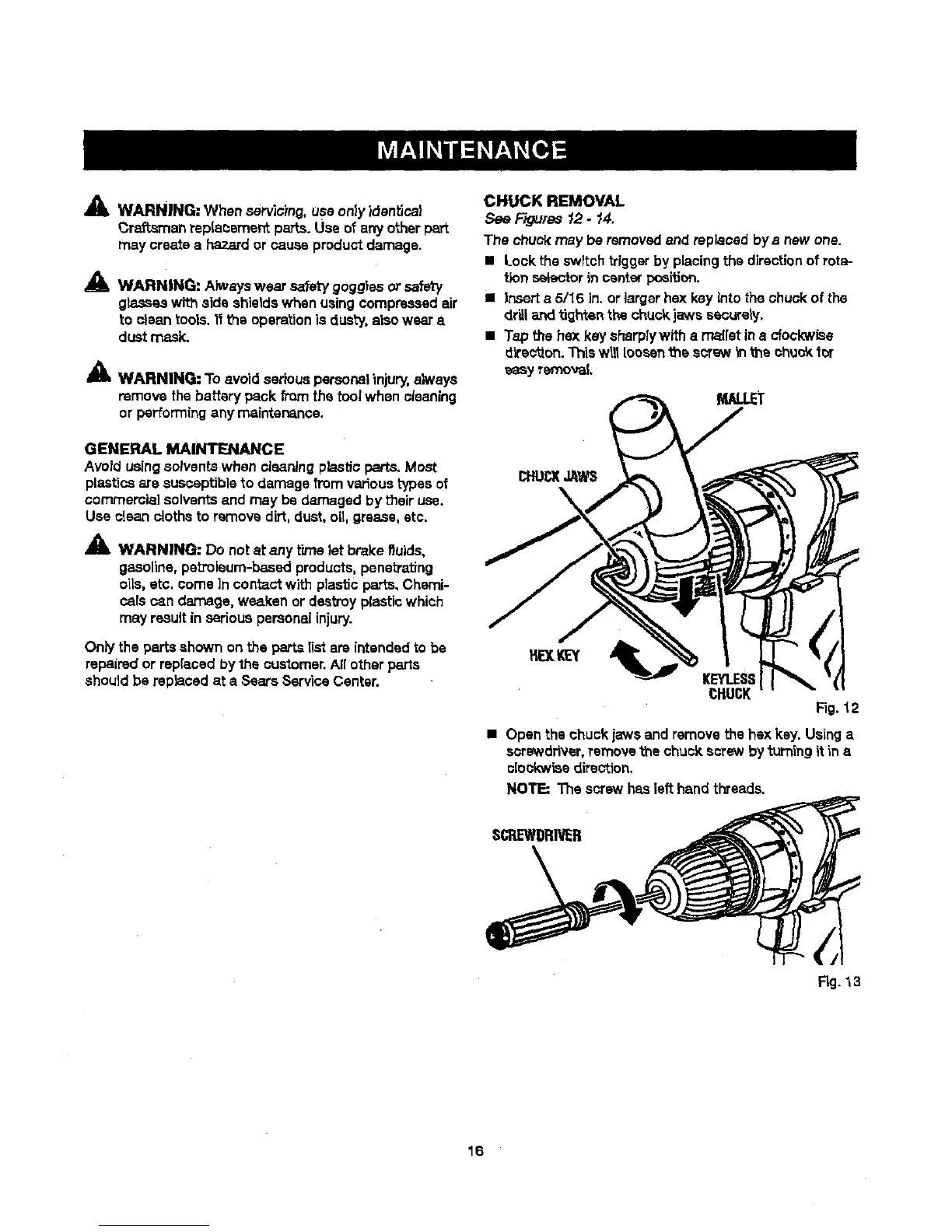
CHUCK REMOVAL
See F-_ums 12- 14.
The chuci( may be removedand replaced bye newone.
• Lock the switch triggerby placing the directionof rota-
tion selectorincenter position.
• |nsert a 5116 in. orlarger hex key intothe chuck of the
driUarid tighten the chuck jaws securely.
• Tap the boxkey sharplywith a ma[(etina clockwise
direc_on. Thisw|_ loosenthe scrs_, _nthe ohucY,tot
easy removal
KEYt,.ESS
CHUCK
Fig. "t2
• Open the chuck jaws and remove the hsx key. Usinga
scrawdriver,remove the chuck screw by b._'ningit in a
clockwisedirection.
NOTE: The screw hasleft hand threads.
SCREWDRIVER
Fig.13
16




 To Next Page