Can, Cold Food, and Frozen Food Module Setup and Operator’s Guide
February, 2000 Page 8 4840053
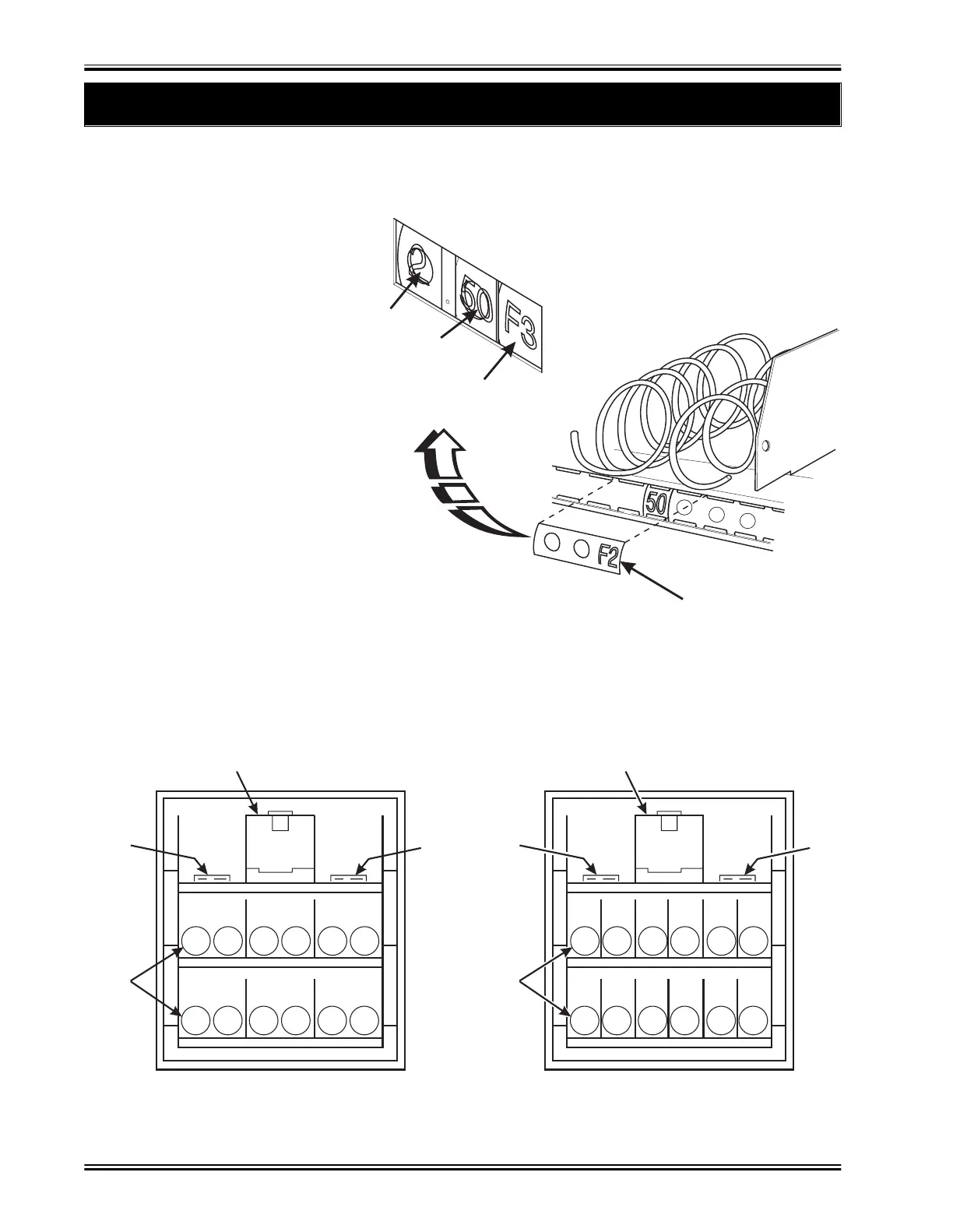
Which Label Goes With Which Selection?
STANDARD FOOD MODULE
2. Install Selection ID Labels for Food Module Items
SELECTION
IDENTIFICATION LABEL
CENTS
PRICE ROLL
DOLLAR
PRICE ROLL
SELECTION
IDENTIFICATION
157P0059
e
ect
on ID num
ers are pr
nte
on c
ear p
ast
c
a
e
s. You w
find these in the plastic bag that contained this manual. Use the
"D", "E", and "F" selection labels for
the food module.
1. Make sure the price rolls are
installed.
2. Press the two long
edges of the selec-
tion ID label together.
3. Snap the label into position on
the front of the tray as shown. The
selection positions are shown in the
figure below.
D0
D2 D4
E4E2
E0
F4F2
F0
PUSHER
BELT
SPIRAL
BELT
157P0058
D0
D2 D4
E4
F4
E2
F2
E0
F0
E1
F1
E3
F3
E5
F5
PUSHER
BELT
SPIRAL
BELT
157P0177


 To Next Page