Can, Cold Food, and Frozen Food Module Setup and Operator’s Guide
4840053 Page 5 February, 2000
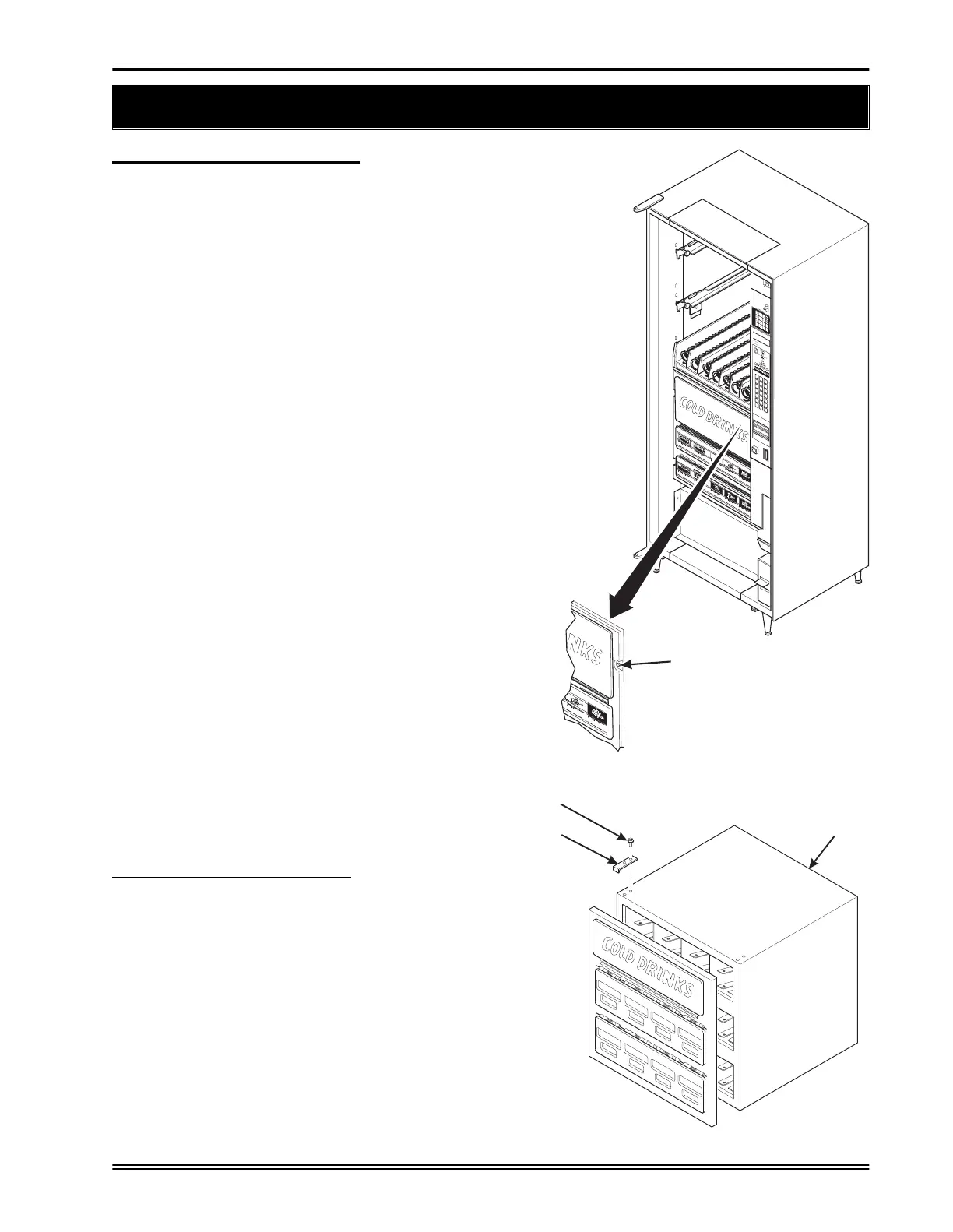
6. Removing the Can Compartment Door Assembly
HEX HEAD SCREW
ABC
DEF
GHJ
123
456
789
Q
0#
CRANE
NATIONALVENDORS
497P0007
CAN MODUL
CAN MODULE
HEX HEAD SCREW
DOOR RETAINER
157P0254
-
:
1. Remove four hex head screws holding the can compartment
door assembly to the can compartment.
2. Remove the can compartment door assembly.
3. Replace the door in the opposite order of removal.
8 - SELECT CAN MODULE:
1. Sufficiently loosen the two hex head screws holding
each door retainer to allow them to lift up clear of the
door assembly front.
2. While lifting up on the front of both door retainers with
your thumbs, pull the door assembly toward you.
3. Lift the door assembly up from the can module.
4. Replace the door in the opposite order of removal.


 To Next Page