Printer Operation
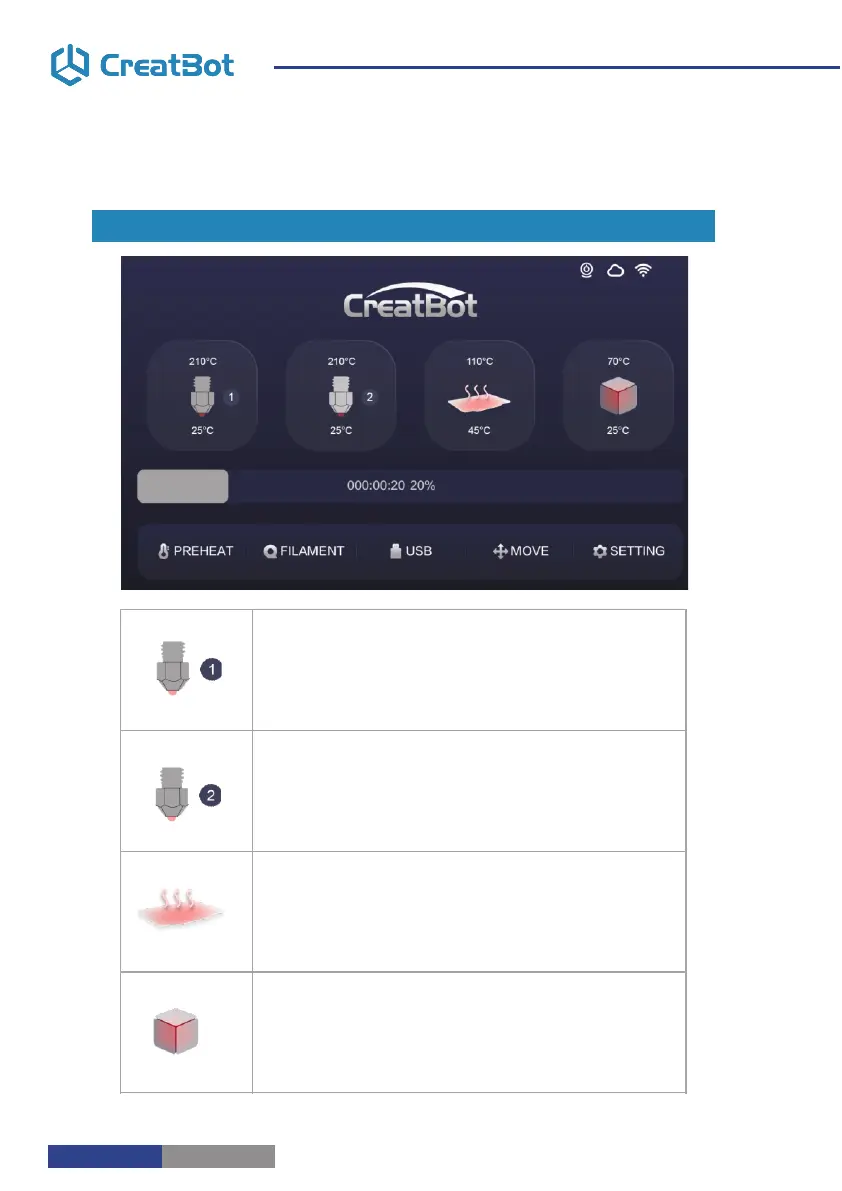
Touchscreen
Main Menu
Cool down
Filament menu
preheat
resume
Setting
Move axis
USB unavailable
bed up
Open U-disk
stop
pause
bed down
210 ° C
25 ° C
210 ° C
25 ° C
110 ° C
45 ° C
Current Chamber temperature
Preset Chamber temperature
Touch and set up the temp of the Chamber.
70 ° C
25 ° C
210 ° C
25 ° C
210 ° C
25 ° C
110 ° C
45 ° C
70 ° C
25 ° C
Touch and set up the temp of the nozzle.
Preset nozzle temperature
Current nozzle temperature
Preset nozzle temperature
Touch and set up the temp of the nozzle.
Touch and set up the temp of the hotbed.
Current platform temperature
Preset platform temperature
Current nozzle temperature
Main Menu
Printer Operation
- 10 -
- 11 -
Touchscreen



 To Next Page