1-2 Knowing and Installing Your Card
Your Audio Card
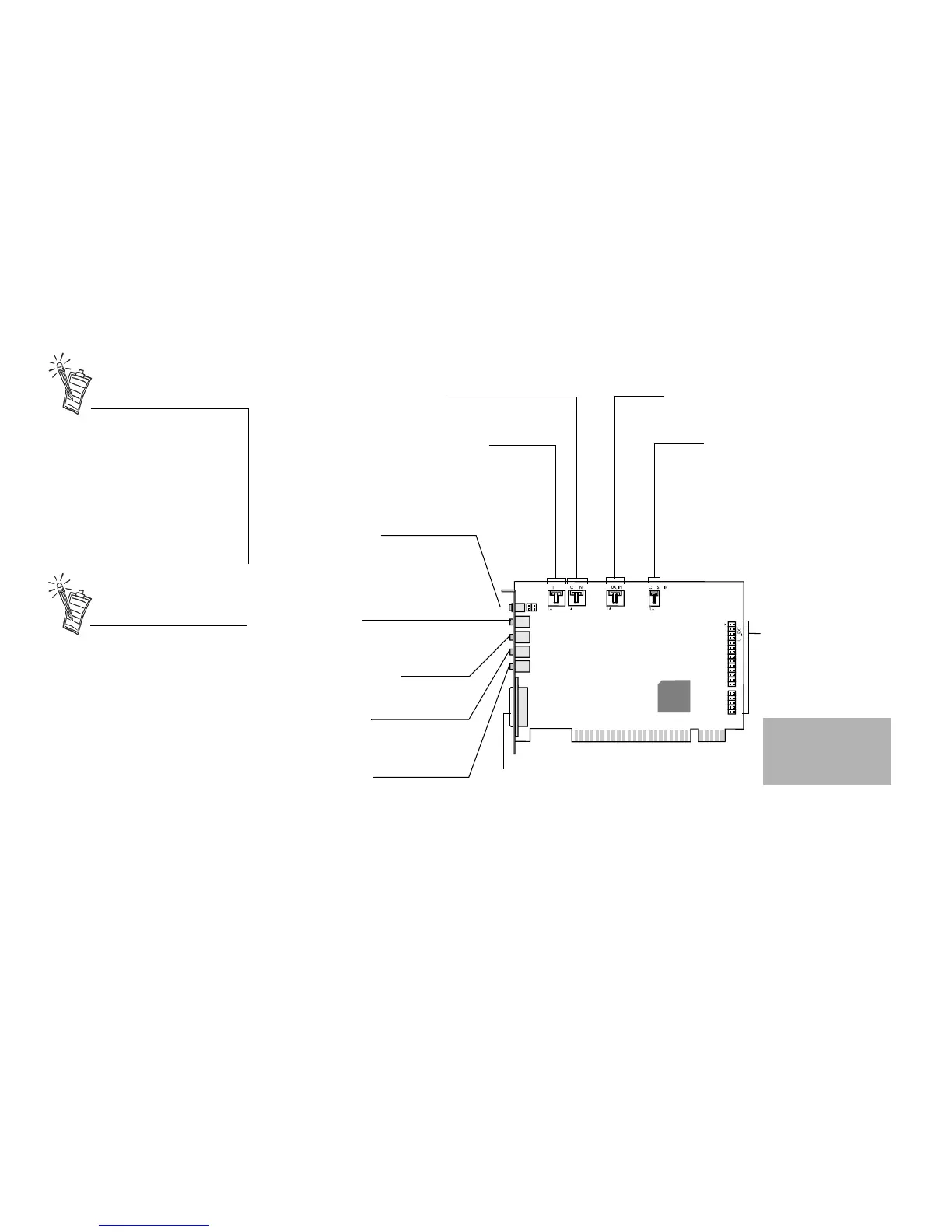
Your audio card has these jacks and connectors which allow you to attach other devices:
A jack is a one-hole connecting
interface whereas a connector
consists of many pins. Some
connectors here may not be
available on your card. Refer to
the online User’s Guide,
“Hardware Information”, for
details on connector pin
assignments.
Line Out and Rear Out jacks can
be used simultaneously to power
4.1 channel speaker systems,
for example,
FourPointSurround
™
speaker
systems from Cambridge
SoundWorks.
CD Audio connector
Connects to the Analog Audio output on a CD-ROM
or DVD-ROM drive using a CD audio cable.
Joystick/MIDI connector
Connects to a joystick or a MIDI device. You can
buy an optional MIDI kit that allows you to plug in
the joystick and MIDI device simultaneously.
Line In jack
Connects to an external device
(such as a cassette, DAT, or MiniD
isc
player
).
Microphone In jack
Connects to an external microphone
for voice input.
Figure 1-1: Jacks and connectors on the Sound Blaster Live! card.
Rear Out jack
Connects to powered speakers or an
external amplifier for audio output.
Line Out jack
Connects to powered speakers or an
external amplifier for audio output.
Also supports headphones.
Telephone Answering Device
connector
Provides a mono connection from a
standard voice modem, and transmits
microphone signals to the modem.
AUX connector
Connects to internal audio sources such as
TV Tuner, MPEG, or other similar cards
.
Audio Extension
(Digital I/O) connector
Connects to the Digital I/O
card or Drive Bay (available
separately).
Warning:.This is not
an IDE interface. Do
not connect to your
IDE devices.
CD SPDIF connector
Connects to the SPDIF (Digital
Audio) output (where available) on
a CD-ROM or DVD-ROM drive
.
Digital Out jack
Front and Rear SPDIF output channels
for connection to external digital
devices, such as a Digital Audio Tape
(DAT) or MiniDisc recorder via a Digital
Output Module (available separately).


 To Next Page