4-10 Using Sound Blaster Live!
Tips
❑ To select multiple notes to play simultaneously, use your right mouse button to click the keys,
which will be marked by black dots.
❑ To release the keys, right-click them one by one,
or
click the All Notes Off button for
simultaneous release.
❑ To slide across the keyboard, drag the mouse.
❑ If the playback’s sustain is too long, click the All Notes Off button.
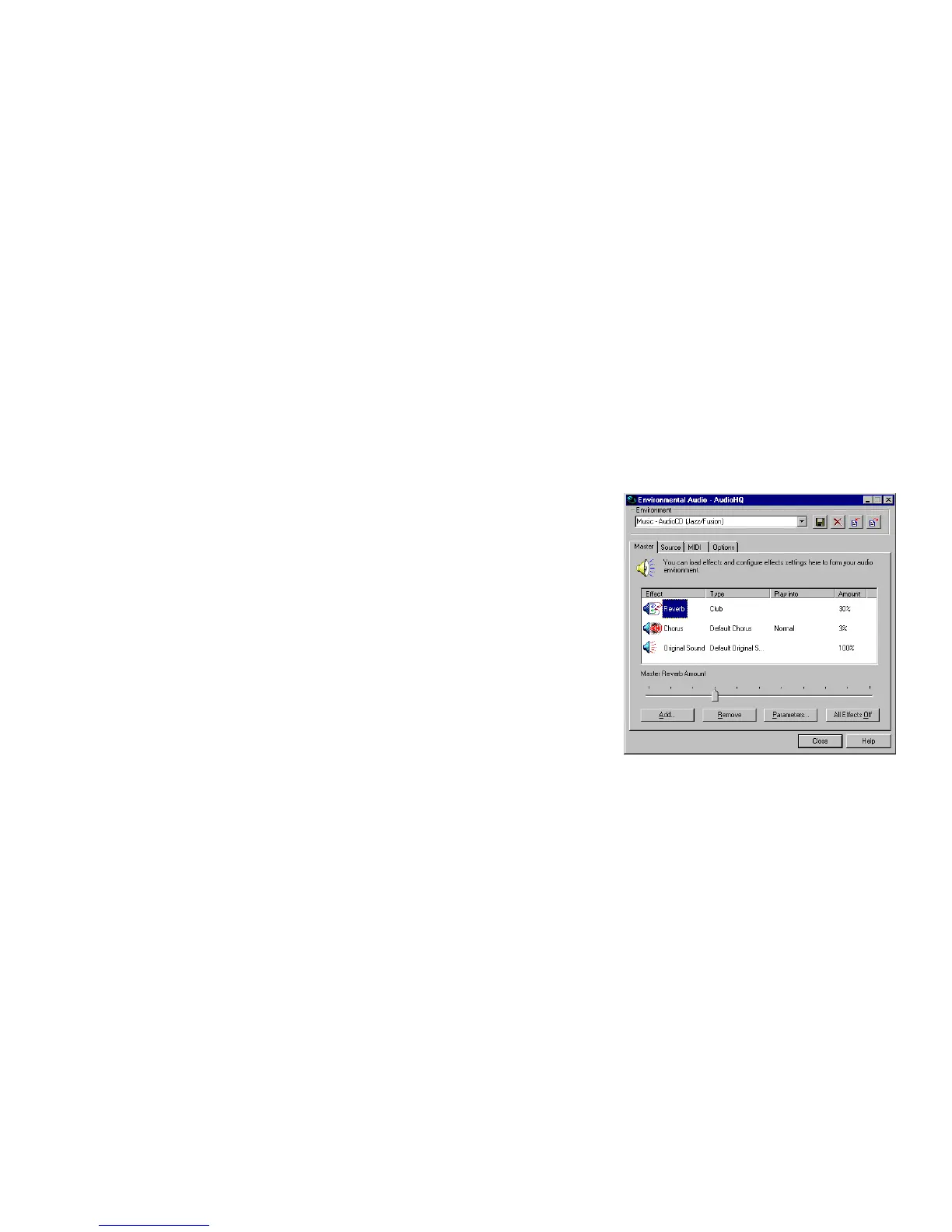
Environmental Audio
Control
Environmental Audio Control allows you to
configure the EMU10K1 effects engine. It allows
you to specify the components that make up the
audio elements that in turn make up an environment.
An environment is the modeling of a real-world
experience. We have provided some entertainment,
gaming and various environments to get you started
with. Environmental Audio Control can be also be
accessed from Creative Surround Mixer.
Learn from the online help how to:
❑ Configure master effects
• Add or remove effects from an environment
• Specify the effect type
• Specify the degree or amount of the effect
• Edit an effect all the way down to its parameters or building blocks
❑ Configure source effects, that is, set the amount of the effects to apply on an audio source.
❑ Configure MIDI playback effects
❑ Export an environment to a file
❑ Import an environment


 To Next Page