1-4 Knowing and Installing Your Card
❑
If you are playing games in
Windows 95/98 MS-DOS mode
(pure DOS mode), you must:
• Make sure the CD In connector
and the Analog Audio
connector of the CD-ROM or
PC-DVD drive are connected.
• In addition, if you get distorted
audio, do not connect the CD
SPDIF connector to the Digital
Audio connector of the CD-
ROM or PC-DVD drive.
❑
If you connect to the Digital Audio
and Analog Audio connectors of
the same CD-ROM or PC-DVD
drive, do not unmute CD Audio
and CD Digital at the same time in
Surround Mixer.
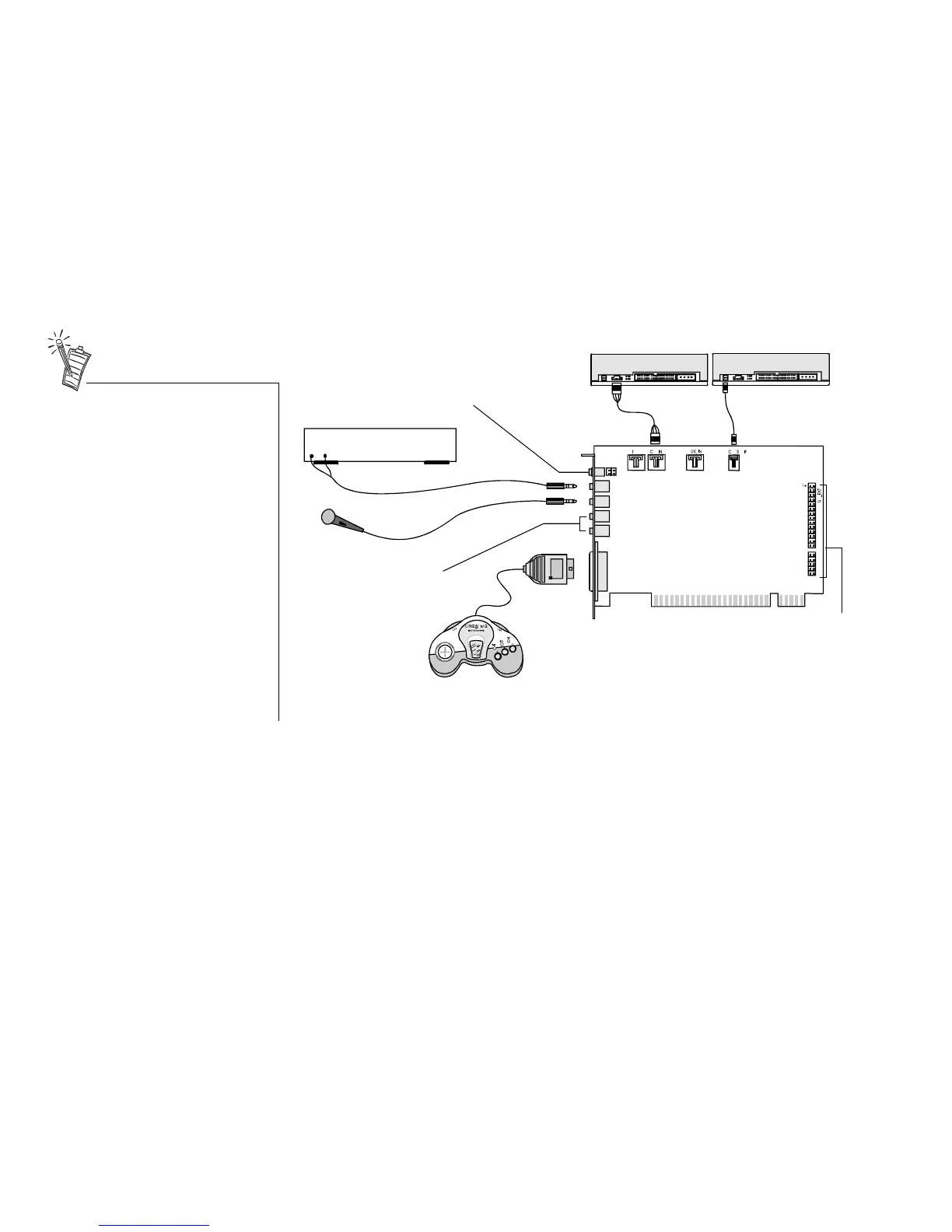
Figure 1-3: Connecting other devices.
CD-ROM drive
Rear Out
Joystick/MIDI
GamePad
Line-out
Microphone
MPC-to-
MPC (4-pin)
audio cable
Line Out
Sound Blaster Live! card
To analog input of
FourPointSurround
speakers
MPC-to-MPC (2-pin)
audio cable
PC-DVD drive
Line In
Cassette and CD player,
Synthesizer, etc.
Mic In
Connects to Optical
Digital I/O card or Drive
Bay. See “Enhancing
Your Sound Blaster Live!
Experience” on page 1-5
for more details.
Connects to digital speakers*,
MiniDisc or DAT via minijack-to-DIN
cable or Digital Output Module.
See “Enhancing Your Sound Blaster
Live! Experience” on page 1-5 for
more details.
* e.g., FPS2000 Digital
speakers from
Cambridge SoundWorks


 To Next Page