Setting Up Your Audio Device
Step 1: Charging your Sound Blaster E3
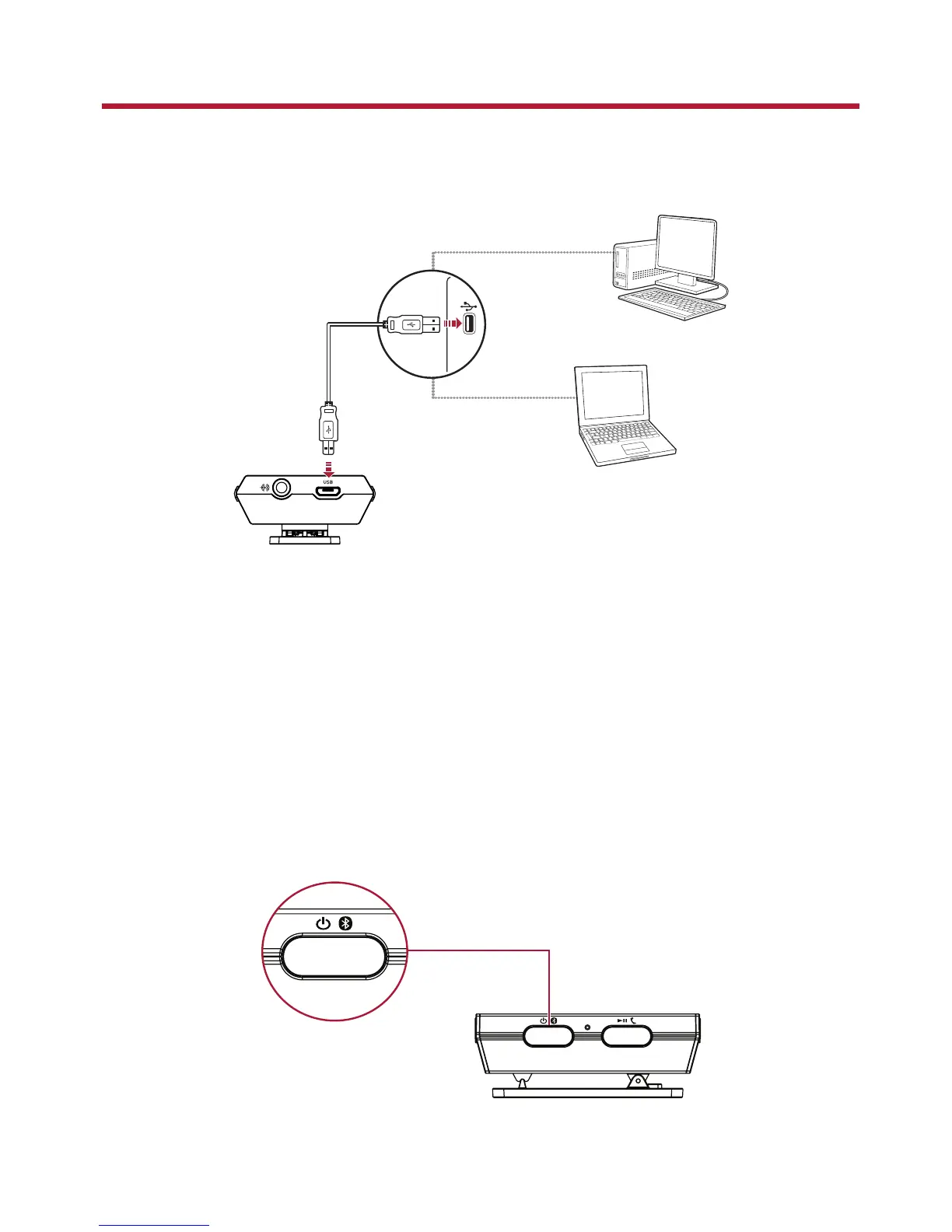
Connect your Sound Blaster E3 directly to a USB port on your computer.
Charge your Sound Blaster E3 for approximately 3 to 4 hours.
It is recommended that you charge it for at least 8 hours before it is used for the first time.
Note:
Lithium polymer battery life may suffer when it is constantly fully depleted or overexerted at low
voltage. It is a good practice to keep the battery well charged.
Step 2: Turning On Sound Blaster E3
Press and hold the Power / Bluetooth button for 1 second to turn on Sound Blaster E3.
l Power On – Press and hold 1 sec
l Bluetooth pairing – Press and hold 2 sec
l Power Off – Press and hold 4 sec
Sound Blaster E3 – Setting Up Your Audio Device 5


 To Next Page