Setting a Timer
Selecting a Timer Mode
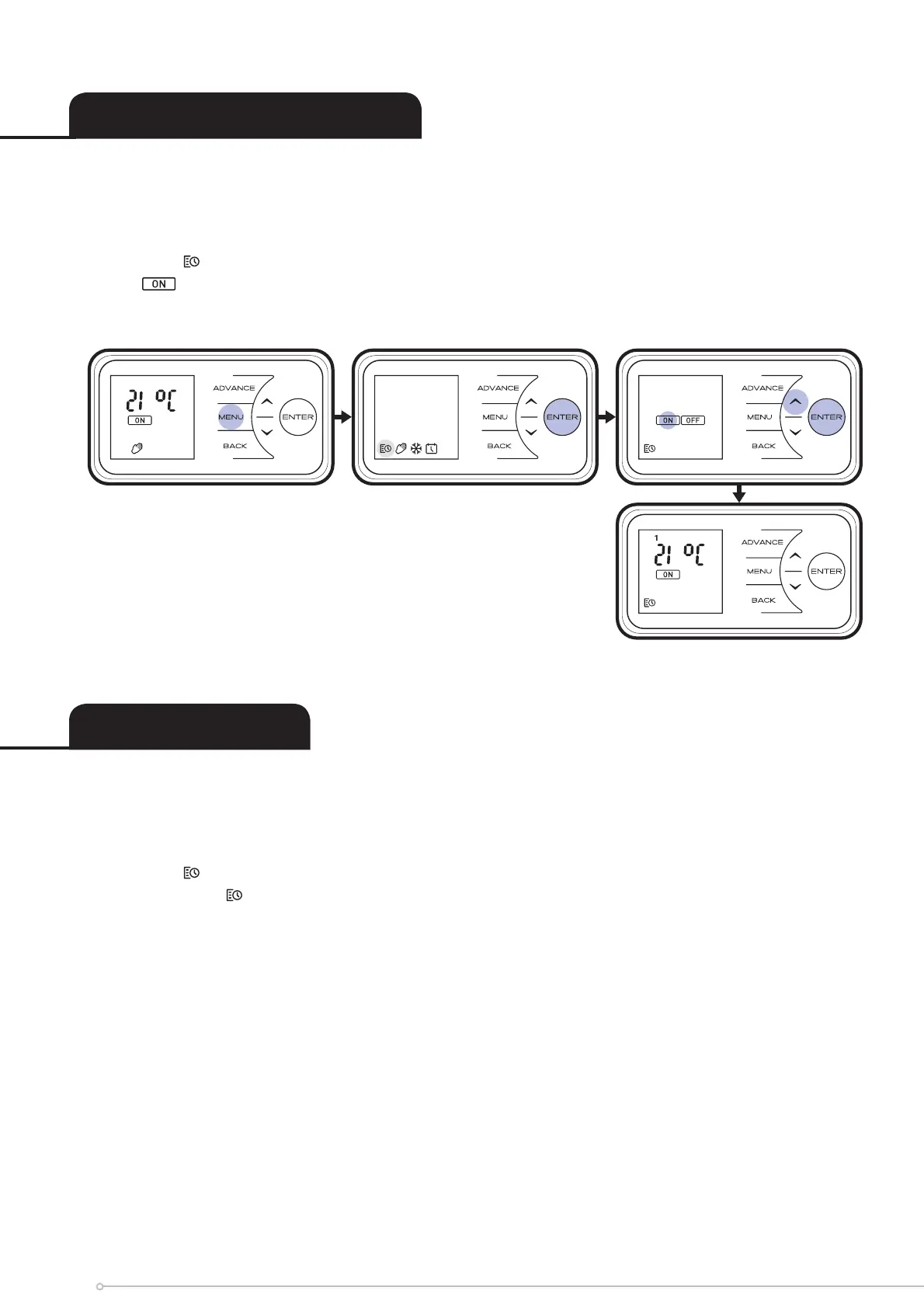
User Timer - To re-programme the factory default Timer Modes:
• Press Menu Button
• When the
Schedule Icon is fl ashing Press Enter
• Press Up until fl ashes and press Enter
*Days of the week are now displayed at the top of the screen*
Day 1 = Monday
Day 2 = Tuesday
Day 3 = Wednesday
Day 4 = Thursday
Day 5 = Friday
Day 6 = Saturday
Day 7 = Sunday
• Press Enter to Modify Day 1 or Press Up to navigate to the desired day and
Press Enter to Select
User Timer - To activate User timer mode:
• Press Menu Button
• When the
Schedule Icon is fl ashing Press Enter
• With highlighted press the Enter Button to activate User Timer, the backlight will fl ash
and the screen will return to the home screen.
14


 To Next Page