Comms - Choose to enable or disable Bluetooth pairing function. Bluetooth is disabled by
default.
Bluetooth
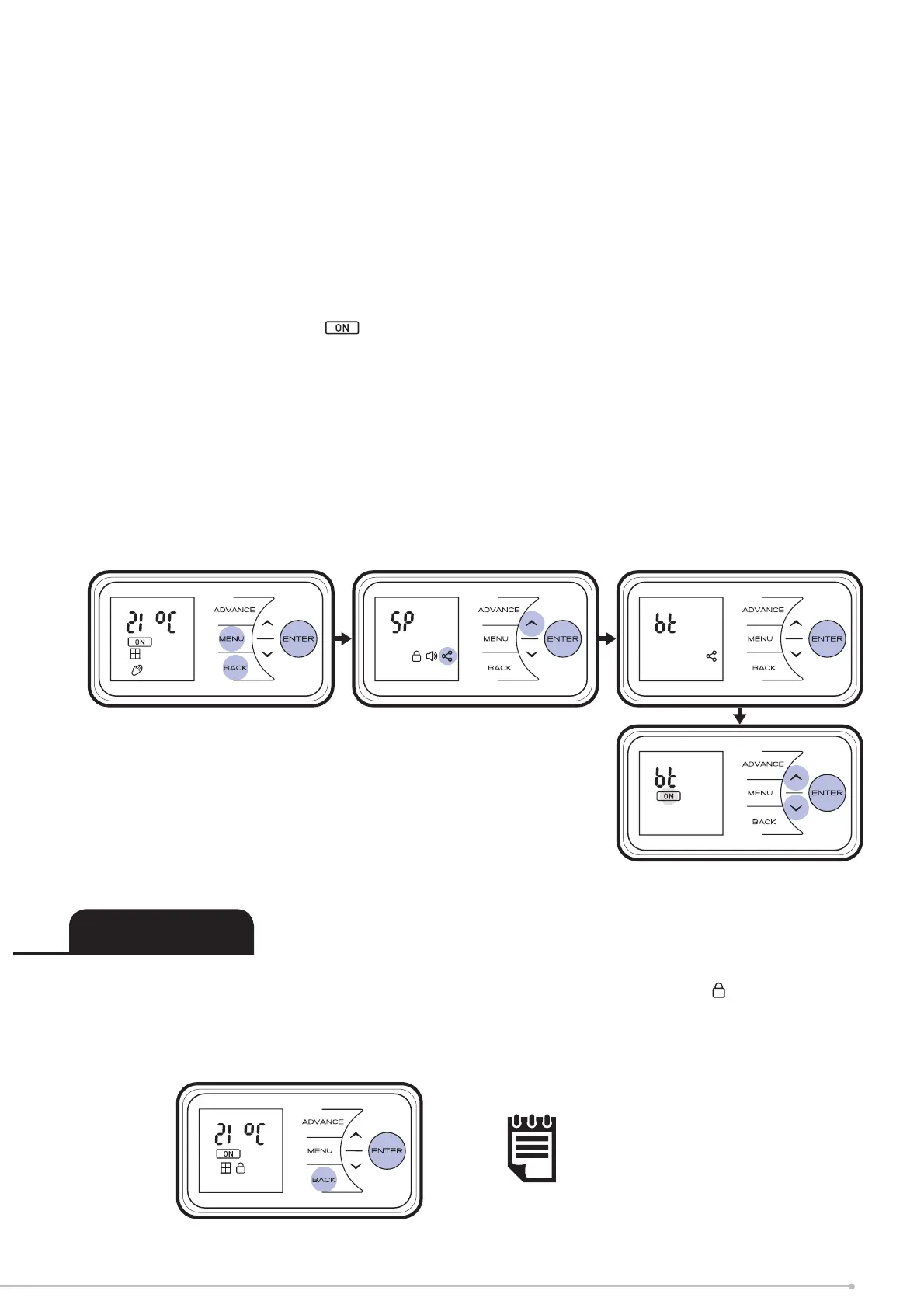
• Press the Menu, Back and Enter buttons and hold for 10 seconds
• The Setpoint menu will be displayed.
• Press Up 3 times to highlight the Comms icon
• Press Enter to enter the Comms menu
• Press Enter to access the Bluetooth (BT) menu
• Press Down or Up to toggle Bluetooth on/off
• For Bluetooth on, highlight
and press Enter button
• Home screen will now display coms icon.
When pairing with a mobile device the 6 digit pairing code will display on the screen automatically.
Initially the fi rst three digits (example: -000) will be displayed. Use the up/down arrow keys to
display the next three (example: 000-).
• Confi rmation screen will show Bluetooth pairing code, Comms symbol will fl ash while
“advertising” Bluetooth. Enter this code to mobile device.
• Press Enter to confi rm
To Lock the controls press Back and Enter together for 3 seconds. The Lock icon will
appear on the screen. To unlock the control, repeat the action of Back and Enter together
for 3 seconds.
NOTE:
The controls cannot be adjusted
when Child Lock is active.
Child Lock
19


 To Next Page