Open Window - The heater comes with a feature that will detect if a window is open
and heat is being lost, so the heater will enter a reduced-power mode instead of using
unnecessary energy. Open Window detection is activated by default. To activate/deactivate
this feature:
• Press the Menu and Advance buttons and hold for 5 seconds
• The Advance menu is displayed
• Press Up three times to highlight the window icon
• Press Enter to access the menu
• Press Down or Up to toggle Open Window on/off
• Press Enter to confi rm
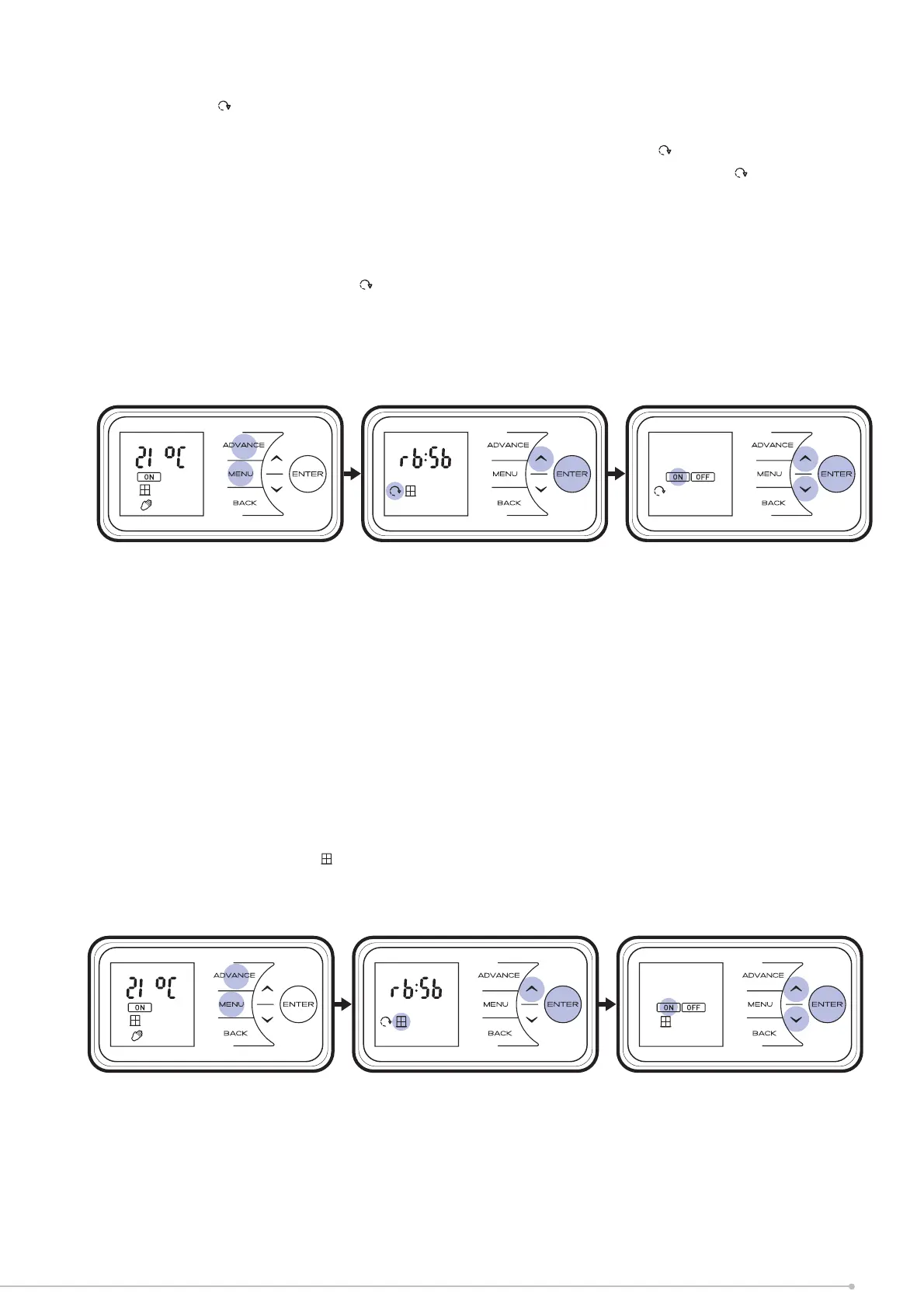
Adaptive Start - to achieve the desired temperature at the onset of the timed ON period the
appliance anticipates when it needs to start heating prior to the onset of the timed period. E.g.
room is 16
o
C, with 21
o
C at 7am set on the timer. With Adaptive Start on the control will start
to heat the room before 7am, reaching 21
o
C at this time. With Adaptive Start off the heater
will start to heat the room at 7am and will reach 21
o
C after this time.
• Press the Menu and Advance buttons and hold for 5 seconds
• The Advance menu is displayed
• Press Up twice to highlight the icon
• Press Enter to access the Adaptive Start menu
• Press Down or Up to toggle Adaptive Start on/off
• Press Enter to confi rm. Icon displayed on screen.
21


 To Next Page