21 • IV-CAMA3-20-N-W-1B, IV-CAMA3-20-N-SLVR-1B, IV-CAMA3-20-W-1B, and IV-CAMA3-20-
SLVR-1B
Product Manual — Doc.
9323C
Zoom Rooms Installation
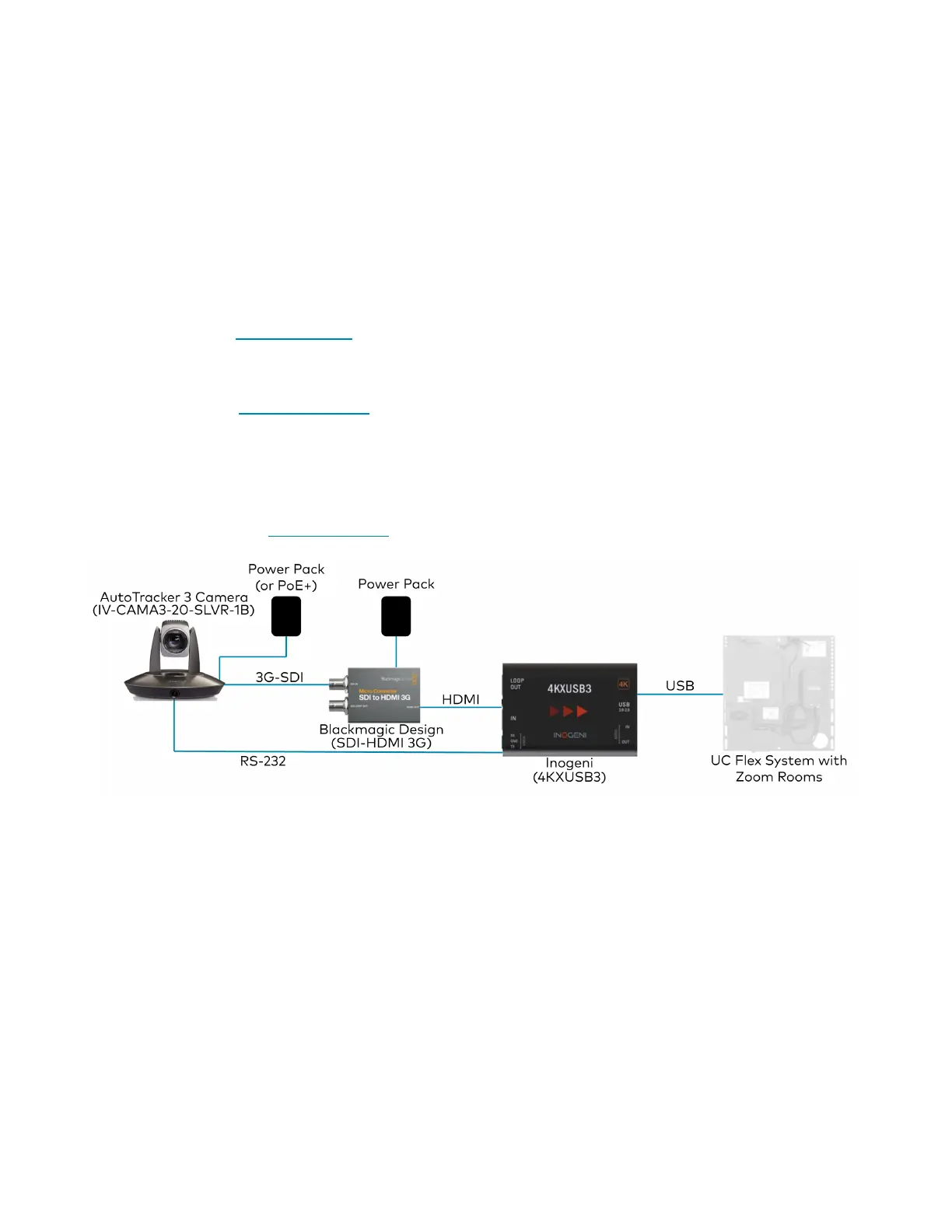
The 1 Beyond AutoTracker 3 camera is compatible with Zoom Rooms® software. To utilize Zoom Rooms
capabilities, the following items are required:
l
1 Beyond AutoTracker 3 camera (IV-CAMA3-20-N-W-1B, IV-CAMA3-N-SLVR-1B,
IV-CAMA3-20-W-1B, or IV-CAMA3-20-SLVR-1B)
l
RS-232 cable (included with the camera)
l
3G-SDI cable
l
HDMI®cable (CBL-8K-HD-1.5)
l
Inogeni™ 4KXUSB3 converter (includes Inogeni terminal block)
o
Firmware version 1.54or higher. To update the firmware on the Inogeni 4KXUSB3 converter,
refer to Inogeni's website.
l
Blackmagic Design® Micro Converter SDI to HDMI3G
l
1 Beyond AutoTracker 3 camera firmware version 5.1.82. For more information on updating the
firmware of the camera, refer to Upgrade Tab on page 29
l
Zoom Rooms software firmware version 5.13 or higher. To update the firmware for Zoom Rooms
software, refer to Zoom's website.
Complete the following procedure to connect the camera to a Zoom Rooms control system:
1. Set the resolution of the camera to 1080p, and the frame rate to 30. For more information about
changing the resolution and frame rate of the camera, refer to Basic 1 Tab on page 46.
2. Connect the RS-232 mini-DIN (male) connector to the RS-232 port located on the rear side of the
camera.



 To Next Page
 Loading...