2-Series Integrated Dual Bus Control System Crestron AV2 & PRO2
NOTE: Pages on the Front Panel Editor can be assigned a join number to facilitate
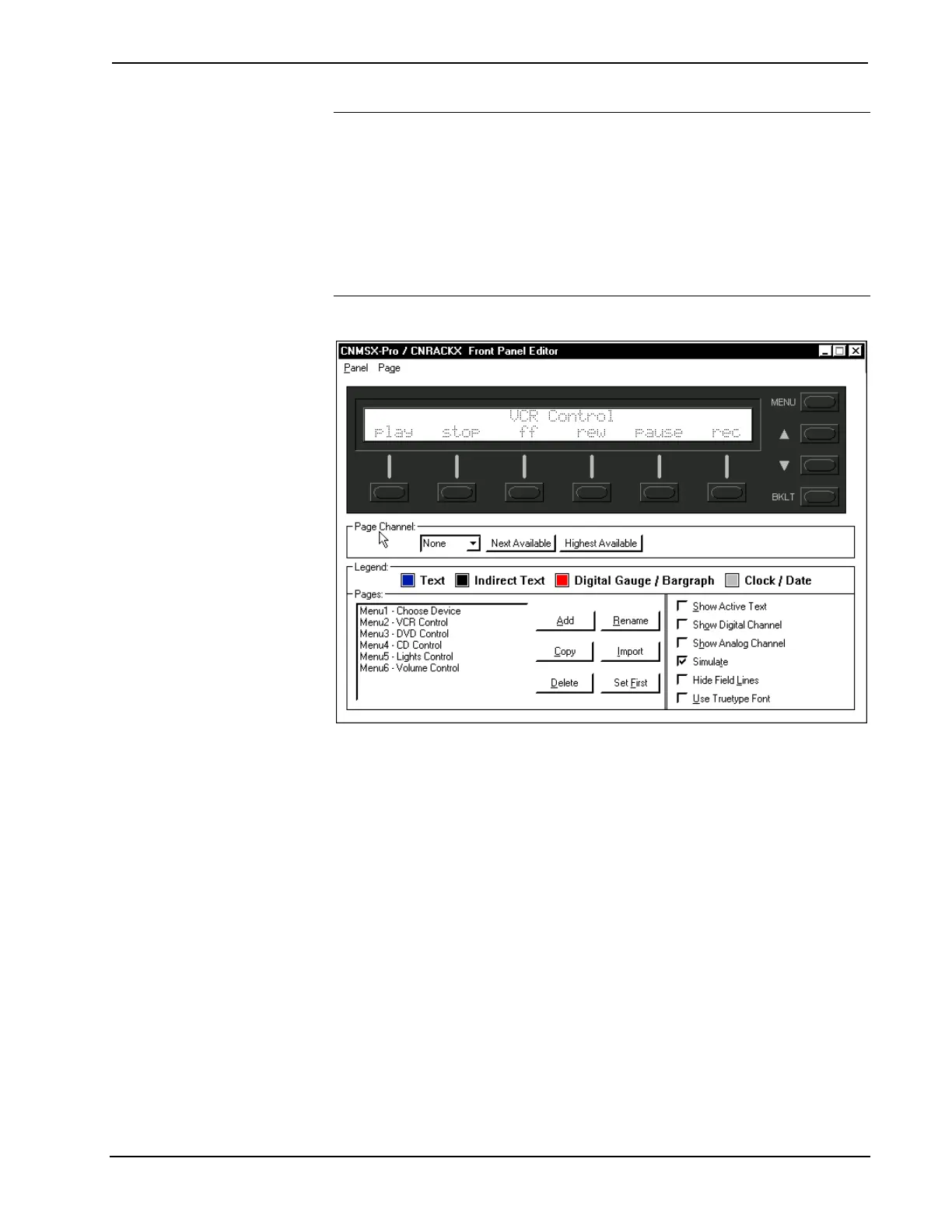
controlled page jumps. Use the "CNMSX-Pro/CNRACKX Front Panel Editor"
window, as shown after this note, to assign the join number. In the Page Channel
area of this window, a specific number can be assigned or with the appropriate
button assign the next or highest available.
Asserting the digital signal for a particular page join number (fb*** on the SIMPL
Window symbol) results in a jump to that page. When the system is on a page with a
join number, the digital signal corresponding to that join number is asserted for as
long as the system is on that page (press *** on the SIMPL Windows symbol).
In this note, *** is used to denote a wildcard.
"CNMSX-Pro / CNRACKX Front Panel Editor" Window
Front Panel Symbol
A powerful tool to assist programmers in naming and routing signals for the LCD
display is the Synchronize Signals command. While the panel appears on the PC
screen, select Panel | Synchronize Signal Names to automatically name all the input
and output signals for the front panel in the SIMPL Windows program. To confirm
the assignment and display the signal names, double click on Slot-10 : C2I-PRO2-
LCDPANEL Pro2 Front Panel which is available from the Central Control Modules
folder in the Program View of SIMPL Windows’ Program Manager. The symbol
appears in Detail View, as shown after this paragraph.
20 • Integrated Dual Bus Control System: PRO2 & AV2 Operations Guide - DOC. 5957











 To Next Page